图像分类数据集
Fashion-MNIST数据集
Fashion-MNIST dataset 是一个用于图像分类任务的经典数据集,由电商公司 Zalando 发布。 它的设计目的,是替代传统的手写数字数据集 MNIST dataset,提供一个更接近真实视觉任务、但难度仍然适中的基准数据集。
数据基本结构
| 项目 | 内容 |
|---|---|
| 数据类型 | 灰度图像 |
| 图像大小 | 28 × 28 像素 |
| 训练集 | 60,000 张 |
| 测试集 | 10,000 张 |
| 类别数 | 10 类服装 |
| 标签形式 | 0–9 整数 |
10个分类类别
| 标签 | 类别 |
|---|---|
| 0 | T-shirt / top |
| 1 | Trouser |
| 2 | Pullover |
| 3 | Dress |
| 4 | Coat |
| 5 | Sandal |
| 6 | Shirt |
| 7 | Sneaker |
| 8 | Bag |
| 9 | Ankle boot |
读取数据集
import torch
import torchvision
from torch.utils import data
from torchvision import transforms
from d2l import torch as d2l

# 告诉 d2l:后续画图时尽量使用 SVG(矢量图)格式。
# 矢量图放大后不容易失真,在学习阶段更容易看清细节。
d2l.use_svg_display()

# =========================
# 1. 读取 Fashion-MNIST 数据集
# =========================

# 原始数据文件在 data/FashionMNIST/raw/ 下,主要有 4 个 idx 格式文件:
# - train-images-idx3-ubyte / t10k-images-idx3-ubyte(图像)
# - train-labels-idx1-ubyte / t10k-labels-idx1-ubyte(标签)
#
# 其中 idx3(图像文件)的逻辑结构可以理解为:
# [magic number][图片数量][行数][列数][像素字节流...]
# - 每张图是 28x28 灰度图,单像素 1 字节(0~255)
#
# idx1(标签文件)的逻辑结构可以理解为:
# [magic number][标签数量][标签字节流...]
# - 每个标签 1 字节,对应类别 0~9

# ToTensor() 会做两件关键事情:
# 1) 把 PIL 图像 / numpy 数组 转成 PyTorch 张量(Tensor)
# 2) 把像素从 [0, 255] 自动缩放到 [0, 1]
# 这样做有利于后续神经网络训练(数值更稳定)。
#
# 结合 Fashion-MNIST 来看:
# - 原始样本(解码后、变换前):
#   (PIL.Image(mode='L', size=(28, 28)), int标签)
# - ToTensor() 之后的单样本:
#   (torch.FloatTensor(shape=(1, 28, 28), 值域[0, 1]), int标签)
#   说明:灰度图会多一个通道维,所以是 (C, H, W) = (1, 28, 28)
trans = transforms.ToTensor()

# 下载(或读取本地缓存)训练集:
# - root="./data":数据保存目录
# - train=True:训练集(60000 张)
# - transform=trans:每次取样本时都会先做 ToTensor 转换
# - download=True:本地没有就自动下载
#
# 因为这里传入了 transform=trans,所以下面 mnist_train[i] 的数据结构是:
# (torch.FloatTensor(shape=(1, 28, 28)), int标签)
mnist_train = torchvision.datasets.FashionMNIST(root="./data", train=True, transform=trans, download=True)

# 测试集(10000 张),参数含义同上,只是 train=False。
# mnist_test[i] 的结构与 mnist_train[i] 相同。
mnist_test = torchvision.datasets.FashionMNIST(root="./data", train=False, transform=trans, download=True)

# 打印“完整的第一张数据”:图像张量全部数值 + 标签
first_img, first_label = mnist_train[0]
print("first_img tensor:\n", first_img)
print("first_label:", first_label)
打印首张图片数据
first_img tensor:
 tensor([[[0.0000, 0.0000, 0.0000, 0.0000, 0.0000, 0.0000, 0.0000, 0.0000,
          0.0000, 0.0000, 0.0000, 0.0000, 0.0000, 0.0000, 0.0000, 0.0000,
          0.0000, 0.0000, 0.0000, 0.0000, 0.0000, 0.0000, 0.0000, 0.0000,
          0.0000, 0.0000, 0.0000, 0.0000],
         [0.0000, 0.0000, 0.0000, 0.0000, 0.0000, 0.0000, 0.0000, 0.0000,
          0.0000, 0.0000, 0.0000, 0.0000, 0.0000, 0.0000, 0.0000, 0.0000,
          0.0000, 0.0000, 0.0000, 0.0000, 0.0000, 0.0000, 0.0000, 0.0000,
          0.0000, 0.0000, 0.0000, 0.0000],
         [0.0000, 0.0000, 0.0000, 0.0000, 0.0000, 0.0000, 0.0000, 0.0000,
          0.0000, 0.0000, 0.0000, 0.0000, 0.0000, 0.0000, 0.0000, 0.0000,
          0.0000, 0.0000, 0.0000, 0.0000, 0.0000, 0.0000, 0.0000, 0.0000,
          0.0000, 0.0000, 0.0000, 0.0000],
         [0.0000, 0.0000, 0.0000, 0.0000, 0.0000, 0.0000, 0.0000, 0.0000,
          0.0000, 0.0000, 0.0000, 0.0000, 0.0039, 0.0000, 0.0000, 0.0510,
          0.2863, 0.0000, 0.0000, 0.0039, 0.0157, 0.0000, 0.0000, 0.0000,
          0.0000, 0.0039, 0.0039, 0.0000],
         [0.0000, 0.0000, 0.0000, 0.0000, 0.0000, 0.0000, 0.0000, 0.0000,
          0.0000, 0.0000, 0.0000, 0.0000, 0.0118, 0.0000, 0.1412, 0.5333,
          0.4980, 0.2431, 0.2118, 0.0000, 0.0000, 0.0000, 0.0039, 0.0118,
          0.0157, 0.0000, 0.0000, 0.0118],
         [0.0000, 0.0000, 0.0000, 0.0000, 0.0000, 0.0000, 0.0000, 0.0000,
          0.0000, 0.0000, 0.0000, 0.0000, 0.0235, 0.0000, 0.4000, 0.8000,
          0.6902, 0.5255, 0.5647, 0.4824, 0.0902, 0.0000, 0.0000, 0.0000,
          0.0000, 0.0471, 0.0392, 0.0000],
         [0.0000, 0.0000, 0.0000, 0.0000, 0.0000, 0.0000, 0.0000, 0.0000,
          0.0000, 0.0000, 0.0000, 0.0000, 0.0000, 0.0000, 0.6078, 0.9255,
          0.8118, 0.6980, 0.4196, 0.6118, 0.6314, 0.4275, 0.2510, 0.0902,
          0.3020, 0.5098, 0.2824, 0.0588],
         [0.0000, 0.0000, 0.0000, 0.0000, 0.0000, 0.0000, 0.0000, 0.0000,
          0.0000, 0.0000, 0.0000, 0.0039, 0.0000, 0.2706, 0.8118, 0.8745,
          0.8549, 0.8471, 0.8471, 0.6392, 0.4980, 0.4745, 0.4784, 0.5725,
          0.5529, 0.3451, 0.6745, 0.2588],
         [0.0000, 0.0000, 0.0000, 0.0000, 0.0000, 0.0000, 0.0000, 0.0000,
          0.0000, 0.0039, 0.0039, 0.0039, 0.0000, 0.7843, 0.9098, 0.9098,
          0.9137, 0.8980, 0.8745, 0.8745, 0.8431, 0.8353, 0.6431, 0.4980,
          0.4824, 0.7686, 0.8980, 0.0000],
         [0.0000, 0.0000, 0.0000, 0.0000, 0.0000, 0.0000, 0.0000, 0.0000,
          0.0000, 0.0000, 0.0000, 0.0000, 0.0000, 0.7176, 0.8824, 0.8471,
          0.8745, 0.8941, 0.9216, 0.8902, 0.8784, 0.8706, 0.8784, 0.8667,
          0.8745, 0.9608, 0.6784, 0.0000],
         [0.0000, 0.0000, 0.0000, 0.0000, 0.0000, 0.0000, 0.0000, 0.0000,
          0.0000, 0.0000, 0.0000, 0.0000, 0.0000, 0.7569, 0.8941, 0.8549,
          0.8353, 0.7765, 0.7059, 0.8314, 0.8235, 0.8275, 0.8353, 0.8745,
          0.8627, 0.9529, 0.7922, 0.0000],
         [0.0000, 0.0000, 0.0000, 0.0000, 0.0000, 0.0000, 0.0000, 0.0000,
          0.0000, 0.0039, 0.0118, 0.0000, 0.0471, 0.8588, 0.8627, 0.8314,
          0.8549, 0.7529, 0.6627, 0.8902, 0.8157, 0.8549, 0.8784, 0.8314,
          0.8863, 0.7725, 0.8196, 0.2039],
         [0.0000, 0.0000, 0.0000, 0.0000, 0.0000, 0.0000, 0.0000, 0.0000,
          0.0000, 0.0000, 0.0235, 0.0000, 0.3882, 0.9569, 0.8706, 0.8627,
          0.8549, 0.7961, 0.7765, 0.8667, 0.8431, 0.8353, 0.8706, 0.8627,
          0.9608, 0.4667, 0.6549, 0.2196],
         [0.0000, 0.0000, 0.0000, 0.0000, 0.0000, 0.0000, 0.0000, 0.0000,
          0.0000, 0.0157, 0.0000, 0.0000, 0.2157, 0.9255, 0.8941, 0.9020,
          0.8941, 0.9412, 0.9098, 0.8353, 0.8549, 0.8745, 0.9176, 0.8510,
          0.8510, 0.8196, 0.3608, 0.0000],
         [0.0000, 0.0000, 0.0039, 0.0157, 0.0235, 0.0275, 0.0078, 0.0000,
          0.0000, 0.0000, 0.0000, 0.0000, 0.9294, 0.8863, 0.8510, 0.8745,
          0.8706, 0.8588, 0.8706, 0.8667, 0.8471, 0.8745, 0.8980, 0.8431,
          0.8549, 1.0000, 0.3020, 0.0000],
         [0.0000, 0.0118, 0.0000, 0.0000, 0.0000, 0.0000, 0.0000, 0.0000,
          0.0000, 0.2431, 0.5686, 0.8000, 0.8941, 0.8118, 0.8353, 0.8667,
          0.8549, 0.8157, 0.8275, 0.8549, 0.8784, 0.8745, 0.8588, 0.8431,
          0.8784, 0.9569, 0.6235, 0.0000],
         [0.0000, 0.0000, 0.0000, 0.0000, 0.0706, 0.1725, 0.3216, 0.4196,
          0.7412, 0.8941, 0.8627, 0.8706, 0.8510, 0.8863, 0.7843, 0.8039,
          0.8275, 0.9020, 0.8784, 0.9176, 0.6902, 0.7373, 0.9804, 0.9725,
          0.9137, 0.9333, 0.8431, 0.0000],
         [0.0000, 0.2235, 0.7333, 0.8157, 0.8784, 0.8667, 0.8784, 0.8157,
          0.8000, 0.8392, 0.8157, 0.8196, 0.7843, 0.6235, 0.9608, 0.7569,
          0.8078, 0.8745, 1.0000, 1.0000, 0.8667, 0.9176, 0.8667, 0.8275,
          0.8627, 0.9098, 0.9647, 0.0000],
         [0.0118, 0.7922, 0.8941, 0.8784, 0.8667, 0.8275, 0.8275, 0.8392,
          0.8039, 0.8039, 0.8039, 0.8627, 0.9412, 0.3137, 0.5882, 1.0000,
          0.8980, 0.8667, 0.7373, 0.6039, 0.7490, 0.8235, 0.8000, 0.8196,
          0.8706, 0.8941, 0.8824, 0.0000],
         [0.3843, 0.9137, 0.7765, 0.8235, 0.8706, 0.8980, 0.8980, 0.9176,
          0.9765, 0.8627, 0.7608, 0.8431, 0.8510, 0.9451, 0.2549, 0.2863,
          0.4157, 0.4588, 0.6588, 0.8588, 0.8667, 0.8431, 0.8510, 0.8745,
          0.8745, 0.8784, 0.8980, 0.1137],
         [0.2941, 0.8000, 0.8314, 0.8000, 0.7569, 0.8039, 0.8275, 0.8824,
          0.8471, 0.7255, 0.7725, 0.8078, 0.7765, 0.8353, 0.9412, 0.7647,
          0.8902, 0.9608, 0.9373, 0.8745, 0.8549, 0.8314, 0.8196, 0.8706,
          0.8627, 0.8667, 0.9020, 0.2627],
         [0.1882, 0.7961, 0.7176, 0.7608, 0.8353, 0.7725, 0.7255, 0.7451,
          0.7608, 0.7529, 0.7922, 0.8392, 0.8588, 0.8667, 0.8627, 0.9255,
          0.8824, 0.8471, 0.7804, 0.8078, 0.7294, 0.7098, 0.6941, 0.6745,
          0.7098, 0.8039, 0.8078, 0.4510],
         [0.0000, 0.4784, 0.8588, 0.7569, 0.7020, 0.6706, 0.7176, 0.7686,
          0.8000, 0.8235, 0.8353, 0.8118, 0.8275, 0.8235, 0.7843, 0.7686,
          0.7608, 0.7490, 0.7647, 0.7490, 0.7765, 0.7529, 0.6902, 0.6118,
          0.6549, 0.6941, 0.8235, 0.3608],
         [0.0000, 0.0000, 0.2902, 0.7412, 0.8314, 0.7490, 0.6863, 0.6745,
          0.6863, 0.7098, 0.7255, 0.7373, 0.7412, 0.7373, 0.7569, 0.7765,
          0.8000, 0.8196, 0.8235, 0.8235, 0.8275, 0.7373, 0.7373, 0.7608,
          0.7529, 0.8471, 0.6667, 0.0000],
         [0.0078, 0.0000, 0.0000, 0.0000, 0.2588, 0.7843, 0.8706, 0.9294,
          0.9373, 0.9490, 0.9647, 0.9529, 0.9569, 0.8667, 0.8627, 0.7569,
          0.7490, 0.7020, 0.7137, 0.7137, 0.7098, 0.6902, 0.6510, 0.6588,
          0.3882, 0.2275, 0.0000, 0.0000],
         [0.0000, 0.0000, 0.0000, 0.0000, 0.0000, 0.0000, 0.0000, 0.1569,
          0.2392, 0.1725, 0.2824, 0.1608, 0.1373, 0.0000, 0.0000, 0.0000,
          0.0000, 0.0000, 0.0000, 0.0000, 0.0000, 0.0000, 0.0000, 0.0000,
          0.0000, 0.0000, 0.0000, 0.0000],
         [0.0000, 0.0000, 0.0000, 0.0000, 0.0000, 0.0000, 0.0000, 0.0000,
          0.0000, 0.0000, 0.0000, 0.0000, 0.0000, 0.0000, 0.0000, 0.0000,
          0.0000, 0.0000, 0.0000, 0.0000, 0.0000, 0.0000, 0.0000, 0.0000,
          0.0000, 0.0000, 0.0000, 0.0000],
         [0.0000, 0.0000, 0.0000, 0.0000, 0.0000, 0.0000, 0.0000, 0.0000,
          0.0000, 0.0000, 0.0000, 0.0000, 0.0000, 0.0000, 0.0000, 0.0000,
          0.0000, 0.0000, 0.0000, 0.0000, 0.0000, 0.0000, 0.0000, 0.0000,
          0.0000, 0.0000, 0.0000, 0.0000]]])
first_label: 9
读取小批量数据
## 读取小批量
batch_size = 2

def get_dataloader_workers():
    """返回 DataLoader 使用的子进程数量。"""
    # num_workers=4 通常能提升读取速度(CPU 预取数据)。
    # 如果你的机器核数较少,或在某些平台(如 Windows)遇到多进程问题,
    # 可以先改成 0 进行排查。
    return 4

# 通过 DataLoader 来按批次读取训练集:
# - batch_size=2:每次返回 2 个样本
# - shuffle=True:每个 epoch 开始前打乱顺序,减少模型记忆样本顺序的风险
# - num_workers=4:使用 4 个子进程并行加载
train_iter = data.DataLoader(mnist_train, batch_size, shuffle=True,
                             num_workers=get_dataloader_workers())

# 测试集的 DataLoader,通常不需要 shuffle,因为评估时顺序无关紧要。
# - batch_size=2:每次返回 2 个样本
# - shuffle=False:保持原始顺序,评估时更稳定
test_iter = data.DataLoader(mnist_test, batch_size, shuffle=False,
                            num_workers=get_dataloader_workers())

# 取一个 batch,并打印该 batch 中“所有样本”的完整内容。
for X, y in train_iter:
    print("batch X shape:", X.shape, "| y shape:", y.shape)

    # 设置张量打印格式:当元素较多时使用省略号显示。
    # 这样不会把 28x28 的所有像素都完整刷屏。
    torch.set_printoptions(edgeitems=2, threshold=50, linewidth=120)

    # 逐个样本打印:图像张量(完整像素值)+ 标签
    for i in range(X.shape[0]):
        print(f"\n===== sample {i} =====")
        print("image tensor:\n", X[i])
        print("label:", int(y[i]))

    break  # 只打印第一个 batch
运行结果
batch X shape: torch.Size([4, 1, 28, 28]) | y shape: torch.Size([4])

===== sample 0 =====
image tensor:
 tensor([[[0., 0.,  ..., 0., 0.],
         [0., 0.,  ..., 0., 0.],
         ...,
         [0., 0.,  ..., 0., 0.],
         [0., 0.,  ..., 0., 0.]]])
label: 1

===== sample 1 =====
image tensor:
 tensor([[[0., 0.,  ..., 0., 0.],
         [0., 0.,  ..., 0., 0.],
         ...,
         [0., 0.,  ..., 0., 0.],
         [0., 0.,  ..., 0., 0.]]])
label: 7

===== sample 2 =====
image tensor:
 tensor([[[0., 0.,  ..., 0., 0.],
         [0., 0.,  ..., 0., 0.],
         ...,
         [0., 0.,  ..., 0., 0.],
         [0., 0.,  ..., 0., 0.]]])
label: 6

===== sample 3 =====
image tensor:
 tensor([[[0., 0.,  ..., 0., 0.],
         [0., 0.,  ..., 0., 0.],
         ...,
         [0., 0.,  ..., 0., 0.],
         [0., 0.,  ..., 0., 0.]]])
label: 4
从零开始实现此模型
"""Fashion-MNIST 数据集加载示例。

本文件演示了如何使用《动手学深度学习》(d2l) 提供的工具函数,
快速加载 Fashion-MNIST 数据集,并返回训练集与测试集的迭代器。
"""

# 导入 PyTorch 主库。
# 虽然此示例中还未直接调用 torch 的具体 API,
# 但后续模型定义、张量运算、训练流程都会依赖它。
import torch

# 导入 IPython 的 display 工具。
# 在 Jupyter/交互式环境中可用于可视化输出(如显示图像、清空输出等)。
# 这里先导入作为后续扩展示例的准备。
from IPython import display

# 从 d2l 库中导入 PyTorch 版本的工具模块,并命名为 d2l。
# 这样可以直接通过 d2l.xxx 调用常用数据处理与训练辅助函数。
from d2l import torch as d2l

# 每个小批量(mini-batch)中包含的样本数量。
# batch_size 越大,单次迭代利用并行计算能力越强,但显存占用也更高。
batch_size = 256

# 加载 Fashion-MNIST 数据集并构造数据迭代器:
# - train_iter: 训练集数据迭代器(用于模型参数学习)
# - test_iter:  测试集数据迭代器(用于评估模型泛化性能)
# 返回的迭代器会按 batch_size 组织数据,便于直接送入训练循环。
train_iter, test_iter = d2l.load_data_fashion_mnist(batch_size)

num_inputs = 784  # 每个图像的像素数量(28x28)
num_outputs = 10  # 分类类别数量(10 类服装)

# 数学表达(softmax 回归 / 多分类逻辑回归):
# 1) 输入图像 X 的单样本形状为 28x28,拉平成向量 x ∈ R^784。
# 2) 线性部分:z = xW + b,其中
#    - W ∈ R^(784x10)
#    - b ∈ R^10
#    - z ∈ R^10(10 个类别的未归一化得分,logits)
# 3) 概率输出:p_j = exp(z_j) / Σ_k exp(z_k),j=1,...,10。
# 4) 训练目标通常为交叉熵损失:
#    L = - Σ_j y_j log(p_j)(单样本 one-hot 形式),
#    或等价写法 L = -log(p_y)(y 为真实类别索引)。

# 初始化模型参数:权重 W 和偏置 b。
# - W: 从均值为 0、标准差为 0.01 的正态分布中随机生成,形状为 (num_inputs, num_outputs),并设置 requires_grad=True 以便后续自动求导。
# - b: 初始化为全零张量,形状为 (num_outputs,),同样设置 requires_grad=True。
# 这与上面的 z = xW + b 一一对应:
# - 代码中的 W 对应公式中的权重矩阵 W
# - 代码中的 b 对应公式中的偏置向量 b
W = torch.normal(0, 0.01, size=(num_inputs, num_outputs), requires_grad=True)
# b 的初始化为全零是常见的做法,尤其在使用 ReLU 激活函数时,可以避免死神经元问题。
b = torch.zeros(num_outputs, requires_grad=True)

print(f'W 的形状: {W.shape}, W 的数据类型: {W.dtype}')
print(f'b 的形状: {b.shape}, b 的数据类型: {b.dtype}')
- 原始数据集中每个样本都是28x28的图像,目前是把每个图看成784的向量
- 每个像素位置看成一个特征
- 模型数学表达方式
z = xW + b

x : (1 × 784)
W : (784 × 10)
b : (10)
z : (1 × 10)
- 权重矩阵 W 的真正含义
10 个分类器
w1 : T-shirt 分类器
w2 : Trouser 分类器
...
w10 : Boot 分类器

每个分类器都会对 784个像素做加权求和

	score_boot = x1*w1 + x2*w2 + ... + x784*w784

意思是:
	某些像素对 boot 更重要
	某些像素对 shirt 更重要

训练过程就是:
	不断调整 W
	让正确类别得分最高
定义softmax
# 定义softmax回归模型的前向传播函数。
def softmax(X):
    """对输入 X 进行 softmax 变换,返回每个类别的概率。"""
    X_exp = torch.exp(X)  # 对每个元素取指数,保持形状不变。
    partition = X_exp.sum(1, keepdim=True)  # 按行求和,得到分母(归一化因子),保持维度以便广播。
    return X_exp / partition  # 每个元素除以对应行的分母,得到概率分布。
定义模型
def net(X):
    """定义模型的前向传播函数,输入 X 输出类别概率。"""
    # 数据流(前向传播):
    # Step 1: 输入 X 来自 DataLoader,原始形状一般为 (batch_size, 1, 28, 28)。
    # Step 2: reshape 成 (batch_size, 784),把图像像素展开为向量。
    # Step 3: 与 W 做矩阵乘法并加偏置 b,得到 logits z,形状为 (batch_size, 10)。
    # Step 4: 对 z 做 softmax,得到每个样本在 10 个类别上的概率分布。

    # 仅在第一次前向传播时打印一次 X 矩阵(展开后),防止训练过程刷屏。
    global _printed_x_once
    X_matrix = X.reshape((-1, W.shape[0]))
    Z = torch.matmul(X_matrix, W) + b  # softmax 之前的线性输出(logits)
    P = softmax(Z)  # softmax 之后的类别概率矩阵

    if not _printed_x_once:
        print(f'输入 X 的原始形状: {X.shape}')
        print('输入 X 原始张量(展开前,过长部分会自动省略):')
        print(X)
        print(f'输入 X 展开后的形状: {X_matrix.shape}')
        print('输入 X 矩阵(过长部分会自动省略):')
        print(X_matrix)
        print(f'softmax 之前 logits Z 的形状: {Z.shape}')
        print('softmax 之前的矩阵 Z(过长部分会自动省略):')
        print(Z)
        print(f'softmax 之后概率矩阵 P 的形状: {P.shape}')
        print('softmax 之后的矩阵 P(过长部分会自动省略):')
        print(P)
        _printed_x_once = True

    return P
    # 1) X_matrix:已经在上面 reshape 成 (batch_size, 784)。
    # 2) torch.matmul(X_matrix, W):执行矩阵乘法,得到线性变换的结果 z,形状为 (batch_size, 10)。
    # 3) + b:将偏置 b 加到每个样本的线性输出上,保持形状不变。
    # 4) softmax(...):对线性输出 z 应用 softmax 函数,得到每个类别的概率分布。
数据流
输入 X 的原始形状: torch.Size([256, 1, 28, 28])
输入 X 原始张量(展开前,过长部分会自动省略):
tensor([[[[0.000, 0.012,  ..., 0.000, 0.000],
          [0.000, 0.000,  ..., 0.000, 0.000],
          ...,
          [0.000, 0.220,  ..., 0.345, 0.000],
          [0.000, 0.075,  ..., 0.176, 0.000]]],


        [[[0.000, 0.000,  ..., 0.000, 0.000],
          [0.000, 0.000,  ..., 0.000, 0.000],
          ...,
          [0.000, 0.000,  ..., 0.000, 0.000],
          [0.000, 0.000,  ..., 0.000, 0.000]]],


        ...,


        [[[0.000, 0.000,  ..., 0.000, 0.000],
          [0.000, 0.000,  ..., 0.000, 0.000],
          ...,
          [0.000, 0.000,  ..., 0.000, 0.000],
          [0.000, 0.000,  ..., 0.000, 0.000]]],


        [[[0.000, 0.000,  ..., 0.000, 0.000],
          [0.000, 0.000,  ..., 0.000, 0.000],
          ...,
          [0.000, 0.000,  ..., 0.000, 0.000],
          [0.000, 0.000,  ..., 0.000, 0.000]]]])
| 维度 | 含义 |
|---|---|
| 256 | 256张图片 |
| 1 | 灰度图 |
| 28 | 高度 |
| 28 | 宽度 |
灰度图: (1,28,28) 彩色图: (3,224,224)
展开后的向量
输入 X 展开后的形状: torch.Size([256, 784])
输入 X 矩阵(过长部分会自动省略):
tensor([[0.000, 0.012,  ..., 0.176, 0.000],
        [0.000, 0.000,  ..., 0.000, 0.000],
        ...,
        [0.000, 0.000,  ..., 0.000, 0.000],
        [0.000, 0.000,  ..., 0.000, 0.000]])
得分Z = torch.matmul(X_matrix, W) + b
X_matrix.shape = (256, 784)
W.shape        = (784, 10)
b.shape        = (10)

784 个像素
↓
10 个分类器
↓
得到 10 个得分

softmax 之前 logits Z 的形状: torch.Size([256, 10])
softmax 之前的矩阵 Z(过长部分会自动省略):
tensor([[ 0.090,  0.276,  ...,  0.094, -0.063],   # 第1张图片各个类别的得分
        [ 0.123,  0.074,  ...,  0.091, -0.053],   # 第2张图片各个类别的得分
        ...,
        [ 0.024,  0.284,  ..., -0.089, -0.085],
        [ 0.049,  0.264,  ...,  0.017, -0.115]],  # 第256张图片各个类别的得分
         grad_fn=<AddBackward0>)
| 变量 | 含义 |
|---|---|
| X_matrix | 256 张图片,每张 784 个像素 |
| W | 权重矩阵 |
| b | 偏置 |
| Z | 输出结果 |
softmax转换成概率P
softmax 之后概率矩阵 P 的形状: torch.Size([256, 10])
softmax 之后的矩阵 P(过长部分会自动省略):
tensor([[0.104, 0.125,  ..., 0.104, 0.089],  # 10 个概率的和是1
        [0.114, 0.108,  ..., 0.110, 0.095],
        ...,
        [0.099, 0.129,  ..., 0.089, 0.089],
        [0.102, 0.127,  ..., 0.099, 0.087]], grad_fn=<DivBackward0>)
定义损失函数
def cross_entropy(y_hat, y):
    """计算交叉熵损失,y_hat 是预测概率,y 是真实标签索引。"""
    return -torch.log(y_hat[range(len(y_hat)), y])
    # 1) y_hat[range(len(y_hat)), y]:从预测概率矩阵 y_hat 中提取每个样本对应的真实类别的预测概率。
    # 2) torch.log(...):对提取的概率取对数,得到 log(p_y)。
    # 3) -torch.log(...):取负号,得到交叉熵损失值。
分类精度
accuracy: 计算一个批次(batch)里 预测正确的样本数量
evaluate_accuracy: 计算 整个数据集 的准确率
def accuracy(y_hat, y):
    """计算预测正确的样本数量。"""
    if len(y_hat.shape) > 1 and y_hat.shape[1] > 1:
        y_hat = y_hat.argmax(axis=1)  # 取每行最大值的索引作为预测类别。
    cmp = y_hat.type(y.dtype) == y  # 将预测类别转换为与真实标签相同的数据类型,并比较是否相等。
    return float(cmp.type(y.dtype).sum())  # 将布尔值转换为数值(True=1, False=0),并求和得到正确预测的数量。

def evaluate_accuracy(net, data_iter):
    """评估在指定数据集上模型的准确率。"""
    if isinstance(net, torch.nn.Module):
        net.eval()  # 将模型设置为评估模式,关闭 dropout 和 batch normalization。
    metric = d2l.Accumulator(2)  # 创建一个累加器,包含两个元素:正确预测数量和总样本数量。
    with torch.no_grad():  # 在评估过程中不需要计算梯度,节省内存和计算资源。
        for X, y in data_iter:
            metric.add(accuracy(net(X), y), y.numel())  # 累加当前批次的正确预测数量和样本总数。
    return metric[0] / metric[1]  # 返回总体准确率:正确预测数量除以总样本数量。
训练
def train_epoch_ch3(net, train_iter, loss, updater):
    """训练模型一个迭代周期(定义见第3章)。"""
    if isinstance(net, torch.nn.Module):
        net.train()  # 将模型设置为训练模式,启用 dropout 和 batch normalization。
    metric = d2l.Accumulator(3)  # 创建一个累加器,包含三个元素:总损失、正确预测数量和总样本数量。
    for X, y in train_iter:
        # 标签 y 不在 net(X) 的参数中,因此在训练循环里单独打印一次。
        global _printed_y_once
        if not _printed_y_once:
            print(f'标签 y 的形状: {y.shape}')
            print('标签 y 张量(过长部分会自动省略):')
            print(y)
            _printed_y_once = True

        # 训练阶段每个 batch 的完整计算流程:
        # 1) 前向传播: X -> y_hat
        # 2) 计算损失: (y_hat, y) -> l
        # 3) 反向传播: l -> 参数梯度
        # 4) 参数更新: 使用 SGD/优化器更新 W、b
        # 5) 指标累计: 累加损失、正确数、样本数
        y_hat = net(X)  # 前向传播,得到预测概率。
        l = loss(y_hat, y)  # 计算当前批次的损失值。
        if isinstance(updater, torch.optim.Optimizer):
            updater.zero_grad()  # 清除之前的梯度信息。
            l.mean().backward()  # 反向传播,计算当前批次的平均损失的梯度。
            updater.step()  # 更新模型参数。
        else:
            # 这里使用的是手写 updater(d2l.sgd),因此使用 l.sum() 与 batch_size 配合。
            l.sum().backward()  # 如果 updater 是自定义函数,则直接对总损失进行反向传播。
            updater(X.shape[0])  # 更新模型参数,传入当前批次的样本数量(用于调整学习率等)。
        metric.add(float(l.sum()), accuracy(y_hat, y), y.numel())  # 累加当前批次的总损失、正确预测数量和样本总数。
    return metric[0] / metric[1], metric[1] / metric[2]  # 返回平均损失和准确率。
标签 y 张量
标签 y 的形状: torch.Size([256])
标签 y 张量(过长部分会自动省略):
tensor([8, 6,  ..., 1, 8])
| 编号 | 类别 |
|---|---|
| 0 | T-shirt |
| 1 | Trouser |
| 2 | Pullover |
| 3 | Dress |
| 4 | Coat |
| 5 | Sandal |
| 6 | Shirt |
| 7 | Sneaker |
| 8 | Bag |
| 9 | Ankle boot |
经过前向传播后得到的概率
y_hat 的形状: torch.Size([256, 10])
y_hat 张量(过长部分会自动省略):
tensor([[0.109, 0.103,  ..., 0.104, 0.092],
        [0.112, 0.102,  ..., 0.110, 0.082],
        ...,
        [0.112, 0.091,  ..., 0.103, 0.094],
        [0.113, 0.103,  ..., 0.090, 0.083]], grad_fn=<DivBackward0>)
交叉熵损失后计算结果
l 的形状: torch.Size([256])
l 张量(过长部分会自动省略):
tensor([2.218, 2.227,  ..., 2.205, 2.272], grad_fn=<NegBackward0>)

假设 y = 8 = [0, 0,  ..., 1, 0]

p = y_hat = [0.109, 0.103,  ..., 0.104, 0.092]

则本次训练 y = 8 的概率为 0.104

计算损失

loss = −ln(0.104) ≈ 2.218
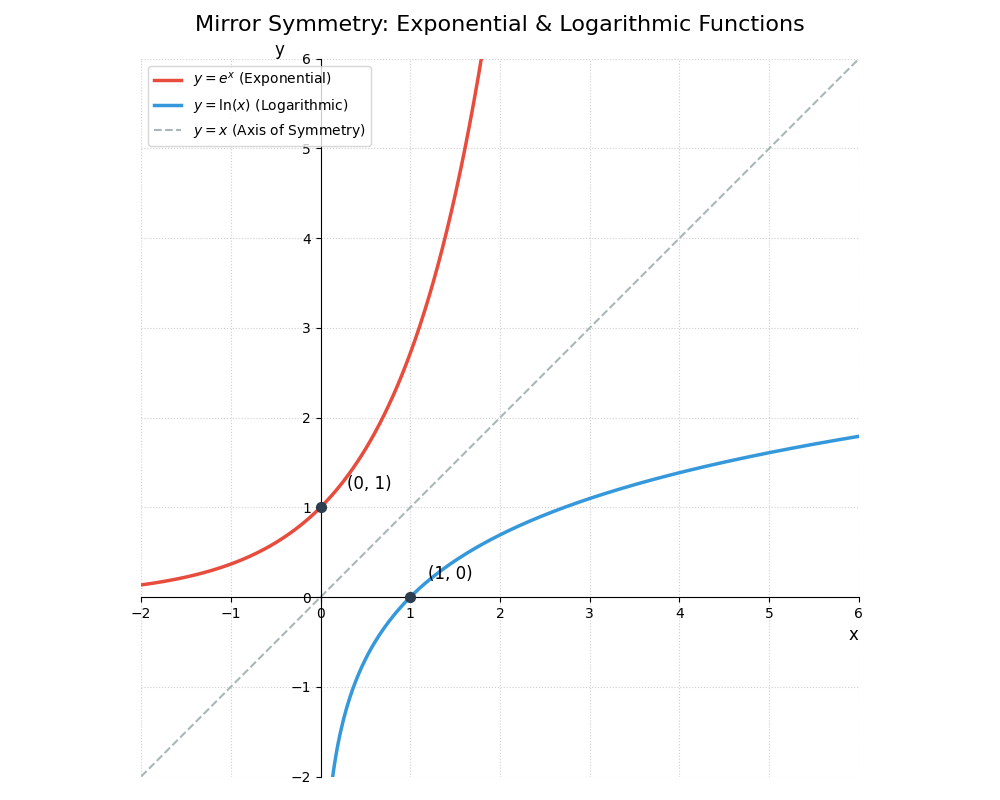
| 真实类别概率 (p_y) | 损失 ( -\ln(p_y) ) |
|---|---|
| 1 | 0 |
| 0.9 | 0.105 |
| 0.5 | 0.693 |
| 0.1 | 2.302 |
| 0.01 | 4.605 |
- 概率越接近1 → loss越接近0 → 奖励正确预测
- 概率越接近0 → loss迅速变大 → 强烈惩罚错误预测
反向传播
l.mean().backward()

l.mean(): 把 256 个样本损失变成 一个标量 2.291281

backward(): 计算 loss 对所有参数的梯度

求类别的梯度: p - y = y_hat - y = [0.109, 0.103,  ..., -0.796, 0.092]

计算权重梯度:

输入像素:

x1 = 0.2
x2 = 0.5
x3 = 0.1

梯度:

dw1 = 0.2 × (-0.796) = -0.16
dw2 = 0.5 × (-0.796) = -0.4
dw3 = 0.1 × (-0.796) = -0.08


学习率: lr = 0.1
更新权重:

w1 = 0.1 - 0.1*(-0.16) = 0.116
w2 = 0.3 - 0.1*(-0.4) = 0.034

直觉理解: 预测概率 0.104 太低, 增加正确类别权重, w1 w2 w3 都变大
小批量训练
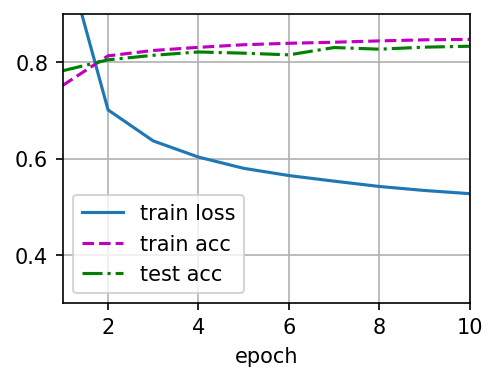
def train_ch3(net, train_iter, test_iter, loss, num_epochs, updater):
    """训练模型(定义见第3章)。"""
    # 训练总流程(按 epoch):
    # Step 1: 训练一个 epoch,得到训练损失与训练准确率。
    # Step 2: 在测试集上评估准确率。
    # Step 3: 将三条曲线(train loss/train acc/test acc)写入 Animator。
    # Step 4: 训练结束后保存曲线图并输出结果检查信息。
    animator = Animator(xlabel='epoch', xlim=[1, num_epochs], ylim=[0.3, 0.9],
                        legend=['train loss', 'train acc', 'test acc'])
    for epoch in range(num_epochs):
        train_metrics = train_epoch_ch3(net, train_iter, loss, updater)
        test_acc = evaluate_accuracy(net, test_iter)
        animator.add(epoch + 1, train_metrics + (test_acc,))
    train_loss, train_acc = train_metrics

    # 终端脚本模式下通常不会弹出交互式图窗,这里显式保存训练曲线。
    output_path = '20260309_train_curve.png'
    animator.fig.savefig(output_path, dpi=150, bbox_inches='tight')
    print(f'训练曲线已保存到: {output_path}')

    # 保留结果检查,但不再使用 assert 直接中断脚本,避免看不到输出图像。
    if train_loss >= 0.5:
        print(f'警告: 训练损失偏高: {train_loss}')
    if not (train_acc <= 1 and train_acc > 0.7):
        print(f'警告: 训练准确率偏低: {train_acc}')
    if not (test_acc <= 1 and test_acc > 0.7):
        print(f'警告: 测试准确率偏低: {test_acc}')


lr = 0.1  # 学习率

def updater(batch_size):
    return d2l.sgd([W, b], lr, batch_size)  # 使用小批量随机梯度下降更新模型参数

num_epochs = 10  # 训练迭代周期数
train_ch3(net, train_iter, test_iter, cross_entropy, num_epochs, updater)
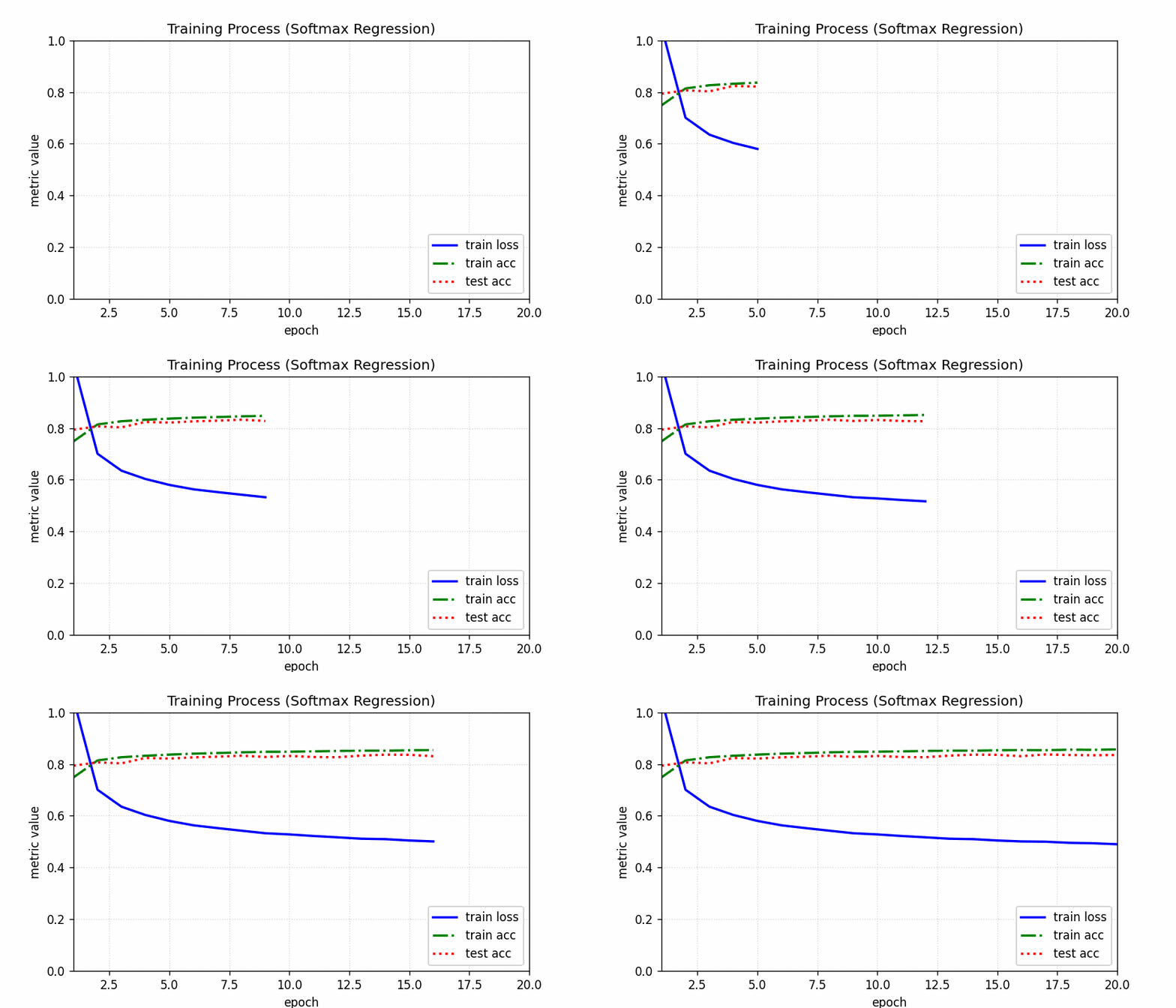
运行后的图像
模型预测
def predict_ch3(net, test_iter, n=6, output_path='20260309_predict_result.png'):
    """显示并保存部分测试样本的预测结果。"""
    for X, y in test_iter:
        break

    trues = d2l.get_fashion_mnist_labels(y)
    preds = d2l.get_fashion_mnist_labels(net(X).argmax(axis=1))

    print('\n前几个测试样本的预测结果:')
    for i, (true_label, pred_label) in enumerate(zip(trues[:n], preds[:n])):
        marker = 'OK' if true_label == pred_label else 'XX'
        print(f'样本{i:02d}: 真实={true_label}, 预测={pred_label} [{marker}]')

    titles = [f'T:{true_label}\nP:{pred_label}' for true_label, pred_label in zip(trues, preds)]
    axes = d2l.show_images(X[0:n].reshape((n, 28, 28)), 1, n, titles=titles[0:n], scale=1.2)

    # d2l.show_images 返回的是 Axes 或 Axes 数组,这里统一取到 Figure 再保存。
    if hasattr(axes, 'figure'):
        fig = axes.figure
    elif hasattr(axes, 'flat'):
        fig = axes.flat[0].figure
    else:
        fig = axes[0].figure

    # 在终端脚本环境下显式保存图像,确保结果可见。
    fig.savefig(output_path, dpi=150, bbox_inches='tight')
    print(f'预测结果图已保存到: {output_path}')
    plt.close(fig)


predict_ch3(net, test_iter, n=8)
运行结果
前几个测试样本的预测结果:
样本00: 真实=ankle boot, 预测=ankle boot [OK]
样本01: 真实=pullover, 预测=pullover [OK]
样本02: 真实=trouser, 预测=trouser [OK]
样本03: 真实=trouser, 预测=trouser [OK]
样本04: 真实=shirt, 预测=shirt [OK]
样本05: 真实=trouser, 预测=trouser [OK]
样本06: 真实=coat, 预测=coat [OK]
样本07: 真实=shirt, 预测=shirt [OK]
预测结果图已保存到: 20260309_predict_result.png

softmax 回归的简洁实现
"""Fashion-MNIST 线性分类模型示例。

本脚本完成三个核心步骤:
1. 加载 Fashion-MNIST 数据集;
2. 定义一个最基础的全连接分类模型;
3. 自定义并应用参数初始化策略。
"""

# 导入 PyTorch 主库(张量运算、自动求导等基础能力)。
import torch

# 从 torch 中导入神经网络模块 nn,包含常用层(Linear、Conv2d 等)和初始化工具。
from torch import nn

# 导入 d2l 的 PyTorch 工具集合,用于快速加载数据集和训练辅助。
from d2l import torch as d2l

# 每个小批量(mini-batch)包含的样本数量。
# batch_size 越大,单步训练越稳定,但显存占用也更高。
batch_size = 256

# 加载 Fashion-MNIST 数据集,返回训练集与测试集迭代器。
# train_iter: 训练阶段使用,按批次提供 (X, y)
# test_iter: 评估阶段使用,按批次提供 (X, y)
train_iter, test_iter = d2l.load_data_fashion_mnist(batch_size)

# 定义模型结构(softmax 回归常见写法):
# 1) nn.Flatten():
#    将输入图像从 (batch_size, 1, 28, 28) 展平为 (batch_size, 784)
# 2) nn.Linear(784, 10):
#    线性层把 784 维像素特征映射到 10 个类别得分(logits)
#    输出形状为 (batch_size, 10)
net = nn.Sequential(nn.Flatten(), nn.Linear(784, 10))

def init_weights(m):
    """自定义参数初始化函数。

    参数
    ----
    m: nn.Module
        当前遍历到的网络层对象。该函数会被 net.apply 递归调用到每一层。
    """
    # 仅对线性层进行初始化,避免误改其他层(如 Flatten 没有可训练参数)。
    if type(m) == nn.Linear:
        # 将权重初始化为均值 0、标准差 0.01 的正态分布。
        # 这是线性模型常见的初始化方式,可避免初始权重过大导致训练不稳定。
        nn.init.normal_(m.weight, std=0.01)

# 将上面的初始化函数应用到 net 的每一层。
# apply 会递归遍历子模块,遇到 nn.Linear 就执行 init_weights 中的初始化逻辑。
net.apply(init_weights)

# 定义损失函数:交叉熵(Cross Entropy)。
# 说明:
# 1) nn.CrossEntropyLoss 期望模型输出是 logits(未经过 softmax 的分数)。
#    因为该损失内部已经包含 log-softmax 计算,所以模型前向里不必手动 softmax。
# 2) reduction='none' 表示保留每个样本的损失值,返回形状通常为 (batch_size,)。
#    这样在训练循环中可以灵活地做 mean/sum,便于教学展示训练细节。
loss = nn.CrossEntropyLoss(reduction='none')

# 定义优化器(参数更新器):随机梯度下降 SGD。
# - net.parameters() 指定需要更新的可训练参数(本例中主要是 Linear 层的权重和偏置)。
# - lr=0.1 是学习率,决定每次参数更新的步长。
#   学习率过大可能导致震荡,过小会使收敛变慢。
trainer = torch.optim.SGD(net.parameters(), lr=0.1)

# 训练轮数(epoch):完整遍历一次训练集记为 1 轮。
# 这里设置为 10,表示模型将对同一训练集进行 10 次完整学习。
num_epochs = 10  # 训练迭代周期数

# 由于当前环境的 d2l 版本可能不包含 train_ch3,这里实现一个等价的本地训练流程。
def accuracy(y_hat, y):
    """计算一个批次中预测正确的样本数。"""
    # y_hat 可能是二维 logits/probability(形状: batch_size x 类别数),
    # 也可能已经是一维类别索引。若是二维,先取每行最大值索引作为预测类别。
    if len(y_hat.shape) > 1 and y_hat.shape[1] > 1:
        y_hat = y_hat.argmax(dim=1)
    # 将预测类别与真实标签逐元素比较,得到布尔向量,再转数值并求和。
    cmp = y_hat.type(y.dtype) == y
    return float(cmp.type(y.dtype).sum())


def evaluate_accuracy(net, data_iter):
    """在指定数据集上评估模型准确率。"""
    # 切换到评估模式:关闭 Dropout/BatchNorm 的训练行为(本模型虽未用到,但这是通用规范)。
    net.eval()
    correct, total = 0.0, 0
    # 评估阶段不需要梯度,禁用 autograd 可减少显存与计算开销。
    with torch.no_grad():
        for X, y in data_iter:
            # 逐批累计“预测正确数”和“样本总数”。
            correct += accuracy(net(X), y)
            total += y.numel()
    # 返回整体准确率(而不是某个批次的准确率)。
    return correct / total


def train_model(net, train_iter, test_iter, loss_fn, num_epochs, optimizer):
    """执行训练并在每轮后输出训练损失、训练准确率和测试准确率。"""
    # 外层循环:每次循环代表一个 epoch(完整遍历一次训练集)。
    for epoch in range(num_epochs):
        # 训练模式下,模型会启用与训练相关的层行为。
        net.train()
        # 下面三个变量用于累计整个 epoch 的统计量。
        loss_sum, correct_sum, sample_count = 0.0, 0.0, 0

        # 内层循环:按 mini-batch 迭代训练数据。
        for X, y in train_iter:
            # 1) 清空上一步残留梯度,避免梯度累加。
            optimizer.zero_grad()

            # 2) 前向传播:输入 X,得到各类别 logits。
            y_hat = net(X)

            # 3) 计算损失:reduction='none' 时,l 是长度为 batch_size 的向量。
            l = loss_fn(y_hat, y)

            # 4) 反向传播:对当前 batch 的平均损失求梯度。
            l.mean().backward()

            # 5) 参数更新:根据梯度更新网络参数。
            optimizer.step()

            # 记录当前 batch 对 epoch 统计量的贡献。
            loss_sum += float(l.sum())
            correct_sum += accuracy(y_hat, y)
            sample_count += y.numel()

        # 一个 epoch 结束后,计算训练集平均损失与准确率。
        train_loss = loss_sum / sample_count
        train_acc = correct_sum / sample_count

        # 额外在测试集上评估泛化性能。
        test_acc = evaluate_accuracy(net, test_iter)

        # 输出本轮训练日志,便于观察是否收敛以及是否过拟合。
        print(
            f'epoch {epoch + 1:02d}: '
            f'train loss={train_loss:.4f}, train acc={train_acc:.4f}, test acc={test_acc:.4f}'
        )


train_model(net, train_iter, test_iter, loss, num_epochs, trainer)

# 训练结束后打印模型参数(权重和偏置)。
# named_parameters() 会返回形如 (参数名, 参数张量) 的迭代器。
print('\n训练结束后的模型参数:')
for name, param in net.named_parameters():
    print(f'参数名: {name}, 形状: {tuple(param.shape)}')
    print(param.data)
运行结果
epoch 01: train loss=0.7857, train acc=0.7483, test acc=0.7879   # 第1轮全样本测试
epoch 02: train loss=0.5697, train acc=0.8133, test acc=0.8098   # 第2轮全样本测试
epoch 03: train loss=0.5248, train acc=0.8259, test acc=0.8211
epoch 04: train loss=0.5005, train acc=0.8313, test acc=0.8230
epoch 05: train loss=0.4846, train acc=0.8366, test acc=0.8229
epoch 06: train loss=0.4740, train acc=0.8399, test acc=0.8256
epoch 07: train loss=0.4646, train acc=0.8428, test acc=0.8337
epoch 08: train loss=0.4577, train acc=0.8451, test acc=0.8070
epoch 09: train loss=0.4525, train acc=0.8462, test acc=0.8274
epoch 10: train loss=0.4468, train acc=0.8479, test acc=0.8277   # 第10轮全样本测试

训练结束后的模型参数:
参数名: 1.weight, 形状: (10, 784)
tensor([[ 0.0018, -0.0067,  0.0056,  ..., -0.0384, -0.0068,  0.0020],  # 第1个类别的模型参数
        [-0.0052,  0.0099,  0.0090,  ...,  0.0003,  0.0052,  0.0037],  # 第2个类别的模型参数
        [ 0.0034,  0.0003, -0.0031,  ...,  0.0254, -0.0023, -0.0032],
        ...,
        [-0.0002, -0.0200, -0.0013,  ..., -0.0026, -0.0012,  0.0079],
        [-0.0011, -0.0192,  0.0170,  ..., -0.0420, -0.0390, -0.0080],
        [ 0.0048, -0.0019, -0.0082,  ..., -0.0077,  0.0182,  0.0110]]) # 第10个类别的模型参数
参数名: 1.bias, 形状: (10,)
tensor([ 0.2837, -0.3010, -0.0937,  0.1988, -0.9130,  1.9041,  0.4180, -0.1169, -0.4493, -0.9555])
第一个类别的预测模型如下
\[y_1 = 0.0018x_1 - 0.0067x_2 + 0.0056x_3 + \dots - 0.0384x_{782} - 0.0068x_{783} + 0.0020x_{784} + 0.2837\]
0
次点赞