三种 ARM Ubuntu 的关系
| 类型 | 维护者 | 目标 |
|---|---|---|
| Ubuntu ARM | Canonical | ARM服务器 |
| Armbian | 社区 | 通用开发板 |
| FriendlyELEC Ubuntu | 厂商 | 自家开发板 |
通用和定制开发板的区别
| 对比 | 通用开发板 | 厂家开发板 |
|---|---|---|
| 系统 | 标准 Ubuntu / Debian | BSP Ubuntu / Android |
| Kernel | 主线Linux | 厂家定制 |
| 资料 | 社区多 | 官方SDK |
| 适配 | 通用 | 特定芯片 |
| 升级 | 容易 | 很难 |
| 驱动 | 开源多 | 私有多 |
为什么不能运行 apt upgrade
| 升级内容 | 结果 |
|---|---|
| kernel | 覆盖厂家kernel |
| mesa | GPU驱动坏 |
| gstreamer | 视频解码坏 |
| systemd | 启动异常 |
嵌入式主板常用方案
BSP Bootloader + BSP Kernel + Armbian rootfs
armbian rootfs 和 Ubuntu 官方 rootfs
| 项目 | BSP + Ubuntu 官方 rootfs | BSP + Armbian rootfs |
|---|---|---|
| Bootloader | BSP U-Boot | BSP U-Boot |
| Kernel | BSP Kernel | BSP Kernel |
| Device Tree | BSP DTB | BSP DTB |
| rootfs来源 | Ubuntu 官方 | Armbian |
| rootfs基础 | Ubuntu Server | Debian / Ubuntu |
| 系统纯净度 | 非常干净 | 带很多开发板脚本 |
| ARM优化 | 基本没有 | 有大量优化 |
| 硬件初始化 | 需要自己配置 | 已经配置 |
| CPU调频 | 需要手动配置 | 自动配置 |
| GPIO工具 | 没有 | 提供工具 |
| HDMI配置 | 需要手动 | 已自动适配 |
| WiFi配置 | 手动配置 | 自动脚本 |
| 系统工具 | 标准 Linux 工具 | armbian-config 等 |
| 软件源 | Ubuntu 官方源 | Debian / Ubuntu + Armbian |
| 系统体积 | 较大 | 较小 |
| 系统稳定性 | 非常稳定 | 稍复杂 |
| 可控性 | 高 | 中 |
| 可定制性 | 高 | 中 |
| 启动脚本 | 很少 | 较多 |
| 适合量产 | 非常适合 | 一般 |
| 适合开发测试 | 可以 | 非常适合 |
ClawPanel 是什么
| 操作 | OpenClaw | ClawPanel |
|---|---|---|
| 创建 agent | CLI | 点按钮 |
| 配置模型 | 改 JSON | UI 下拉框 |
| 查看日志 | terminal | dashboard |
| 管理任务 | CLI | 面板 |
| 诊断问题 | 手动 | 自动检测 |
Armbian 监控CPU频率
armbian@rk3528-ddr4:~$ armbianmonitor -m
Stop monitoring using [ctrl]-[c]
Time        CPU    load %cpu %sys %usr %nice %io %irq   Tcpu  C.St.

11:40:40  2016 MHz  1.24  13%   1%  11%   0%   0%   0%  52.7 °C  0/8
11:40:45  2016 MHz  1.22  37%   2%  34%   0%   0%   0%  51.4 °C  0/8
11:40:50   816 MHz  1.28  11%   2%   8%   0%   0%   0%  49.5 °C  0/8
11:40:56   816 MHz  1.26   1%   0%   0%   0%   0%   0%  48.9 °C  0/8
11:41:01   816 MHz  1.16   1%   0%   0%   0%   0%   0%  48.9 °C  0/8
安装cpufrequtils, 查看配置文件
sudo apt install cpufrequtils

armbian@rk3528-ddr4:~$ cat /etc/default/cpufrequtils
ENABLE=true
MIN_SPEED=408000
MAX_SPEED=2016000
GOVERNOR=performance

sudo systemctl restart cpufrequtils
htop 命令查看性能负载
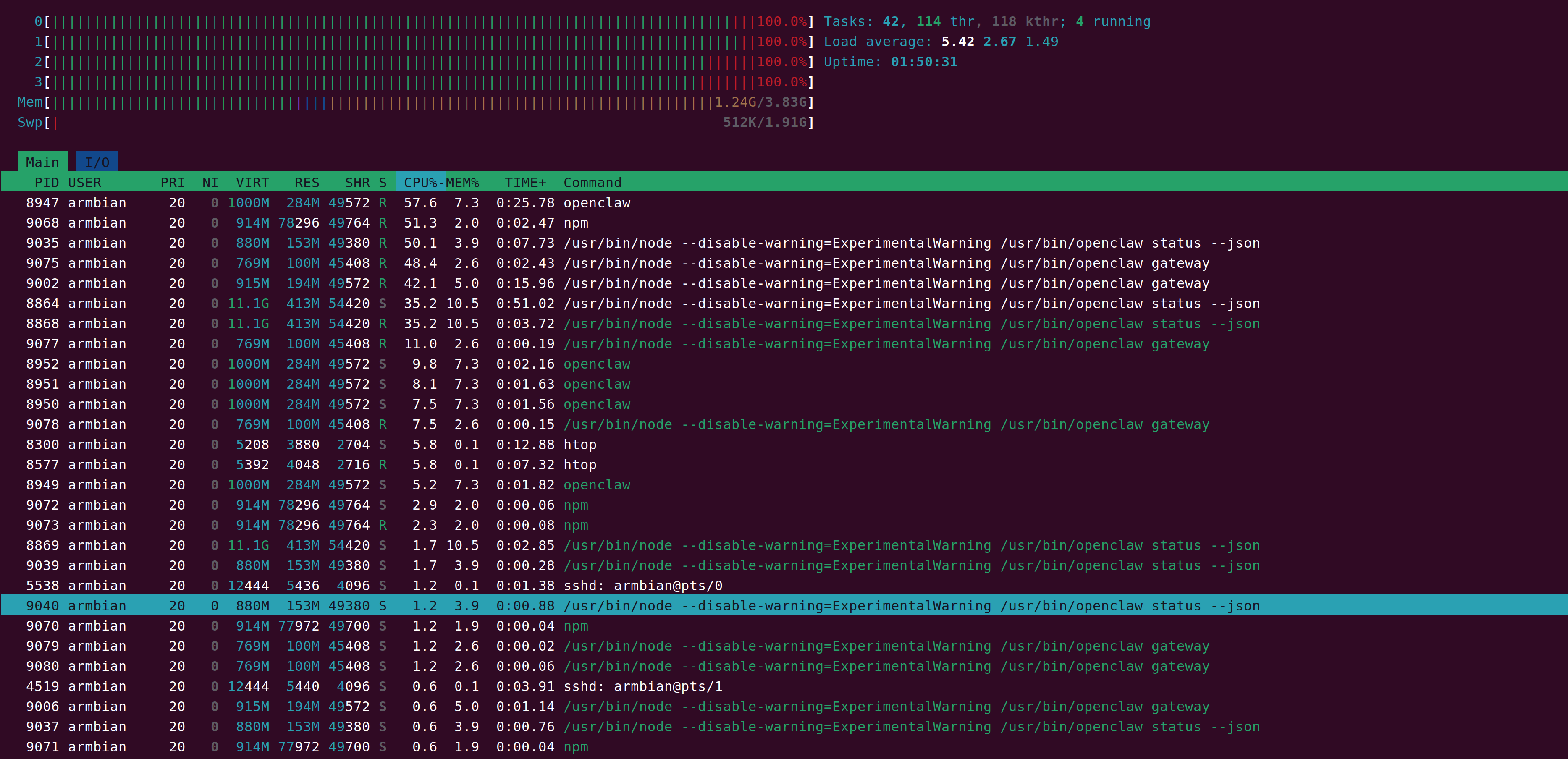
| 项目 | 当前状态 | 证据 | 结论 |
|---|---|---|---|
| CPU使用率 | 100% | 4个核心全部 100% | 主要瓶颈 |
| Load Average | 5.42 | CPU核心数只有4 | 任务排队运行 |
| 内存使用 | 1.24G / 3.83G | swap几乎没用 | 内存 不是瓶颈 |
| Swap | 512K / 1.91G | 几乎未使用 | 正常 |
| 主要占用进程 | openclaw / node / npm | 单进程 35%~57% | NodeJS负载高 |
| Node进程数量 | 6~10个 | openclaw status / gateway | 进程 过多 |
| CPU架构 | Cortex-A53 | RK3528 | 单核性能低 |
| CPU频率 | ~816MHz (当前) | 系统信息 | 可能未跑满频 |
| IO磁盘 | 未见明显压力 | htop未显示IO等待 | 基本正常 |
RK3528 clawpanel 安装
curl -fsSL https://raw.githubusercontent.com/qingchencloud/clawpanel/main/scripts/linux-deploy.sh | bash

✓ built in 8.55s
✅ ClawPanel 安装完成: /home/armbian/.local/share/clawpanel
✅ 启动命令: npm run serve
✅ 已设置默认访问密码: 123456
🔧 创建 systemd 服务... Failed to connect to bus: No medium found
解决方法
# 安装
sudo npm install -g pm2

# 启动
cd ~/.local/share/clawpanel
pm2 start npm --name clawpanel -- run serve

# 查看
pm2 list

# 开机启动
pm2 startup
pm2 save
配置WIFI
sudo apt install -y dialog whiptail python3 python3-pip python3-requests python3-apt

sudo armbian-config

sudo armbian-config
        │
        ▼
  ┌─────────────┐
  │ Armbian Menu│
  └─────────────┘
        │
        ▼
   Select "Network"
        │
        ▼
┌─────────────────────────┐
│  BNS001 - Basic Network │
└─────────────────────────┘
        │
        ▼
   Select Interface
   ┌─────────────┐
   │ eth0        │ ← 有线网络 (DHCP / Static)
   │ wlan0       │ ← 无线网络 (WiFi)
   └─────────────┘
        │
        ▼
 If wlan0 selected:
 ┌──────────────────────┐
 │ Scan Available WiFi  │
 └──────────────────────┘
        │
        ▼
  Select SSID (WiFi Name)
        │
        ▼
   Enter Password
        │
        ▼
Choose IP method
 ┌───────────────┐
 │ DHCP          │ ← 自动获取IP
 │ Static        │ ← 手动设置IP
 └───────────────┘
        │
        ▼
   Save Configuration
        │
        ▼
  System applies network
        │
        ▼
   Check Network
 ┌───────────────┐
 │ ip addr show  │
 │ ping 8.8.8.8 │
 └───────────────┘
        │
        ▼
WiFi Connected & Ready
0
次点赞