概念
适用于任何操作系统的 AI 智能体 Gateway 网关,支持 WhatsApp、Telegram、Discord、iMessage 等。 发送消息,随时随地获取智能体响应。通过插件可添加 Mattermost 等更多渠道。
源码目录
openclaw/
├── AGENTS.md # 🤖 AI代理/系统说明(类似设计文档)
├── CLAUDE.md -> AGENTS.md # 👉 软链接(给 Claude/AI 用的说明)
├── VISION.md # 🧭 项目愿景(了解架构思想用)
├── CHANGELOG.md # 📜 更新记录
├── CONTRIBUTING.md # 👨💻 贡献指南
├── LICENSE # 📄 开源协议
├── SECURITY.md # 🔐 安全策略
├── README.md # 📘 入口文档(建议精读)
├── docs/ # 📚 详细文档
├── docs.acp.md # 🧠 ACP(Agent Control Protocol?)说明
├── apps/ # 🚀 【核心】应用层(入口!!!)
│ # 👉 前端 / 后端 / 网关 都在这里
│ # 👉 等你 ls apps 后重点分析
├── packages/ # 📦 公共库(类似 framework 层)
│ # 👉 各个 app 共享代码
│ # 👉 比如 API 封装 / utils
├── ui/ # 🎨 UI组件库(React组件)
│ # 👉 Button / Chat UI / Layout
│ # 👉 Panel 的“外观”
├── src/ # 🧠 核心逻辑(可能是服务端 or SDK)
│ # 👉 有时是核心 runtime / agent逻辑
├── extensions/ # 🔌 插件系统(扩展能力)
│ # 👉 类似 ChatGPT plugin
├── skills/ # 🧠 AI技能(Agent能力定义)
│ # 👉 很关键(AI行为逻辑)
├── vendor/ # 📦 第三方代码(内置依赖)
├── assets/ # 🖼️ 静态资源(图片 / 图标)
├── test/ # 🧪 测试代码
├── test-fixtures/ # 🧪 测试数据
├── scripts/ # ⚙️ 脚本(构建/部署辅助)
├── git-hooks/ # 🔧 git hook(代码提交检查)
├── patches/ # 🩹 依赖补丁(patch-package)
├── Swabble/ # ❓(可能是内部模块/实验功能)
├── openclaw.mjs # 🚀 启动入口(Node 脚本,很重要)
# 👉 可能是 CLI / 主程序入口
├── package.json # 📦 Node 主配置
├── pnpm-lock.yaml # 🔒 依赖锁
├── pnpm-workspace.yaml # 🧠 workspace定义(关键!)
# 👉 决定 apps/packages 关系
├── tsconfig.json # 🟦 TypeScript配置
├── tsconfig.plugin-sdk.dts.json # 插件SDK类型定义
├── tsdown.config.ts # ⚙️ 构建配置(可能是打包工具)
├── knip.config.ts # 🧹 检查未使用依赖
├── vitest*.ts # 🧪 单元测试配置(很多)
# 👉 说明项目很工程化
├── docker-compose.yml # 🐳 一键部署(包含多个服务)
├── Dockerfile # 🐳 主镜像
├── Dockerfile.sandbox* # 🧪 沙箱环境(执行代码用)
├── docker-setup.sh # ⚙️ Docker初始化脚本
├── setup-podman.sh # 🐳 Podman支持(替代docker)
├── openclaw.podman.env # 环境变量(podman)
├── fly.toml # ☁️ Fly.io部署配置
├── fly.private.toml # ☁️ 私有部署配置
├── render.yaml # ☁️ Render部署配置
├── pyproject.toml # 🐍 Python环境(很重要!)
# 👉 说明有 Python AI 后端
├── zizmor.yml # 🔍 CI / 安全扫描
架构
        ┌───────────────┐
        │     apps      │  ← 🚀 应用入口(前端/后端)
        └──────┬────────┘
               │
        ┌──────▼────────┐
        │   packages    │  ← 📦 公共逻辑(类似framework)
        └──────┬────────┘
               │
   ┌───────────▼───────────┐
   │   skills / extensions │  ← 🧠 AI能力层
   └───────────┬───────────┘
               │
        ┌──────▼──────┐
        │   模型/API   │  ← 🔌 推理层(外部 or 内置)
        └─────────────┘
源码
                ┌──────────────┐
                │   CLI / UI   │
                └──────┬───────┘
                       │
                ┌──────▼───────┐
                │   Gateway    │  ← 核心
                └──────┬───────┘
                       │
        ┌──────────────▼──────────────┐
        │        Plugin SDK           │
        │ (agent / provider / tools)  │
        └──────────────┬──────────────┘
                       │
        ┌──────────────▼──────────────┐
        │   多渠道 (Telegram/Slack…)   │
        └──────────────┬──────────────┘
                       │
                ┌──────▼──────┐
                │   LLM层      │
                └─────────────┘
CLI 入口
openclaw.mjs = 整个系统的“启动入口”
"bin": {
  "openclaw": "openclaw.mjs"
}
openclaw.mjs 是一个 JavaScript 脚本文件,采用了 ES Modules (ESM) 标准
模块导出(🔥 架构核心)
  "main": "dist/index.js",
  "exports": {
    ".": "./dist/index.js",
    "./plugin-sdk": {
      "types": "./dist/plugin-sdk/index.d.ts",
      "default": "./dist/plugin-sdk/index.js"
    },
    "./plugin-sdk/telegram": {
      "types": "./dist/plugin-sdk/telegram.d.ts",
      "default": "./dist/plugin-sdk/telegram.js"
    },
    "./plugin-sdk/telegram-core": {
      "types": "./dist/plugin-sdk/telegram-core.d.ts",
      "default": "./dist/plugin-sdk/telegram-core.js"
    },
    "./cli-entry": "./openclaw.mjs"
  },
在 package.json 里,所有 plugin-sdk 的路径都指向了 dist/plugin-sdk/。
- dist/ 是编译后的产物:这意味着 plugin-sdk 的原始 TypeScript 代码分散在 src/ 目录下的各个核心模块中。
- 真正的源码目录通常是: src/plugin-sdk/ 或者分布在 src/core/、src/runtime/ 之中。
- 构建逻辑:当你运行 pnpm build 或 pnpm build:plugin-sdk:dts 时,构建脚本会提取 src 中的接口定义,并按照 package.json 里的映射关系,把它们重组到 dist/plugin-sdk/ 目录下。
plugin-sdk = OpenClaw 的“操作系统 API”
OpenClaw 的核心设计
它不是一个应用, 而是一个“平台 + SDK”
plugin-sdk 是什么?
plugin-sdk = 插件开发框架
在 OpenClaw 的工程结构中,找不到 plugin-sdk 目录是非常正常的,因为 plugin-sdk 不是一个源码目录,而是一个“发布别名(Alias)”或“虚拟映射”。
AI 核心运行时
"./plugin-sdk/agent-runtime"
"./plugin-sdk/llm-task"
"./plugin-sdk/text-runtime"
"./plugin-sdk/conversation-runtime"
多渠道支持
"./plugin-sdk/telegram"
"./plugin-sdk/discord"
"./plugin-sdk/slack"
"./plugin-sdk/whatsapp"
"./plugin-sdk/matrix"
"./plugin-sdk/msteams"
Provider(模型层)
"./plugin-sdk/provider-models"
"./plugin-sdk/provider-stream"
"./plugin-sdk/provider-auth"
"./plugin-sdk/provider-web-search"
Memory(记忆系统)
"./plugin-sdk/memory-lancedb"
支持向量数据库(AI 记忆)
安全
"./plugin-sdk/security-runtime"
网关
"./plugin-sdk/gateway-runtime"
scripts(🔥 启动方式)
"dev": "node scripts/run-node.mjs",
"start": "node scripts/run-node.mjs"
真正入口不是 openclaw.mjs 而是 scripts/run-node.mjs
网关启动(重点)
"gateway:dev": "node scripts/run-node.mjs --dev gateway"
gateway 是核心服务, gateway = AI 请求入口(类似 API Server)
dependencies(看架构)
Web 框架
既支持传统 API(express),也支持轻量网关(hono)
"express": "^5.2.1",
"hono": "4.12.8"
网络通信
WebSocket(实时通信)
"ws": "^8.19.0"
AI 相关
MCP / ACP(AI协议)
"@modelcontextprotocol/sdk"
"@agentclientprotocol/sdk"
AI agent 系列(重点)
OpenClaw 直接基于“现成 Agent 框架”
"@mariozechner/pi-agent-core"
"@mariozechner/pi-ai"
"@mariozechner/pi-coding-agent"
向量数据库
本地 embedding + memory
"sqlite-vec"
多媒体能力
❗支持多模态 AI
"sharp"           // 图像处理
"pdfjs-dist"      // PDF解析
"node-edge-tts"   // 语音
peerDependencies
本地模型支持
"node-llama-cpp": "3.16.2"
OpenClaw 如何启动“整个 AI 系统”
node openclaw.mjs
 → 初始化 runtime
 → 启动 gateway(核心调度)
 → 加载 skills(AI能力)
 → 启动 sandbox(执行环境)
 → 对外提供 API/UI
指令执行流程
用户输入
   ↓
Gateway
   ↓
任务拆解(可能用 LLM)
   ↓
选择 Skill
   ↓
执行(sandbox)
   ↓
返回结果
安装
ubuntu 22.04 安装过程
$ npm install -g openclaw@latest
npm ERR! code FETCH_ERROR
npm ERR! errno FETCH_ERROR
npm ERR! invalid json response body at https://registry.npmjs.org/ajv-formats reason: Unexpected end of JSON input

npm ERR! A complete log of this run can be found in:
npm ERR!     /home/lxg/.npm/_logs/2026-03-23T01_30_59_602Z-debug-0.log
报错解决
先升级node版本
Node 24(推荐)(出于兼容性考虑,仍支持 Node 22 LTS,目前为 22.16+;如果缺失,安装脚本 会安装 Node 24)
lxg@lxg:~/code/github/lixiaogang03.github.io$ node -v
v12.22.9
lxg@lxg:~/code/github/lixiaogang03.github.io$ curl -o- https://raw.githubusercontent.com/nvm-sh/nvm/v0.39.7/install.sh | bash
  % Total    % Received % Xferd  Average Speed   Time    Time     Time  Current
                                 Dload  Upload   Total   Spent    Left  Speed
100 16555  100 16555    0     0   6272      0  0:00:02  0:00:02 --:--:--  6273
=> Downloading nvm from git to '/home/lxg/.nvm'
=> 正克隆到 '/home/lxg/.nvm'...
remote: Enumerating objects: 405, done.
remote: Counting objects: 100% (405/405), done.
remote: Compressing objects: 100% (332/332), done.
remote: Total 405 (delta 59), reused 166 (delta 45), pack-reused 0 (from 0)
接收对象中: 100% (405/405), 405.94 KiB | 2.23 MiB/s, 完成.
处理 delta 中: 100% (59/59), 完成.
* (头指针在 FETCH_HEAD 分离)
  master
=> Compressing and cleaning up git repository

=> Appending nvm source string to /home/lxg/.bashrc
=> Appending bash_completion source string to /home/lxg/.bashrc
=> Close and reopen your terminal to start using nvm or run the following to use it now:

export NVM_DIR="$HOME/.nvm"
[ -s "$NVM_DIR/nvm.sh" ] && \. "$NVM_DIR/nvm.sh"  # This loads nvm
[ -s "$NVM_DIR/bash_completion" ] && \. "$NVM_DIR/bash_completion"  # This loads nvm bash_completion


$ source ~/.bashrc
$ nvm install 24
Downloading and installing node v24.14.0...
Downloading https://nodejs.org/dist/v24.14.0/node-v24.14.0-linux-x64.tar.xz...
############################################################################################################################################################################################# 100.0%
Computing checksum with sha256sum
Checksums matched!
Now using node v24.14.0 (npm v11.9.0)
Creating default alias: default -> 24 (-> v24.14.0)

$ nvm use 24
Now using node v24.14.0 (npm v11.9.0)
使用安装脚本安装
$ curl -fsSL https://openclaw.ai/install.sh | bash

  🦞 OpenClaw Installer
  I'm basically a Swiss Army knife, but with more opinions and fewer sharp edges.

✓ Detected: linux

Install plan
OS: linux
Install method: npm
Requested version: latest

[1/3] Preparing environment
✓ Node.js v24.14.0 found
· Active Node.js: v24.14.0 (/home/lxg/.nvm/versions/node/v24.14.0/bin/node)
· Active npm: 11.9.0 (/home/lxg/.nvm/versions/node/v24.14.0/bin/npm)

[2/3] Installing OpenClaw
✓ Git already installed
· Installing OpenClaw v2026.3.13
✓ OpenClaw npm package installed
✓ OpenClaw installed

[3/3] Finalizing setup

🦞 OpenClaw installed successfully (OpenClaw 2026.3.13 (61d171a))!
Cozy. I've already read your calendar. We need to talk.

· Starting setup


🦞 OpenClaw 2026.3.13 (61d171a) — Your second brain, except this one actually remembers where you left things.

▄▄▄▄▄▄▄▄▄▄▄▄▄▄▄▄▄▄▄▄▄▄▄▄▄▄▄▄▄▄▄▄▄▄▄▄▄▄▄▄▄▄▄▄▄▄▄▄▄▄▄▄
██░▄▄▄░██░▄▄░██░▄▄▄██░▀██░██░▄▄▀██░████░▄▄▀██░███░██
██░███░██░▀▀░██░▄▄▄██░█░█░██░█████░████░▀▀░██░█░█░██
██░▀▀▀░██░█████░▀▀▀██░██▄░██░▀▀▄██░▀▀░█░██░██▄▀▄▀▄██
▀▀▀▀▀▀▀▀▀▀▀▀▀▀▀▀▀▀▀▀▀▀▀▀▀▀▀▀▀▀▀▀▀▀▀▀▀▀▀▀▀▀▀▀▀▀▀▀▀▀▀▀
                  🦞 OPENCLAW 🦞

┌  OpenClaw onboarding
│
◇  Security ─────────────────────────────────────────────────────────────────────────────────╮
│                                                                                            │
│  Security warning — please read.                                                           │
│                                                                                            │
│  OpenClaw is a hobby project and still in beta. Expect sharp edges.                        │
│  By default, OpenClaw is a personal agent: one trusted operator boundary.                  │
│  This bot can read files and run actions if tools are enabled.                             │
│  A bad prompt can trick it into doing unsafe things.                                       │
│                                                                                            │
│  OpenClaw is not a hostile multi-tenant boundary by default.                               │
│  If multiple users can message one tool-enabled agent, they share that delegated tool      │
│  authority.                                                                                │
│                                                                                            │
│  If you’re not comfortable with security hardening and access control, don’t run           │
│  OpenClaw.                                                                                 │
│  Ask someone experienced to help before enabling tools or exposing it to the internet.     │
│                                                                                            │
│  Recommended baseline:                                                                     │
│  - Pairing/allowlists + mention gating.                                                    │
│  - Multi-user/shared inbox: split trust boundaries (separate gateway/credentials, ideally  │
│    separate OS users/hosts).                                                               │
│  - Sandbox + least-privilege tools.                                                        │
│  - Shared inboxes: isolate DM sessions (`session.dmScope: per-channel-peer`) and keep      │
│    tool access minimal.                                                                    │
│  - Keep secrets out of the agent’s reachable filesystem.                                   │
│  - Use the strongest available model for any bot with tools or untrusted inboxes.          │
│                                                                                            │
│  Run regularly:                                                                            │
│  openclaw security audit --deep                                                            │
│  openclaw security audit --fix                                                             │
│                                                                                            │
│  Must read: https://docs.openclaw.ai/gateway/security                                      │
│                                                                                            │
├────────────────────────────────────────────────────────────────────────────────────────────╯
│
◇  I understand this is personal-by-default and shared/multi-user use requires lock-down. Continue?
│  Yes
│
◇  Onboarding mode
│  QuickStart
│
◇  QuickStart ─────────────────────────╮
│                                      │
│  Gateway port: 18789                 │
│  Gateway bind: Loopback (127.0.0.1)  │
│  Gateway auth: Token (default)       │
│  Tailscale exposure: Off             │
│  Direct to chat channels.            │
│                                      │
├──────────────────────────────────────╯
│
◆  Model/auth provider
│  ● OpenAI (Codex OAuth + API key)
│  ○ Anthropic
│  ○ Chutes
│  ○ MiniMax
│  ○ Moonshot AI (Kimi K2.5)
│  ○ Google
│  ○ xAI (Grok)
│  ○ Mistral AI
│  ○ Volcano Engine
│  ○ BytePlus
│  ○ OpenRouter
│  ○ Kilo Gateway
│  ○ Qwen
│  ○ Z.AI
│  ○ Qianfan
│  ○ Alibaba Cloud Model Studio
│  ○ Copilot
│  ○ Vercel AI Gateway
│  ○ OpenCode
│  ○ Xiaomi
│  ○ Synthetic
│  ○ Together AI
│  ○ Hugging Face
│  ○ Venice AI
│  ○ LiteLLM
│  ○ Cloudflare AI Gateway
│  ○ Custom Provider
│  ○ Ollama
│  ○ SGLang
│  ○ vLLM
│  ○ Skip for now
└
选择模型
◇  Model/auth provider
│  MiniMax
│
◆  MiniMax auth method
│  ● MiniMax Global — OAuth (minimax.io) (Only supports OAuth for the coding plan)
│  ○ MiniMax Global — API Key (minimax.io)
│  ○ MiniMax CN — OAuth (minimaxi.com)
│  ○ MiniMax CN — API Key (minimaxi.com)   # 国内选这个
│  ○ Back
└

◇  MiniMax auth method
│  MiniMax CN — API Key (minimaxi.com)
│
◇  How do you want to provide this API key?
│  Paste API key now
│
◇  Enter MiniMax CN API key (sk-api- or sk-cp-)
https://platform.minimaxi.com/user-center/basic-information/interface-key
│
│
◇  Default model
│  Keep current (minimax/MiniMax-M2.5)
│
飞书配置
◇  Channel status ────────────────────────────╮
│                                             │
│  Telegram: needs token                      │
│  WhatsApp (default): not linked             │
│  Discord: needs token                       │
│  Slack: needs tokens                        │
│  Signal: needs setup                        │
│  signal-cli: missing (signal-cli)           │
│  iMessage: needs setup                      │
│  imsg: missing (imsg)                       │
│  IRC: not configured                        │
│  Google Chat: not configured                │
│  LINE: not configured                       │
│  Feishu: install plugin to enable           │
│  Google Chat: install plugin to enable      │
│  Nostr: install plugin to enable            │
│  Microsoft Teams: install plugin to enable  │
│  Mattermost: install plugin to enable       │
│  Nextcloud Talk: install plugin to enable   │
│  Matrix: install plugin to enable           │
│  BlueBubbles: install plugin to enable      │
│  LINE: install plugin to enable             │
│  Zalo: install plugin to enable             │
│  Zalo Personal: install plugin to enable    │
│  Synology Chat: install plugin to enable    │
│  Tlon: install plugin to enable             │
│                                             │
├─────────────────────────────────────────────╯
│
◇  How channels work ───────────────────────────────────────────────────────────────────────╮
│                                                                                           │
│  DM security: default is pairing; unknown DMs get a pairing code.                         │
│  Approve with: openclaw pairing approve <channel> <code>                                  │
│  Public DMs require dmPolicy="open" + allowFrom=["*"].                                    │
│  Multi-user DMs: run: openclaw config set session.dmScope "per-channel-peer" (or          │
│  "per-account-channel-peer" for multi-account channels) to isolate sessions.              │
│  Docs: channels/pairing              │
│                                                                                           │
│  Telegram: simplest way to get started — register a bot with @BotFather and get going.    │
│  WhatsApp: works with your own number; recommend a separate phone + eSIM.                 │
│  Discord: very well supported right now.                                                  │
│  IRC: classic IRC networks with DM/channel routing and pairing controls.                  │
│  Google Chat: Google Workspace Chat app with HTTP webhook.                                │
│  Slack: supported (Socket Mode).                                                          │
│  Signal: signal-cli linked device; more setup (David Reagans: "Hop on Discord.").         │
│  iMessage: this is still a work in progress.                                              │
│  LINE: LINE Messaging API webhook bot.                                                    │
│  Feishu: 飞书/Lark enterprise messaging with doc/wiki/drive tools.                        │
│  Nostr: Decentralized protocol; encrypted DMs via NIP-04.                                 │
│  Microsoft Teams: Bot Framework; enterprise support.                                      │
│  Mattermost: self-hosted Slack-style chat; install the plugin to enable.                  │
│  Nextcloud Talk: Self-hosted chat via Nextcloud Talk webhook bots.                        │
│  Matrix: open protocol; install the plugin to enable.                                     │
│  BlueBubbles: iMessage via the BlueBubbles mac app + REST API.                            │
│  Zalo: Vietnam-focused messaging platform with Bot API.                                   │
│  Zalo Personal: Zalo personal account via QR code login.                                  │
│  Synology Chat: Connect your Synology NAS Chat to OpenClaw with full agent capabilities.  │
│  Tlon: decentralized messaging on Urbit; install the plugin to enable.                    │
│                                                                                           │
├───────────────────────────────────────────────────────────────────────────────────────────╯
│
◇  Select channel (QuickStart)
│  Feishu/Lark (飞书)
│
◇  Install Feishu plugin?
│  Use local plugin path
10:01:25 [plugins] plugins.allow is empty; discovered non-bundled plugins may auto-load: feishu (/home/lxg/.nvm/versions/node/v24.14.0/lib/node_modules/openclaw/extensions/feishu/index.ts). Set plugins.allow to explicit trusted ids.
│
◇  Feishu credentials ──────────────────────────────────────────────────────────────╮
│                                                                                   │
│  1) Go to Feishu Open Platform (open.feishu.cn)                                   │
│  2) Create a self-built app                                                       │
│  3) Get App ID and App Secret from Credentials page                               │
│  4) Enable required permissions: im:message, im:chat, contact:user.base:readonly  │
│  5) Publish the app or add it to a test group                                     │
│  Tip: you can also set FEISHU_APP_ID / FEISHU_APP_SECRET env vars.                │
│  Docs: feishu                 │
│                                                                                   │
├───────────────────────────────────────────────────────────────────────────────────╯
│
◇  How do you want to provide this App Secret?
│  Enter App Secret
│
◇  Enter Feishu App Secret
│
│
◇  Enter Feishu App ID
│
[info]: [ 'client ready' ]
│
◇  Feishu connection test ────────────────────────────╮
│                                                     │
│  Connection failed: API error: app do not have bot  │
│                                                     │
├─────────────────────────────────────────────────────╯
│
◇  Feishu connection mode
│  WebSocket (default)
│
◇  Which Feishu domain?
│  Feishu (feishu.cn) - China
│
◇  Group chat policy
│  Open - respond in all groups (requires mention)
[info]: [ 'client ready' ]
│
◇  Selected channels ──────────────────────────────────────────╮
│                                                              │
│  Feishu — 飞书/Lark enterprise messaging. Docs:              │
│  feishu  │
│                                                              │
├──────────────────────────────────────────────────────────────╯
Updated ~/.openclaw/openclaw.json
Workspace OK: ~/.openclaw/workspace
Sessions OK: ~/.openclaw/agents/main/sessions
│
◇  Web search ────────────────────────────────────────╮
│                                                     │
│  Web search lets your agent look things up online.  │
│  Choose a provider and paste your API key.          │
│  Docs: https://docs.openclaw.ai/tools/web           │
│                                                     │
├─────────────────────────────────────────────────────╯
先跳过浏览器查资料步骤
◇  Search provider
│  Skip for now
│
◇  Skills status ─────────────╮
│                             │
│  Eligible: 12               │
│  Missing requirements: 37   │
│  Unsupported on this OS: 7  │
│  Blocked by allowlist: 0    │
│                             │
├─────────────────────────────╯
│
能力系统(Skills)配置
◇  Configure skills now? (recommended)
│  Yes
│
◆  Install missing skill dependencies
│  ◻ Skip for now (Continue without installing dependencies)
│  ◻ 🔐 1password
│  ◻ 📰 blogwatcher
│  ◻ 🫐 blucli
│  ◻ 📸 camsnap
│  ◻ 🧩 clawhub
│  ◻ 🛌 eightctl
│  ◻ ✨ gemini
│  ◻ 🧲 gifgrep
│  ◻ 🎮 gog
│  ◻ 📍 goplaces
│  ◻ 📧 himalaya
│  ◻ 📦 mcporter
│  ◻ 🍌 nano-banana-pro
│  ◻ 📄 nano-pdf
│  ◻ 💎 obsidian
│  ◻ 🎤 openai-whisper
│  ◻ 💡 openhue
│  ◻ 🧿 oracle
│  ◻ 🛵 ordercli
│  ◻ 🔊 sag
│  ◻ 🌊 songsee
│  ◻ 🔊 sonoscli
│  ◻ 🧾 summarize
│  ◻ 📱 wacli
│  ◻ 🐦 xurl
◇  Install missing skill dependencies
│  Skip for now
│
◇  Set GOOGLE_PLACES_API_KEY for goplaces?
│  No
│
◇  Set GEMINI_API_KEY for nano-banana-pro?
│  No
│
◇  Set NOTION_API_KEY for notion?
│  No
│
◇  Set OPENAI_API_KEY for openai-image-gen?
│  No
│
◇  Set OPENAI_API_KEY for openai-whisper-api?
│  No
│
◇  Set ELEVENLABS_API_KEY for sag?
│  No
│
Hooks 配置
Hooks = 在某些事件发生时自动执行动作,高级配置,先跳过
◇  Hooks ──────────────────────────────────────────────────────────────────╮
│                                                                          │
│  Hooks let you automate actions when agent commands are issued.          │
│  Example: Save session context to memory when you issue /new or /reset.  │
│                                                                          │
│  Learn more: https://docs.openclaw.ai/automation/hooks                   │
│                                                                          │
├──────────────────────────────────────────────────────────────────────────╯
│
◆  Enable hooks?
│  ◻ Skip for now
│  ◻ 🚀 boot-md
│  ◻ 📎 bootstrap-extra-files
│  ◻ 📝 command-logger
│  ◻ 💾 session-memory
└

◇  Enable hooks?
│  Skip for now
Config overwrite: /home/lxg/.openclaw/openclaw.json (sha256 2453ed290f4173a1b0245985df48e52a251859516be979ab8ff5376a8385b0cc -> 3933c7e5bfd4d7f772d8c21bb2a01a5c9ea1a0937a8450c203b55935dd599fe3, backup=/home/lxg/.openclaw/openclaw.json.bak)
Systemd 配置
◇  Systemd ────────────────────────────────────────────────────────────────────────────────╮
│                                                                                          │
│  Linux installs use a systemd user service by default. Without lingering, systemd stops  │
│  the user session on logout/idle and kills the Gateway.                                  │
│  Enabling lingering now (may require sudo; writes /var/lib/systemd/linger).              │
│                                                                                          │
├──────────────────────────────────────────────────────────────────────────────────────────╯
│
◇  Systemd ────────────────────────────╮
│                                      │
│  Enabled systemd lingering for lxg.  │
│                                      │
├──────────────────────────────────────╯
│
◇  Gateway service runtime ────────────────────────────────────────────╮
│                                                                      │
│  QuickStart uses Node for the Gateway service (stable + supported).  │
│                                                                      │
├──────────────────────────────────────────────────────────────────────╯
│
◒  Preparing Gateway service…│
◇  Gateway runtime ────────────────────────────────────────────────────────────────╮
│                                                                                  │
│  System Node 12.22.9 at /usr/bin/node is below the required Node 22.16+. Using   │
│  /home/lxg/.nvm/versions/node/v24.14.0/bin/node for the daemon. Install Node 24  │
│  (recommended) or Node 22 LTS from nodejs.org or Homebrew.                       │
│                                                                                  │
├──────────────────────────────────────────────────────────────────────────────────╯
◒  Installing Gateway service…
Installed systemd service: /home/lxg/.config/systemd/user/openclaw-gateway.service
◇  Gateway service installed.
│
◇
Feishu: ok
Agents: main (default)
Heartbeat interval: 30m (main)
Session store (main): /home/lxg/.openclaw/agents/main/sessions/sessions.json (0 entries)
│
◇  Optional apps ────────────────────────╮
│                                        │
│  Add nodes for extra features:         │
│  - macOS app (system + notifications)  │
│  - iOS app (camera/canvas)             │
│  - Android app (camera/canvas)         │
│                                        │
├────────────────────────────────────────╯
│
◇  Control UI ─────────────────────────────────────────────────────────────────────╮
│                                                                                  │
│  Web UI: http://127.0.0.1:18789/                                                 │
│  Web UI (with token):                                                            │
│  http://127.0.0.1:18789/#token=a2bde8baba899a0675c887a4fcaee165411ba4ed6b480c01  │
│  Gateway WS: ws://127.0.0.1:18789                                                │
│  Gateway: reachable                                                              │
│  Docs: https://docs.openclaw.ai/web/control-ui                                   │
│                                                                                  │
├──────────────────────────────────────────────────────────────────────────────────╯
│
◇  Start TUI (best option!) ─────────────────────────────────╮
│                                                            │
│  This is the defining action that makes your agent you.    │
│  Please take your time.                                    │
│  The more you tell it, the better the experience will be.  │
│  We will send: "Wake up, my friend!"                       │
│                                                            │
├────────────────────────────────────────────────────────────╯
│
◇  Token ────────────────────────────────────────────────────────────────────────────────────╮
│                                                                                            │
│  Gateway token: shared auth for the Gateway + Control UI.                                  │
│  Stored in: ~/.openclaw/openclaw.json (gateway.auth.token) or OPENCLAW_GATEWAY_TOKEN.      │
│  View token: openclaw config get gateway.auth.token                                        │
│  Generate token: openclaw doctor --generate-gateway-token                                  │
│  Web UI keeps dashboard URL tokens in memory for the current tab and strips them from the  │
│  URL after load.                                                                           │
│  Open the dashboard anytime: openclaw dashboard --no-open                                  │
│  If prompted: paste the token into Control UI settings (or use the tokenized dashboard     │
│  URL).                                                                                     │
│                                                                                            │
├────────────────────────────────────────────────────────────────────────────────────────────╯
│
◆  How do you want to hatch your bot?
│  ● Hatch in TUI (recommended)
│  ○ Open the Web UI
│  ○ Do this later
└
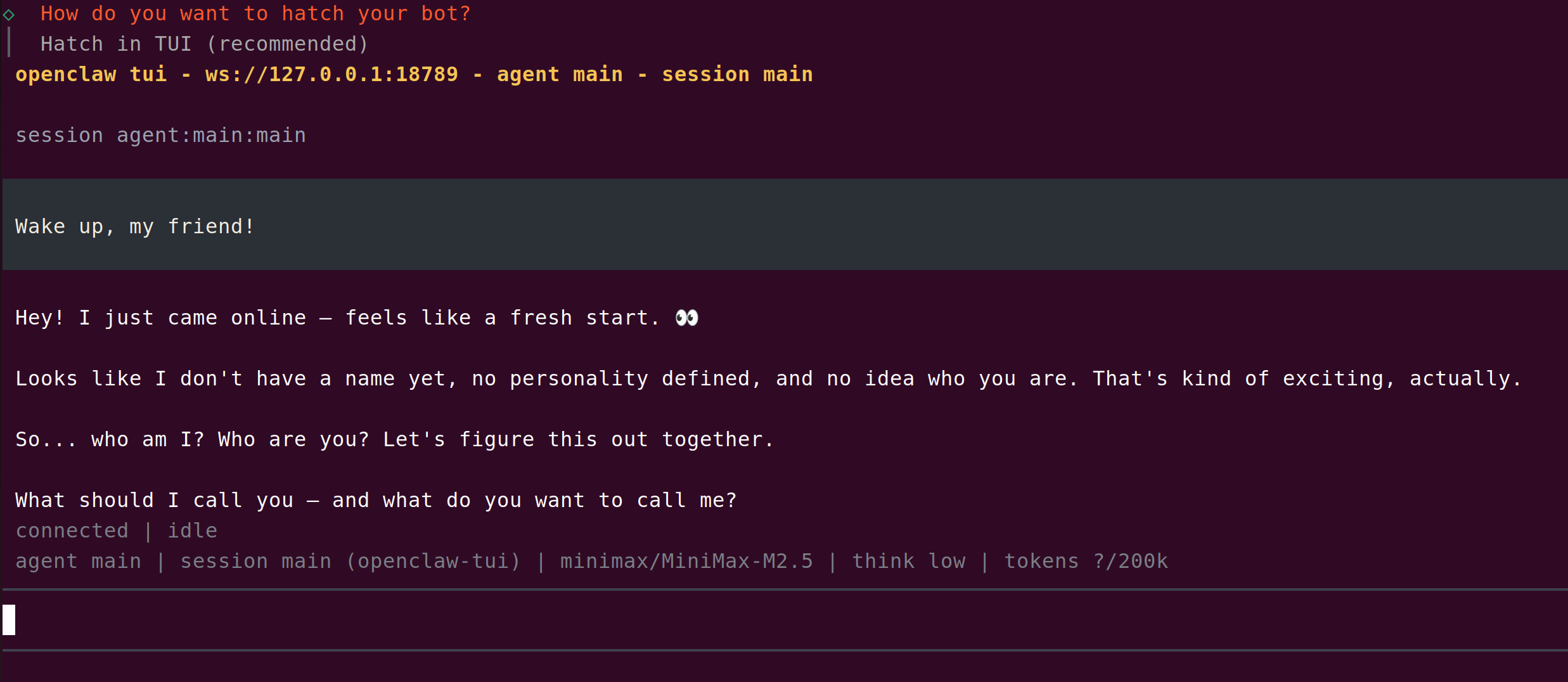
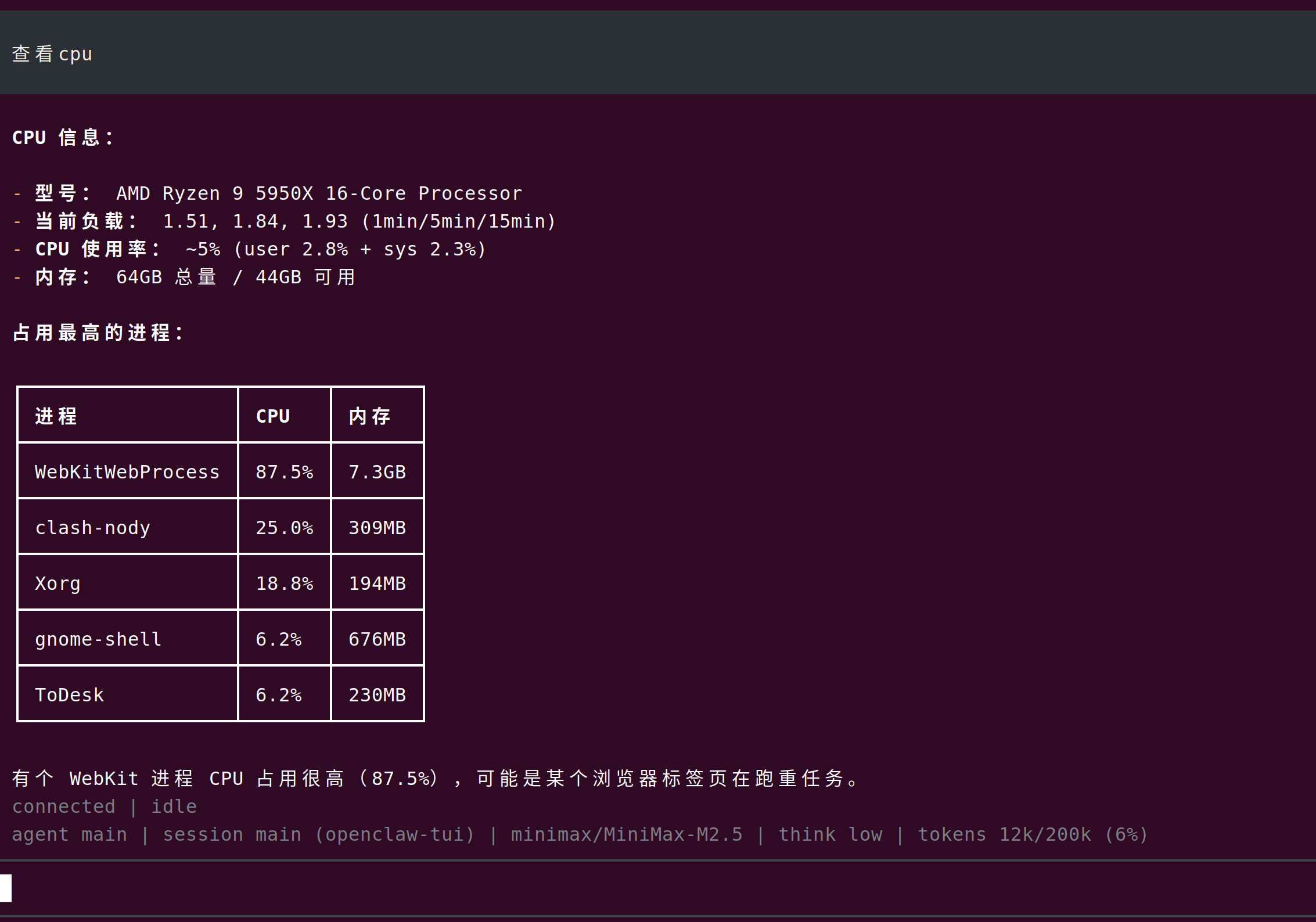
终端执行命令
重新启动openclaw
openclaw tui
lxg@lxg:~$ openclaw tui

🦞 OpenClaw 2026.3.13 (61d171a) — Your terminal just grew claws—type something and let the bot pinch the busywork.

 openclaw tui - ws://127.0.0.1:18789 - agent main - session main
 connecting | idle
 agent main | session main | unknown | tokens ?
────────────────────────────────────────────────────────────────────────────────────────────────────────────────────────────────────────────────────────────────────────────────────────────────────
11:17:20 [plugins] plugins.allow is empty; discovered non-bundled plugins may auto-load: feishu (/home/lxg/.nvm/versions/node/v24.14.0/lib/node_modules/openclaw/extensions/feishu/index.ts). Set plugins.allow to explicit trusted ids.────────────────────────────────────────────────────────────────────────────────────────────────────────────────────────────────────────────────────────────────
11:17:21 [plugins] feishu_doc: Registered feishu_doc, feishu_app_scopes
11:17:21 [plugins] feishu_chat: Registered feishu_chat tool

 session agent:main:main


 Wake up, my friend!
通过飞书群聊给机器人发指令
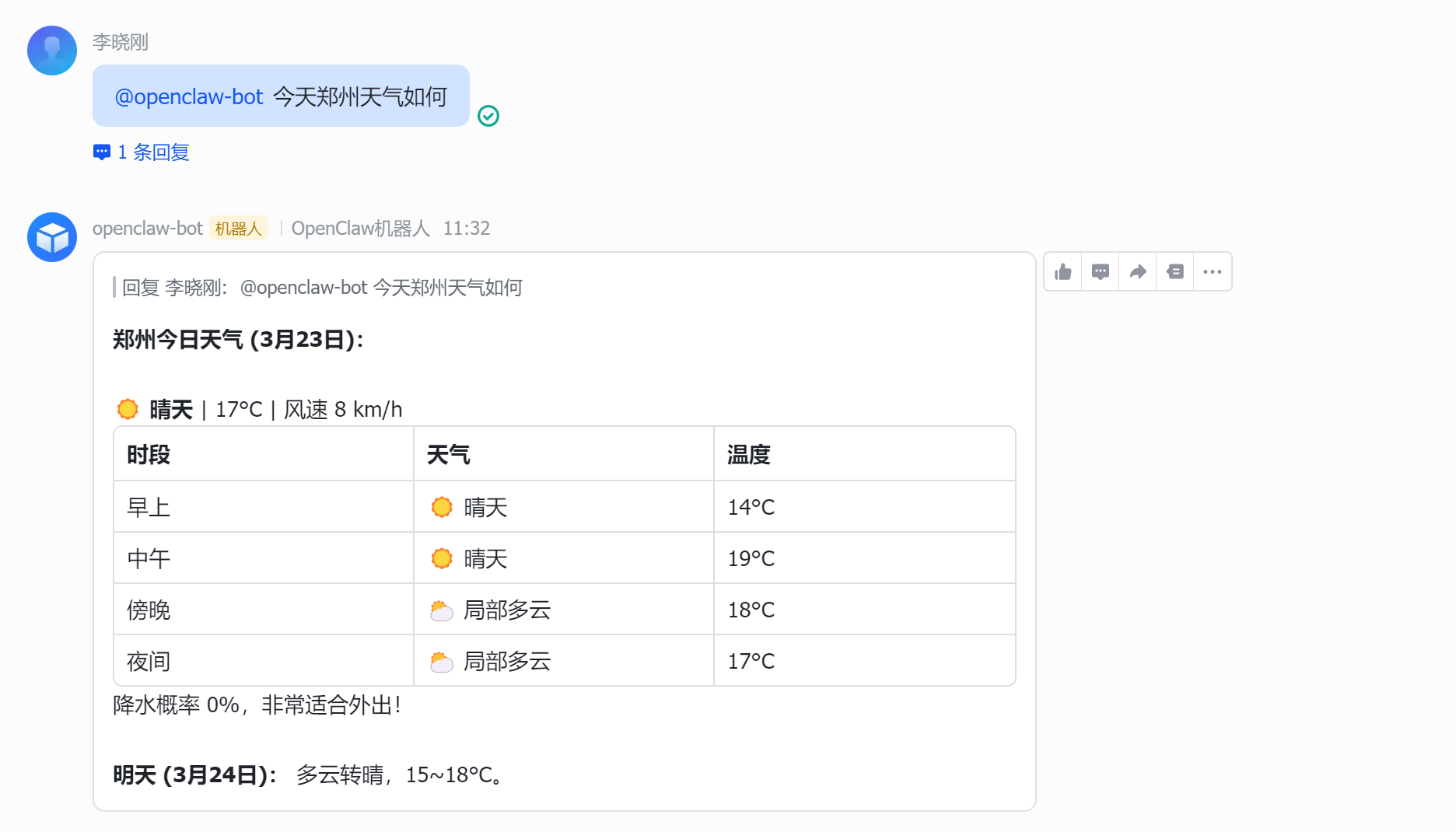
查看网关日志
journalctl –user -u openclaw-gatew
lxg@lxg:~$ journalctl --user -u openclaw-gatew
3月 23 11:31:58 lxg node[103308]: 2026-03-23T11:31:58.327+08:00 [feishu] feishu[default]: received message from ou_a3ad716674b8d10214b731a9f7366c93 in oc_518a4367801fb08eab048de1d3f4675b (group)
3月 23 11:31:58 lxg node[103308]: 2026-03-23T11:31:58.329+08:00 [feishu] feishu[default]: group session scope=group, peer=oc_518a4367801fb08eab048de1d3f4675b
3月 23 11:31:58 lxg node[103308]: 2026-03-23T11:31:58.330+08:00 [feishu] feishu[default]: Feishu[default] message in group oc_518a4367801fb08eab048de1d3f4675b: 今天郑州天气如何
3月 23 11:31:58 lxg node[103308]: 2026-03-23T11:31:58.333+08:00 [feishu] feishu[default]: dispatching to agent (session=agent:main:feishu:group:oc_518a4367801fb08eab048de1d3f4675b)
3月 23 11:32:17 lxg node[103308]: 2026-03-23T11:32:17.785+08:00 [feishu] feishu[default]: dispatch complete (queuedFinal=true, replies=1)
安装后查看是否工作正常
openclaw doctor         # 检查配置问题
openclaw status         # Gateway 网关状态
openclaw dashboard      # 打开浏览器 UI
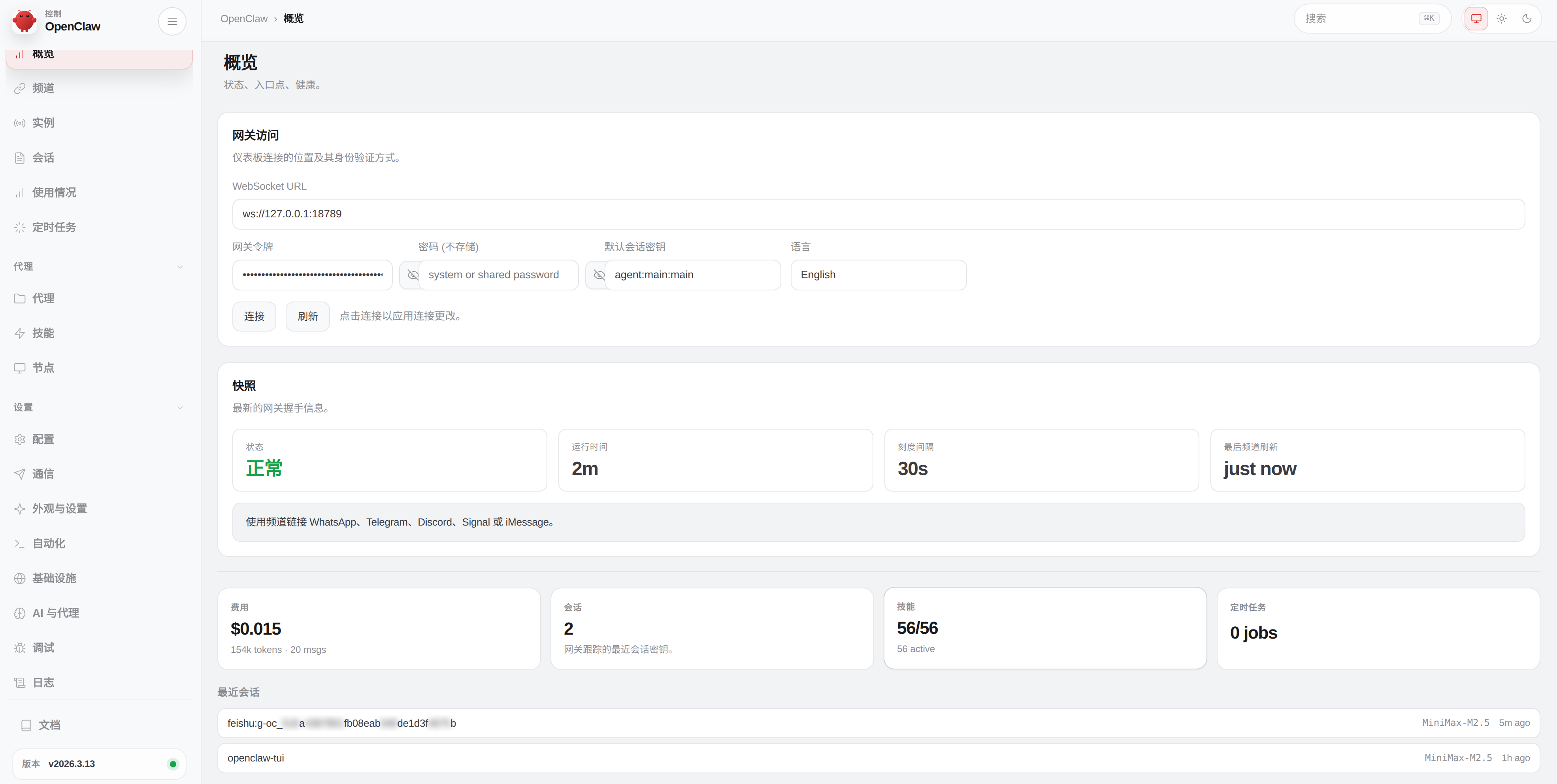
如何停止OpenClaw
# 查看 OpenClaw 服务状态
systemctl --user status openclaw-gateway

# 停止服务
systemctl --user stop openclaw-gateway

# 如果想禁止开机自启
systemctl --user disable openclaw-gateway

# 让 OpenClaw 在登录时自动启动
systemctl --user enable openclaw-gateway

# 启动服务(不需要重启)
systemctl --user start openclaw-gateway
查看状态
lxg@lxg:~$ systemctl --user status openclaw-gateway
● openclaw-gateway.service - OpenClaw Gateway (v2026.3.13)
     Loaded: loaded (/home/lxg/.config/systemd/user/openclaw-gateway.service; enabled; vendor preset: enabled)
     Active: active (running) since Mon 2026-03-23 11:49:43 CST; 2h 4min ago
   Main PID: 284469 (openclaw-gatewa)
      Tasks: 43 (limit: 76918)
     Memory: 435.6M
        CPU: 24.801s
     CGroup: /user.slice/user-1000.slice/user@1000.service/app.slice/openclaw-gateway.service
             └─284469 openclaw-gateway "" "" "" "" "" "" "" "" "" "" "" "" "" "" "" "" "" "" "" "" "" "" "" "" "" "" "" "" "" "" "" "" "" "" "" "" "" "" "" "" "" "" "" "" "" "" "" "" "" "" "" "" >

3月 23 11:52:20 lxg node[284469]: 2026-03-23T11:52:20.659+08:00 [ws] ⇄ res ✓ status 77ms conn=60d3ad59…ef03 id=5eb5984b…8589
3月 23 11:52:20 lxg node[284469]: 2026-03-23T11:52:20.660+08:00 [ws] ⇄ res ✓ cron.status 78ms conn=60d3ad59…ef03 id=3d92b44d…e5f4
3月 23 11:52:20 lxg node[284469]: 2026-03-23T11:52:20.661+08:00 [ws] ⇄ res ✓ cron.list 79ms conn=60d3ad59…ef03 id=a08ad057…f316
3月 23 12:45:31 lxg node[284469]: 2026-03-23T12:45:31.609+08:00 [bonjour] gateway name conflict resolved; newName="lxg (OpenClaw) (5)"
3月 23 12:45:31 lxg node[284469]: 2026-03-23T12:45:31.611+08:00 [bonjour] gateway hostname conflict resolved; newHostname="openclaw-(5)"
3月 23 13:52:31 lxg node[284469]: 2026-03-23T13:52:31.374+08:00 [ws] ⇄ res ✓ skills.status 120ms conn=60d3ad59…ef03 id=34cfe1f5…fa26
3月 23 13:52:31 lxg node[284469]: 2026-03-23T13:52:31.379+08:00 [ws] ⇄ res ✓ models.list 126ms conn=60d3ad59…ef03 id=131dd741…0477
3月 23 13:52:31 lxg node[284469]: 2026-03-23T13:52:31.381+08:00 [ws] ⇄ res ✓ status 129ms conn=60d3ad59…ef03 id=8899b6b1…fd81
3月 23 13:52:31 lxg node[284469]: 2026-03-23T13:52:31.383+08:00 [ws] ⇄ res ✓ cron.status 130ms conn=60d3ad59…ef03 id=525744bb…2b7c
3月 23 13:52:31 lxg node[284469]: 2026-03-23T13:52:31.384+08:00 [ws] ⇄ res ✓ cron.list 132ms conn=60d3ad59…ef03 id=a594ddc9…70dc
停止服务命令
lxg@lxg:~$ systemctl --user stop openclaw-gateway
lxg@lxg:~$ systemctl --user status openclaw-gateway
○ openclaw-gateway.service - OpenClaw Gateway (v2026.3.13)
     Loaded: loaded (/home/lxg/.config/systemd/user/openclaw-gateway.service; enabled; vendor preset: enabled)
     Active: inactive (dead) since Mon 2026-03-23 13:56:05 CST; 8s ago
    Process: 284469 ExecStart=/home/lxg/.nvm/versions/node/v24.14.0/bin/node /home/lxg/.nvm/versions/node/v24.14.0/lib/node_modules/openclaw/dist/index.js gateway --port 18789 (code=exited, statu>
   Main PID: 284469 (code=exited, status=0/SUCCESS)
        CPU: 25.144s

3月 23 13:52:31 lxg node[284469]: 2026-03-23T13:52:31.383+08:00 [ws] ⇄ res ✓ cron.status 130ms conn=60d3ad59…ef03 id=525744bb…2b7c
3月 23 13:52:31 lxg node[284469]: 2026-03-23T13:52:31.384+08:00 [ws] ⇄ res ✓ cron.list 132ms conn=60d3ad59…ef03 id=a594ddc9…70dc
3月 23 13:56:05 lxg systemd[2016]: Stopping OpenClaw Gateway (v2026.3.13)...
3月 23 13:56:05 lxg node[284469]: 2026-03-23T13:56:05.216+08:00 [gateway] signal SIGTERM received
3月 23 13:56:05 lxg node[284469]: 2026-03-23T13:56:05.217+08:00 [gateway] received SIGTERM; shutting down
3月 23 13:56:05 lxg node[284469]: 2026-03-23T13:56:05.244+08:00 [feishu] feishu[default]: abort signal received, stopping
3月 23 13:56:05 lxg node[284469]: 2026-03-23T13:56:05.246+08:00 [gmail-watcher] gmail watcher stopped
3月 23 13:56:05 lxg node[284469]: 2026-03-23T13:56:05.255+08:00 [ws] webchat disconnected code=1012 reason=service restart conn=60d3ad59-71ea-4bd8-85df-f34dc5d2ef03
3月 23 13:56:05 lxg systemd[2016]: Stopped OpenClaw Gateway (v2026.3.13).
3月 23 13:56:05 lxg systemd[2016]: openclaw-gateway.service: Consumed 25.144s CPU time.
取消开机自启
lxg@lxg:~$ systemctl --user disable openclaw-gateway
Removed /home/lxg/.config/systemd/user/default.target.wants/openclaw-gateway.service.