SAM3 模型介绍
在多模态大模型领域,SAM 2/3 系列与 Qwen3-VL-8B-Instruct 代表了两种截然不同的演进方向:前者侧重于通用分割与时空感知,后者侧向于综合视觉理解与交互
配置环境
conda create -n sam3 python=3.12
conda deactivate
conda activate sam3

pip install opencv-python einops pycocotools psutil
权限
| 类型 | 作用 | 是否必须 |
|---|---|---|
| Hugging Face Token | 登录下载用 | ✅ 必须 |
| SAM3 Repo Access | 模型授权 | ✅ 必须(最关键) |
一般很难获取模型参数授权,需要想其他方式
下载安装SAM3 API
git clone https://github.com/facebookresearch/sam3.git
cd sam3
pip install -e .
测试脚本和模型权重
(sam3) root@ebm9tkrl:~/code/sam3_test# tree -L 3
.
├── sam3_github
│   └── sam3
│       ├── CODE_OF_CONDUCT.md
│       ├── CONTRIBUTING.md
│       ├── LICENSE
│       ├── MANIFEST.in
│       ├── README.md
│       ├── README_TRAIN.md
│       ├── assets
│       ├── examples
│       ├── pyproject.toml
│       ├── sam3
│       ├── sam3.egg-info
│       └── scripts
├── sam3_model
│   ├── LICENSE
│   ├── README.md
│   ├── config.json
│   ├── gitattributes
│   ├── merges.txt
│   ├── model-e7be5886a47c.safetensors.qkdownloading
│   ├── processor_config.json
│   ├── sam3.pt
│   ├── special_tokens_map.json
│   ├── tokenizer.json
│   ├── tokenizer_config.json
│   └── vocab.json
├── sam3_test.py
└── test_scene.jpg
ssh 文件传输
scp -P 10357 root@ip:/root/code/sam3_test/object.jpg ./code/AI/

# 语法:scp [本地文件路径] [用户名]@[服务器IP]:[远程路径]
scp -P 10357 car_768x768.jpg root@ip:/root/code/sam3_test/
RTX5090 pytorch版本问题
NVIDIA GeForce RTX 5090 with CUDA capability sm_120 is not compatible with the current PyTorch installation.
安装cuda128以上版本
pip3 install torch torchvision --index-url https://download.pytorch.org/whl/cu128
推理脚本
import argparse
import time
import torch
import sys
from PIL import Image
import numpy as np
import cv2

# 1. 路径设置
sys.path.insert(0, "/root/code/sam3_test/sam3_github/sam3")
from sam3.model_builder import build_sam3_image_model
from sam3.model.sam3_image_processor import Sam3Processor

# 2. 环境配置:强制离线模式
import os
os.environ["HF_HUB_OFFLINE"] = "1"

# 命令行参数
parser = argparse.ArgumentParser(description="SAM3 image segmentation")
parser.add_argument("image", help="输入图片路径")
parser.add_argument("--prompt", default="object", help="文本 prompt(默认: object)")
parser.add_argument("--output", default="result.jpg", help="输出图片路径(默认: result.jpg)")
args = parser.parse_args()

device = "cuda" if torch.cuda.is_available() else "cpu"
ckpt_path = "/root/code/sam3_test/sam3_model/sam3.pt"

# 3. 模型预加载(计时)
t0 = time.perf_counter()
model = build_sam3_image_model(
    checkpoint_path=ckpt_path,
    load_from_HF=False,
    device=device
)
print("✅ Model built successfully.")

state_dict = torch.load(ckpt_path, map_location="cpu")
if "model" in state_dict:
    state_dict = state_dict["model"]
model.load_state_dict(state_dict, strict=False)
model.to(device)
model.eval()
t_load = time.perf_counter() - t0
print(f"✅ 模型加载完成,耗时 {t_load:.2f} 秒")

# 4. 初始化 Processor(调低阈值,默认0.5会过滤掉几乎所有结果)
processor = Sam3Processor(model, confidence_threshold=0.05)

# 5. 读取图片
image = Image.open(args.image).convert("RGB")
print(f"Image: {args.image}  size={image.size}")

# 6. 图像编码(Vision Encoder)
t1 = time.perf_counter()
inference_state = processor.set_image(image)
t_encode = time.perf_counter() - t1
print(f"图像编码耗时:{t_encode*1000:.1f} ms")

# 7. 文本 Prompt 推理
prompt = args.prompt
print(f"Querying for: '{prompt}'")
t2 = time.perf_counter()
output = processor.set_text_prompt(
    state=inference_state,
    prompt=prompt
)
t_text = time.perf_counter() - t2
print(f"文本检测耗时:{t_text*1000:.1f} ms")

# 8. 获取结果
masks = output["masks"]
scores = output["scores"]
print(f"masks shape: {masks.shape}, dtype: {masks.dtype}")
print(f"scores: {scores}")

if masks.numel() == 0:
    print("⚠️  文本 Prompt 没有检测到任何目标,尝试全图 box prompt 验证模型...")
    t3 = time.perf_counter()
    output = processor.add_geometric_prompt(
        box=[0.5, 0.5, 1.0, 1.0],
        label=True,
        state=inference_state,
    )
    t_box = time.perf_counter() - t3
    masks = output["masks"]
    scores = output["scores"]
    print(f"box Prompt 结果 -> masks shape: {masks.shape}, scores: {scores}  (耗时 {t_box*1000:.1f} ms)")

# 9. 可视化
t4 = time.perf_counter()
vis = np.array(image)
for i, mask in enumerate(masks):
    score_val = scores[i].item() if scores.numel() > 0 else 0.0
    print(f"  mask[{i}] score={score_val:.4f}, shape={mask.shape}")
    if mask.dim() > 2:
        mask = mask.squeeze()

    m = mask.cpu().numpy().astype(bool)
    print(f"  positive pixels: {m.sum()} / {m.size}")
    if score_val < 0.1:
        print(f"  skipped (score too low)")
        continue
    if m.sum() == 0:
        print(f"  skipped (empty mask)")
        continue

    color = np.random.randint(0, 255, (3,), dtype=np.uint8)
    vis[m] = (vis[m] * 0.5 + color * 0.5).astype(np.uint8)

cv2.imwrite(args.output, cv2.cvtColor(vis, cv2.COLOR_RGB2BGR))
t_total = time.perf_counter() - t1  # 不含模型加载
print(f"✅ 完成!结果已保存到 {args.output}")
print(f"推理总耗时(编码+检测):{t_total*1000:.1f} ms")
运行结果
python sam3_test_preload.py test_scene_1024.jpg –prompt “object” –output object.jpg
sam3) root@ebm9tkrl:~/code/sam3_test# python sam3_test_preload.py test_scene_1024.jpg --prompt "object" --output object.jpg
/root/code/sam3_test/sam3_github/sam3/sam3/model_builder.py:8: UserWarning: pkg_resources is deprecated as an API. See https://setuptools.pypa.io/en/latest/pkg_resources.html. The pkg_resources package is slated for removal as early as 2025-11-30. Refrain from using this package or pin to Setuptools<81.
  import pkg_resources
✅ Model built successfully.
✅ 模型加载完成,耗时 10.96 秒
Image: test_scene_1024.jpg  size=(1024, 1024)
图像编码耗时:327.2 ms
Querying for: 'object'
文本检测耗时:394.8 ms
masks shape: torch.Size([53, 1, 1024, 1024]), dtype: torch.bool
scores: tensor([0.0849, 0.0939, 0.0723, 0.0742, 0.3552, 0.0846, 0.0578, 0.3125, 0.0942,
        0.0552, 0.1710, 0.1374, 0.0574, 0.1886, 0.1119, 0.0551, 0.2212, 0.1630,
        0.1422, 0.1208, 0.2016, 0.0632, 0.2288, 0.1188, 0.0694, 0.0538, 0.1000,
        0.0706, 0.1827, 0.1730, 0.1118, 0.1243, 0.0990, 0.1559, 0.1440, 0.1035,
        0.0789, 0.0746, 0.1141, 0.1205, 0.1125, 0.0927, 0.0549, 0.0550, 0.1415,
        0.0893, 0.0965, 0.0509, 0.1359, 0.1781, 0.0923, 0.1687, 0.1606],
       device='cuda:0')
  mask[0] score=0.0849, shape=torch.Size([1, 1024, 1024])
  positive pixels: 9879 / 1048576
  skipped (score too low)
  mask[1] score=0.0939, shape=torch.Size([1, 1024, 1024])
  positive pixels: 430 / 1048576
  skipped (score too low)
  mask[2] score=0.0723, shape=torch.Size([1, 1024, 1024])
  positive pixels: 8369 / 1048576
  skipped (score too low)
  mask[3] score=0.0742, shape=torch.Size([1, 1024, 1024])
  positive pixels: 254 / 1048576
  skipped (score too low)
  mask[4] score=0.3552, shape=torch.Size([1, 1024, 1024])
  positive pixels: 6833 / 1048576
  mask[5] score=0.0846, shape=torch.Size([1, 1024, 1024])
  positive pixels: 282 / 1048576
  skipped (score too low)
  mask[6] score=0.0578, shape=torch.Size([1, 1024, 1024])
  positive pixels: 11310 / 1048576
  skipped (score too low)
  mask[7] score=0.3125, shape=torch.Size([1, 1024, 1024])
  positive pixels: 929 / 1048576
  mask[8] score=0.0942, shape=torch.Size([1, 1024, 1024])
  positive pixels: 238 / 1048576
  skipped (score too low)
  mask[9] score=0.0552, shape=torch.Size([1, 1024, 1024])
  positive pixels: 1998 / 1048576
  skipped (score too low)
  mask[10] score=0.1710, shape=torch.Size([1, 1024, 1024])
  positive pixels: 1877 / 1048576
  mask[11] score=0.1374, shape=torch.Size([1, 1024, 1024])
  positive pixels: 19673 / 1048576
  mask[12] score=0.0574, shape=torch.Size([1, 1024, 1024])
  positive pixels: 741 / 1048576
  skipped (score too low)
  mask[13] score=0.1886, shape=torch.Size([1, 1024, 1024])
  positive pixels: 9654 / 1048576
  mask[14] score=0.1119, shape=torch.Size([1, 1024, 1024])
  positive pixels: 195 / 1048576
  mask[15] score=0.0551, shape=torch.Size([1, 1024, 1024])
  positive pixels: 144 / 1048576
  skipped (score too low)
  mask[16] score=0.2212, shape=torch.Size([1, 1024, 1024])
  positive pixels: 695 / 1048576
  mask[17] score=0.1630, shape=torch.Size([1, 1024, 1024])
  positive pixels: 2465 / 1048576
  mask[18] score=0.1422, shape=torch.Size([1, 1024, 1024])
  positive pixels: 460 / 1048576
  mask[19] score=0.1208, shape=torch.Size([1, 1024, 1024])
  positive pixels: 2945 / 1048576
  mask[20] score=0.2016, shape=torch.Size([1, 1024, 1024])
  positive pixels: 7558 / 1048576
  mask[21] score=0.0632, shape=torch.Size([1, 1024, 1024])
  positive pixels: 588 / 1048576
  skipped (score too low)
  mask[22] score=0.2288, shape=torch.Size([1, 1024, 1024])
  positive pixels: 2686 / 1048576
  mask[23] score=0.1188, shape=torch.Size([1, 1024, 1024])
  positive pixels: 2184 / 1048576
  mask[24] score=0.0694, shape=torch.Size([1, 1024, 1024])
  positive pixels: 2092 / 1048576
  skipped (score too low)
  mask[25] score=0.0538, shape=torch.Size([1, 1024, 1024])
  positive pixels: 158663 / 1048576
  skipped (score too low)
  mask[26] score=0.1000, shape=torch.Size([1, 1024, 1024])
  positive pixels: 271 / 1048576
  skipped (score too low)
  mask[27] score=0.0706, shape=torch.Size([1, 1024, 1024])
  positive pixels: 785 / 1048576
  skipped (score too low)
  mask[28] score=0.1827, shape=torch.Size([1, 1024, 1024])
  positive pixels: 19244 / 1048576
  mask[29] score=0.1730, shape=torch.Size([1, 1024, 1024])
  positive pixels: 19096 / 1048576
  mask[30] score=0.1118, shape=torch.Size([1, 1024, 1024])
  positive pixels: 122 / 1048576
  mask[31] score=0.1243, shape=torch.Size([1, 1024, 1024])
  positive pixels: 256 / 1048576
  mask[32] score=0.0990, shape=torch.Size([1, 1024, 1024])
  positive pixels: 5375 / 1048576
  skipped (score too low)
  mask[33] score=0.1559, shape=torch.Size([1, 1024, 1024])
  positive pixels: 8390 / 1048576
  mask[34] score=0.1440, shape=torch.Size([1, 1024, 1024])
  positive pixels: 1206 / 1048576
  mask[35] score=0.1035, shape=torch.Size([1, 1024, 1024])
  positive pixels: 1462 / 1048576
  mask[36] score=0.0789, shape=torch.Size([1, 1024, 1024])
  positive pixels: 94 / 1048576
  skipped (score too low)
  mask[37] score=0.0746, shape=torch.Size([1, 1024, 1024])
  positive pixels: 2789 / 1048576
  skipped (score too low)
  mask[38] score=0.1141, shape=torch.Size([1, 1024, 1024])
  positive pixels: 955 / 1048576
  mask[39] score=0.1205, shape=torch.Size([1, 1024, 1024])
  positive pixels: 2747 / 1048576
  mask[40] score=0.1125, shape=torch.Size([1, 1024, 1024])
  positive pixels: 1663 / 1048576
  mask[41] score=0.0927, shape=torch.Size([1, 1024, 1024])
  positive pixels: 4945 / 1048576
  skipped (score too low)
  mask[42] score=0.0549, shape=torch.Size([1, 1024, 1024])
  positive pixels: 104 / 1048576
  skipped (score too low)
  mask[43] score=0.0550, shape=torch.Size([1, 1024, 1024])
  positive pixels: 4836 / 1048576
  skipped (score too low)
  mask[44] score=0.1415, shape=torch.Size([1, 1024, 1024])
  positive pixels: 714 / 1048576
  mask[45] score=0.0893, shape=torch.Size([1, 1024, 1024])
  positive pixels: 155 / 1048576
  skipped (score too low)
  mask[46] score=0.0965, shape=torch.Size([1, 1024, 1024])
  positive pixels: 162 / 1048576
  skipped (score too low)
  mask[47] score=0.0509, shape=torch.Size([1, 1024, 1024])
  positive pixels: 6947 / 1048576
  skipped (score too low)
  mask[48] score=0.1359, shape=torch.Size([1, 1024, 1024])
  positive pixels: 8776 / 1048576
  mask[49] score=0.1781, shape=torch.Size([1, 1024, 1024])
  positive pixels: 31010 / 1048576
  mask[50] score=0.0923, shape=torch.Size([1, 1024, 1024])
  positive pixels: 9588 / 1048576
  skipped (score too low)
  mask[51] score=0.1687, shape=torch.Size([1, 1024, 1024])
  positive pixels: 3370 / 1048576
  mask[52] score=0.1606, shape=torch.Size([1, 1024, 1024])
  positive pixels: 13970 / 1048576
✅ 完成!结果已保存到 out.jpg
推理总耗时(编码+检测):970.5 ms
768x768
python sam3_test_preload.py test_scene_768.jpg –prompt “object” –output object.jpg
RTX5090 + Intel(R) Xeon(R) Platinum 8473C
✅ 模型加载完成,耗时 10.22 秒
Image: test_scene_768.jpg  size=(768, 768)
图像编码耗时:285.0 ms
Querying for: 'object'
文本检测耗时:341.8 ms
✅ 完成!结果已保存到 object.jpg
推理总耗时(编码+检测):755.9 ms
RTX3090 + i9-14900KF
✅ 模型加载完成,耗时 5.94 秒
Image: test_scene_768.jpg  size=(768, 768)
图像编码耗时:410.5 ms
Querying for: 'object'
文本检测耗时:182.4 ms
✅ 完成!结果已保存到 object_768_3090.jpg
推理总耗时(编码+检测):657.8 ms
| 阶段 | 5090 + Xeon 8473C | 3090 + i9-14900KF | 胜者 | ✅ 更本质原因 |
|---|---|---|---|---|
| 模型加载 | 10.22s | 5.94s | 🟢 3090组 | 内存延迟 + 单核频率(不是GPU问题) |
| 图像编码 | 285ms | 410ms | 🔵 5090组 | GPU算力 + Tensor Core |
| 文本检测 | 341ms | 182ms | 🟢 3090组 | ❗CPU主导 + Python调度 |
| 总耗时 | 755ms | 657ms | 🟢 3090组 | ❗pipeline不GPU-bound |
SAM3 推理的硬件分配
| 阶段 | 术语 | 执行硬件 | 你的 log 对应项 | 目的 |
|---|---|---|---|---|
| A | 图像解码 (Decoding) | CPU | 脚本启动时 | 把 .jpg → 像素矩阵(HWC → Tensor) |
| B | 图像编码 (Vision Encoding) | GPU | 图像编码耗时:XXX ms | 像素 → 高维视觉特征(image embedding) |
| C | 文本处理 (Text Processing) | CPU为主 | Querying for: “object” | prompt → token(字符串 → 数值) |
| D | 文本编码 (Text Encoding) | CPU + GPU(轻量) | 文本检测耗时的一部分 | token → 文本 embedding |
| E | 跨模态匹配 (Cross-modal Fusion) | GPU(但低利用率) | 文本检测耗时的核心部分 | image embedding + text embedding 做关联 |
| F | Mask 解码 (Mask Decoding) | GPU | masks shape / scores | 生成候选分割 mask |
| G | 结果筛选 (Filtering / Ranking) | CPU | skipped (score too low) | 根据 score / 阈值筛选 |
| H | 后处理 (Postprocess) | CPU | 保存前 | mask → 可视化(resize / overlay) |
| I | 图像编码保存 (Encoding) | CPU | 保存 jpg | Tensor → .jpg 文件 |
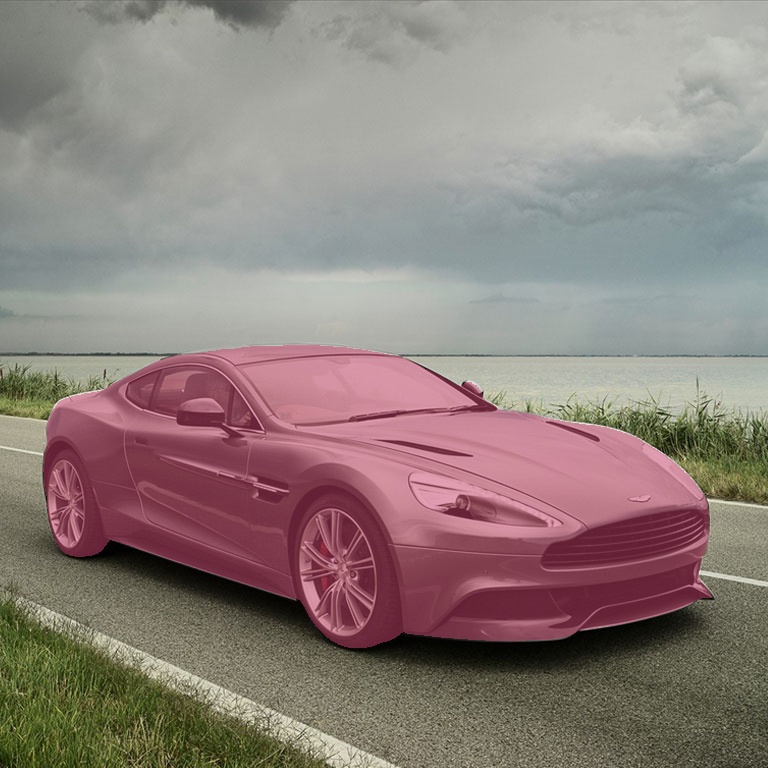
Car 检测
sam3) root@ebm9tkrl:~/code/sam3_test# python sam3_test_preload.py car_768x768.jpg --prompt "car" --output object.jpg
✅ 模型加载完成,耗时 9.18 秒
Image: car_768x768.jpg  size=(768, 768)
图像编码耗时:264.6 ms
Querying for: 'car'
文本检测耗时:308.8 ms
masks shape: torch.Size([2, 1, 768, 768]), dtype: torch.bool
scores: tensor([0.0643, 0.9781], device='cuda:0')
  mask[0] score=0.0643, shape=torch.Size([1, 768, 768])
  positive pixels: 142272 / 589824
  skipped (score too low)
  mask[1] score=0.9781, shape=torch.Size([1, 768, 768])
  positive pixels: 144442 / 589824
✅ 完成!结果已保存到 object.jpg
推理总耗时(编码+检测):622.1 ms
开启:FP16 + TensorRT
对比
| 项目 | PyTorch原始推理 | FP16 + TensorRT |
|---|---|---|
| 推理速度 | 🟡 中等(基准) | 🚀 2~5×提升 |
| GPU利用率 | 不稳定 | 高且稳定 |
| 延迟抖动 | 有(Python + kernel launch) | 极低 |
| 显存占用 | 高 | ↓30%~50% |
| batch吞吐 | 一般 | 很强 |
| 工程部署 | 简单 | 复杂(build engine) |
为什么 TensorRT 会快这么多?
PyTorch 推理路径
Python
  ↓
PyTorch eager execution
  ↓
ATen operator(很多小算子)
  ↓
CUDA kernel 多次 launch
  ↓
GPU执行
TensorRT 推理路径
PyTorch SAM3
  ↓ export
ONNX
  ↓
TensorRT graph optimization
  ↓
layer fusion(Conv + BN + Act)
  ↓
kernel 合并(少但大)
  ↓
CUDA execution
安装环境
pip install tensorrt pycuda onnx onnxsim

sudo apt-get install nvidia-cuda-dev
将SAM3模型导出为ONNX
sam3-onnxruntim 没跑起来
0
次点赞