ROS2 是如何组织源码的
ROS2 并不是一个单仓库项目,而是由很多独立仓库组成的“软件集合”,这就是你在 GitHub 上没看到单一源码仓库的原因。
| 仓库 | 功能 |
|---|---|
| ros2/ros2 | “超级仓库”,汇总脚本和引用各个核心包的版本信息,自己不包含所有源码,只是入口。 |
| ros2/rcl | ROS2 客户端库(C) |
| ros2/rclcpp | C++ 客户端库 |
| ros2/rclpy | Python 客户端库 |
| ros2/launch | 启动系统 |
| ros2/geometry2 | TF2 / 坐标变换 |
| ros2/navigation2 | Navigation2 模块 |
| ros2/examples | 各种示例节点 |
源码结构
ROS2 GitHub 源码结构
=====================

ros2/ros2  (超级仓库/入口)
│
├─ ros2.repos  ← 列出所有核心仓库地址
│
├─ Core Client Libraries
│   ├─ rcl       (C)       ← ROS2 核心客户端库
│   ├─ rclcpp    (C++)     ← C++客户端库,性能关键模块
│   ├─ rclpy     (Python)  ← Python客户端库,快速原型
│   └─ rclc      (C, embedded) ← 嵌入式/微控制器支持
│
├─ ROS Middleware / DDS
│   ├─ rmw_fastrtps_cpp (C++) ← Fast DDS C++ 封装
│   ├─ rmw_cyclonedds_cpp (C++) ← Cyclone DDS 封装
│   └─ rmw (C) ← ROS2 中间件接口层
│
├─ Tools / Launch
│   ├─ launch       (Python)   ← 启动系统
│   ├─ launch_ros   (Python)   ← ROS2 launch 文件接口
│   ├─ rviz         (C++)      ← 可视化工具
│   └─ diagnostics  (C++)      ← 系统健康检查工具
│
├─ Core Libraries / Utilities
│   ├─ tf2          (C++)  ← 坐标变换库
│   ├─ geometry2    (C++)  ← TF2 高层接口
│   ├─ lifecycle    (C++)  ← 生命周期管理
│   └─ parameters   (C++)  ← 参数服务
│
├─ Middleware-independent Packages
│   ├─ examples     (C++, Python) ← 官方示例节点
│   └─ demo_nodes   (C++, Python) ← 入门示例
│
└─ Applications / Higher Level
    ├─ navigation2  (C++)  ← 路径规划、控制器
    ├─ slam_toolbox (C++)  ← SLAM 工具
    ├─ perception   (C++)  ← 图像/传感器处理
    └─ robot_state_publisher (C++) ← TF 发布节点
系统架构图
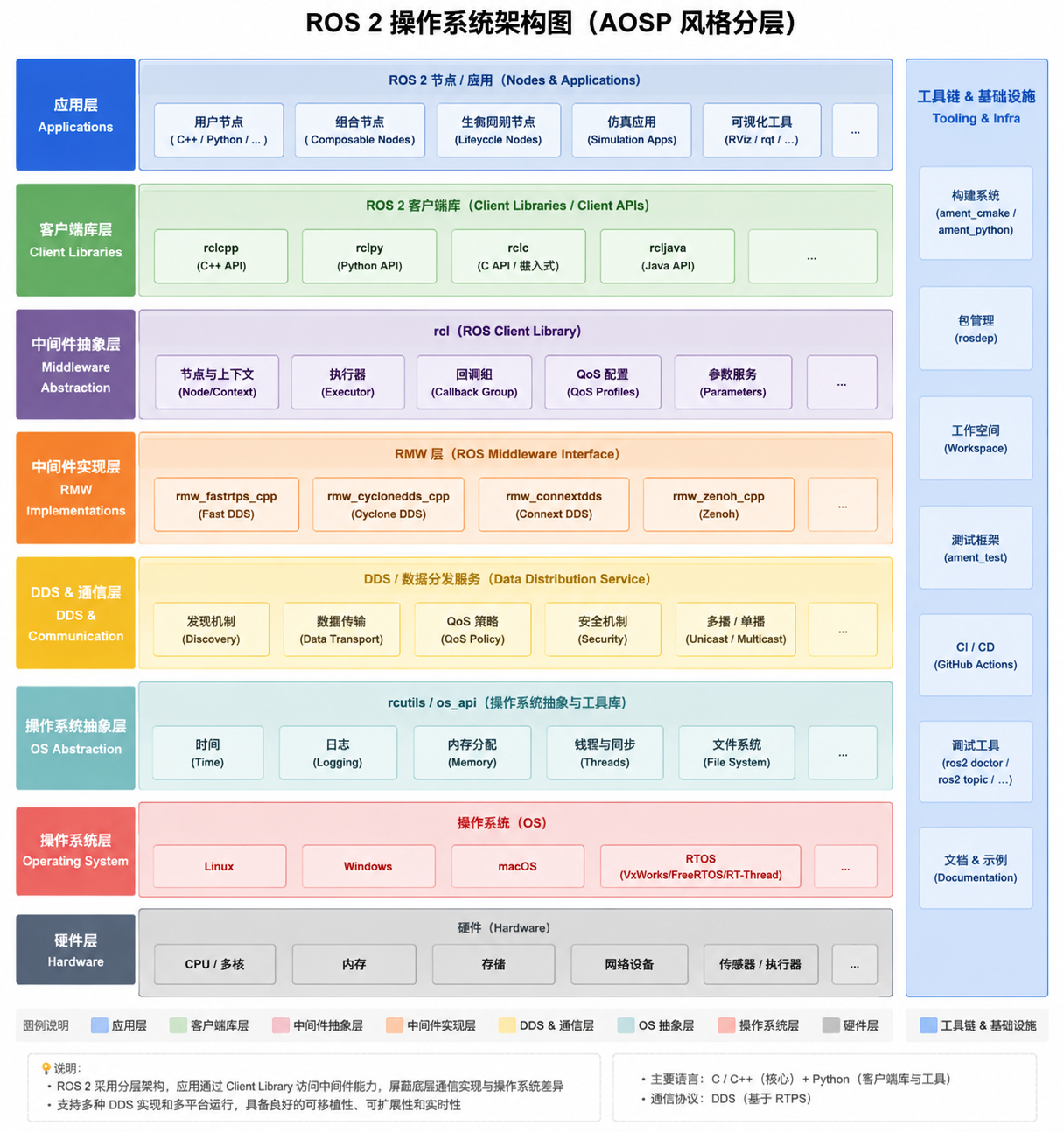
ROS2 VS AOSP
相同点
| 特点 | ROS2 | AOSP | 说明 |
|---|---|---|---|
| 分层设计 | 硬件 → OS → OS 抽象层 → DDS/中间件 → 客户端库 → 应用 | 硬件 → Linux Kernel → HAL → Framework → 应用 | 都遵循“底层提供抽象,上层专注功能”的理念 |
| 抽象层隔离硬件 | OS 抽象层 (rcutils/os_api) + DDS/通信抽象 |
HAL(Hardware Abstraction Layer) | 上层应用不直接依赖硬件接口,便于跨平台 |
| 工具链 / 构建系统 | ament_cmake / colcon / rosdep | Gradle / Soong / Ninja | 都有统一构建工具链来管理多模块、多仓库 |
| 多语言支持 | C / C++ / Python / Java | Java / C++ / Kotlin | 都提供多语言接口,方便不同层次开发者 |
差异点
| 层/维度 | ROS2 | AOSP | 异同分析 |
|---|---|---|---|
| 操作系统依赖 | Linux 为主,也支持 Windows/macOS/RTOS | Linux Kernel + Android OS 定制 | AOSP 是完整 OS,包含 UI 框架、媒体、输入事件,ROS2 只是中间件/运行环境 |
| 中间件/通信 | DDS (RTPS) + RMW 层,节点通信中心 | Binder / IPC / HIDL / AIDL | ROS2 面向机器人分布式通信,AOSP 面向进程内或跨进程通信 |
| 应用层目标 | 机器人节点、SLAM、Nav2、仿真应用 | Android 应用、系统服务、UI | ROS2 关注实时机器人控制和仿真,AOSP 关注移动设备系统服务和用户体验 |
| 硬件抽象层 | OS 抽象层 + 驱动,节点通过 Client Library 使用 | HAL + Vendor 驱动 | 都是屏蔽硬件差异,但 ROS2 更轻量,只抽象传感器/执行器,AOSP 更复杂(图形、音频、传感器、网络) |
| 生命周期管理 | rcl/lifecycle 节点管理 | Activity / Service 生命周期 | ROS2 的生命周期针对机器人节点运行状态,AOSP 针对 UI/服务状态 |
| 构建与依赖管理 | colcon + rosdep + ament | Soong + Gradle | 逻辑类似,都是多模块依赖管理,但 AOSP 更复杂(几十万个源文件) |
| 实时性 | 高实时性需求,DDS 可选 RTOS 支持 | 实时性较弱(普通 Android 主要靠 Linux 内核调度) | ROS2 更偏向工业/机器人控制实时,AOSP 偏 UI 和服务响应性 |
AOSP 的使用模式
目的:厂商要把 Android 移植到自己的硬件(手机、平板、智能设备)
做法:
- 下载 AOSP 源码 → 修改 HAL / 驱动 / 系统服务 → 自己编译固件
- 编译后生成 完整系统镜像(boot.img、system.img)
特点:
- 高度定制化,针对不同芯片、不同硬件
- 需要厂商有内核/驱动/系统级开发能力
ROS2 的使用模式
目的:在已有操作系统上运行机器人应用
做法:
- 直接使用官方或者社区提供的 预编译包(binary packages)
- 在 Ubuntu 等系统上 apt install ros-humble-desktop 或者用 colcon build 编译源码包
- 机器人厂商很少去修改 ROS2 核心源码
特点:
- ROS2 是 中间件/框架,依赖 OS + 驱动
- 节点、应用程序和机器人控制逻辑可以自定义,但核心 ROS2 包基本不改
- 如果要修改,通常是为了加新节点、改配置或增加自定义库,而不是修改底层 RMW / DDS
下载 ROS2 所有源码
sudo apt update
sudo apt install -y git python3-colcon-common-extensions python3-rosdep python3-vcstool build-essential wget curl
初始化 rosdep(用于依赖管理):
sudo rosdep init

sudo apt update
下载 ROS2 仓库索引
mkdir -p ros2_humble_src
cd ros2_humble_src
wget https://raw.githubusercontent.com/ros2/ros2/humble/ros2.repos
使用 vcs 工具下载源码
lxg@lxg:~/code/ROS2/ros2_humble_src$ mkdir src
lxg@lxg:~/code/ROS2/ros2_humble_src$ vcs import src < ros2.repos
下载完成后源码目录
lxg@lxg:~/code/ROS2/ros2_humble_src$ tree -L 3
.
├── ros2.repos              ← .repos 索引文件,管理 ROS2 源码仓库地址
└── src
    ├── ament               ← 构建和包管理工具
    │   ├── ament_cmake         ← CMake 构建系统集成
    │   ├── ament_index         ← 包索引和查找
    │   ├── ament_lint          ← 静态检查工具
    │   ├── ament_package       ← 包的定义和安装规则
    │   ├── google_benchmark_vendor ← Google Benchmark 测试依赖
    │   ├── googletest           ← 单元测试框架
    │   └── uncrustify_vendor    ← 代码格式化工具
    ├── eclipse-cyclonedds  ← Cyclone DDS 通信中间件实现
    │   └── cyclonedds           ← Cyclone DDS 核心库
    ├── eclipse-iceoryx     ← 零拷贝实时通信中间件
    │   └── iceoryx              ← 核心库
    ├── eProsima             ← Fast DDS 及其依赖库
    │   ├── Fast-CDR             ← DDS 消息序列化库
    │   ├── Fast-DDS             ← eProsima Fast DDS 核心库
    │   └── foonathan_memory_vendor ← 内存管理库
    ├── gazebo-release       ← Gazebo 仿真相关依赖
    │   ├── gz_cmake2_vendor      ← Gazebo CMake 工具库
    │   └── gz_math6_vendor       ← Gazebo 数学库
    ├── osrf                 ← OSRF 官方工具与测试
    │   ├── osrf_pycommon         ← Python 公共工具
    │   └── osrf_testing_tools_cpp ← C++ 测试工具
    ├── ros                  ← ROS 核心基础库
    │   ├── class_loader          ← 插件加载机制
    │   ├── kdl_parser            ← URDF/KDL 解析
    │   ├── pluginlib             ← 插件管理
    │   ├── resource_retriever    ← 资源查找工具
    │   ├── robot_state_publisher ← 发布机器人 TF 坐标
    │   ├── ros_environment       ← ROS 环境管理
    │   ├── ros_tutorials         ← 官方示例教程节点
    │   ├── urdfdom               ← URDF 解析库
    │   └── urdfdom_headers       ← URDF 头文件
    ├── ros2                 ← ROS2 核心库 + 客户端库 + 工具
    │   ├── ament_cmake_ros       ← ROS2 CMake 扩展
    │   ├── common_interfaces     ← 通用接口消息
    │   ├── console_bridge_vendor ← 日志工具
    │   ├── demos                 ← 官方演示节点
    │   ├── eigen3_cmake_module   ← Eigen CMake 模块
    │   ├── example_interfaces    ← 示例接口消息
    │   ├── examples              ← 示例节点
    │   ├── geometry2             ← TF2 坐标变换库
    │   ├── launch                ← 启动系统核心库
    │   ├── launch_ros            ← ROS2 launch API
    │   ├── libyaml_vendor        ← YAML 库
    │   ├── message_filters       ← 消息过滤器
    │   ├── mimick_vendor         ← 测试依赖
    │   ├── orocos_kdl_vendor     ← KDL 库
    │   ├── performance_test_fixture ← 性能测试工具
    │   ├── pybind11_vendor       ← Python/C++ 绑定库
    │   ├── python_cmake_module   ← Python CMake 工具
    │   ├── rcl                   ← ROS2 核心 C 客户端库
    │   ├── rclcpp                ← ROS2 核心 C++ 客户端库
    │   ├── rcl_interfaces        ← 客户端接口定义
    │   ├── rcl_logging           ← 日志系统
    │   ├── rclpy                 ← ROS2 Python 客户端库
    │   ├── rcpputils             ← C++ 辅助工具
    │   ├── rcutils               ← C 辅助工具
    │   ├── realtime_support      ← 实时支持库
    │   ├── rmw                   ← ROS2 中间件接口
    │   ├── rmw_connextdds        ← Connext DDS 实现
    │   ├── rmw_cyclonedds        ← Cyclone DDS 实现
    │   ├── rmw_dds_common        ← DDS 公共接口
    │   ├── rmw_fastrtps          ← Fast DDS 实现
    │   ├── rmw_implementation    ← RMW 抽象
    │   ├── ros2cli               ← ROS2 命令行工具
    │   ├── ros2cli_common_extensions ← CLI 扩展
    │   ├── ros2_tracing          ← 性能追踪
    │   ├── rosbag2               ← 数据记录与回放
    │   ├── rosidl                ← 消息生成系统
    │   ├── rosidl_dds            ← DDS 支持
    │   ├── rosidl_defaults       ← 默认配置
    │   ├── rosidl_python         ← Python 消息生成
    │   ├── rosidl_runtime_py     ← Python 运行支持
    │   ├── rosidl_typesupport    ← 类型支持接口
    │   ├── rosidl_typesupport_fastrtps ← Fast DDS 类型支持
    │   ├── ros_testing           ← 测试框架
    │   ├── rpyutils              ← Python 辅助工具
    │   ├── rviz                  ← 可视化工具
    │   ├── spdlog_vendor         ← 日志库
    │   ├── sros2                 ← 安全支持
    │   ├── system_tests          ← 系统测试
    │   ├── test_interface_files  ← 测试消息接口
    │   ├── tinyxml2_vendor       ← XML 库
    │   ├── tinyxml_vendor        ← XML 库
    │   ├── tlsf                  ← 内存管理
    │   ├── unique_identifier_msgs ← 唯一 ID 消息
    │   ├── urdf                  ← URDF 支持库
    │   └── yaml_cpp_vendor       ← YAML 库
    ├── ros2-rust             ← Rust 语言支持
    │   └── rosidl_rust           ← ROS2 Rust 消息生成
    ├── ros-perception        ← 感知相关库
    │   ├── image_common          ← 图像处理工具
    │   └── laser_geometry        ← 激光雷达处理
    ├── ros-planning          ← 规划相关库
    │   └── navigation_msgs       ← 导航消息接口
    ├── ros-tooling           ← 工具链和统计工具
    │   ├── keyboard_handler      ← 键盘输入工具
    │   └── libstatistics_collector ← 数据统计收集
    └── ros-visualization     ← 可视化工具和 RQt
        ├── interactive_markers    ← 交互标记
        ├── python_qt_binding      ← Python Qt 绑定
        ├── qt_gui_core            ← Qt GUI 核心
        ├── rqt                    ← RQt 框架
        ├── rqt_action             ← RQt Action 工具
        ├── rqt_bag                ← 数据回放工具
        ├── rqt_console            ← 日志查看
        ├── rqt_graph              ← 节点关系图
        ├── rqt_msg                ← 消息查看
        ├── rqt_plot               ← 数据绘图
        ├── rqt_publisher          ← 发布器 GUI
        ├── rqt_py_console         ← Python 控制台
        ├── rqt_reconfigure        ← 动态参数修改
        ├── rqt_service_caller     ← 调用服务
        ├── rqt_shell              ← 终端 Shell
        ├── rqt_srv                ← 查看服务
        ├── rqt_topic              ← Topic 查看/调试
        └── tango_icons_vendor     ← 图标资源
ROS2 概念学习
节点 Node
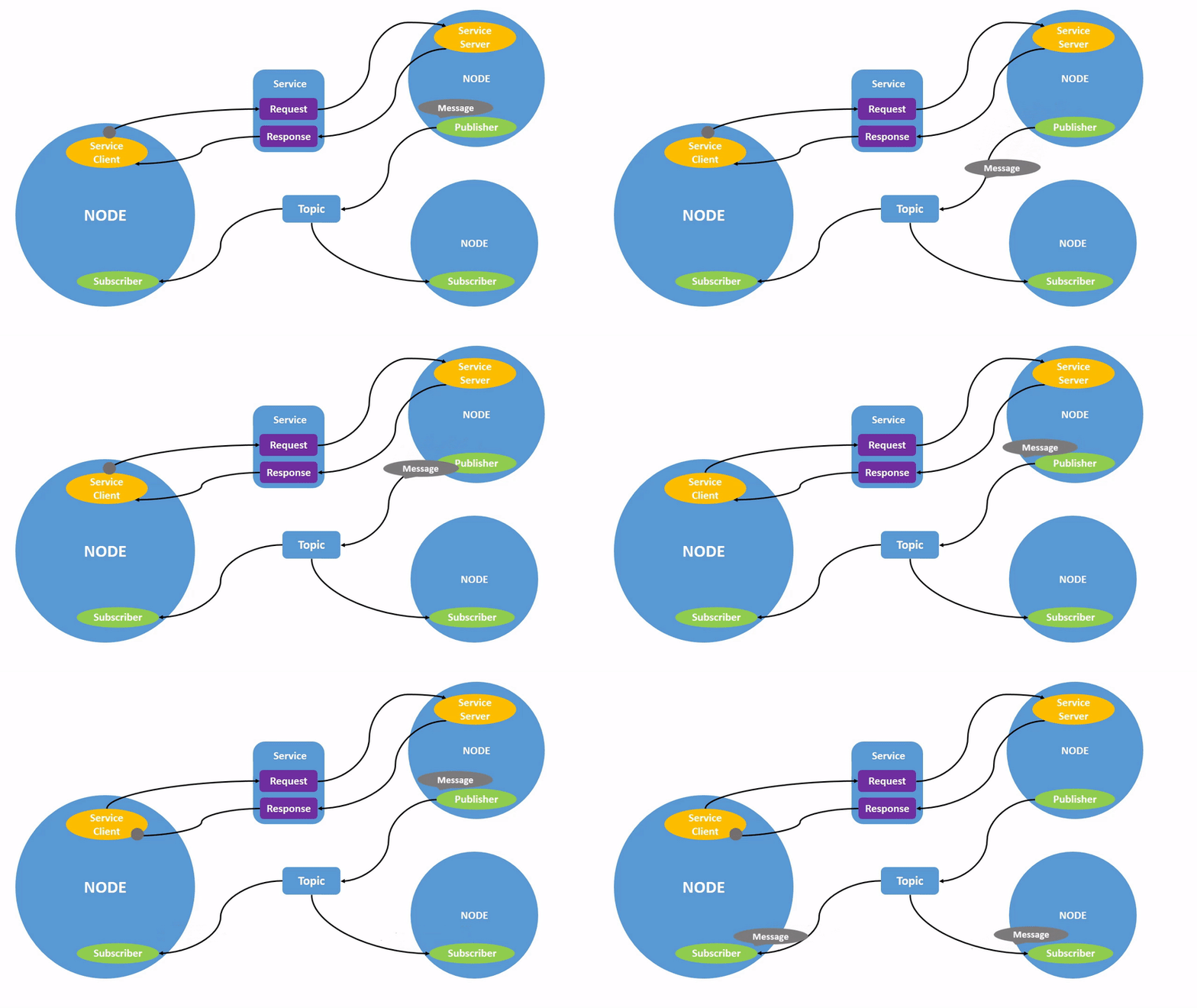
ROS中的每个节点应负责单个模块目的 (例如,一个用于控制车轮电机的节点,一个用于控制激光测距仪的节点等)。每个节点可以通过话题、服务、动作或参数向其他节点发送和接收数据。
比如
lxg@lxg:~/code/ROS2/ros2_humble_src/src/ros2$ ros2 run turtlesim turtlesim_node
[INFO] [1778826303.327602528] [turtlesim]: Starting turtlesim with node name /turtlesim
[INFO] [1778826303.331715999] [turtlesim]: Spawning turtle [turtle1] at x=[5.544445], y=[5.544445], theta=[0.000000]
查看节点信息
lxg@lxg:~$ ros2 node info /turtlesim
/turtlesim
  Subscribers:
    /parameter_events: rcl_interfaces/msg/ParameterEvent
    /turtle1/cmd_vel: geometry_msgs/msg/Twist
  Publishers:
    /parameter_events: rcl_interfaces/msg/ParameterEvent
    /rosout: rcl_interfaces/msg/Log
    /turtle1/color_sensor: turtlesim/msg/Color
    /turtle1/pose: turtlesim/msg/Pose
  Service Servers:
    /clear: std_srvs/srv/Empty
    /kill: turtlesim/srv/Kill
    /reset: std_srvs/srv/Empty
    /spawn: turtlesim/srv/Spawn
    /turtle1/set_pen: turtlesim/srv/SetPen
    /turtle1/teleport_absolute: turtlesim/srv/TeleportAbsolute
    /turtle1/teleport_relative: turtlesim/srv/TeleportRelative
    /turtlesim/describe_parameters: rcl_interfaces/srv/DescribeParameters
    /turtlesim/get_parameter_types: rcl_interfaces/srv/GetParameterTypes
    /turtlesim/get_parameters: rcl_interfaces/srv/GetParameters
    /turtlesim/list_parameters: rcl_interfaces/srv/ListParameters
    /turtlesim/set_parameters: rcl_interfaces/srv/SetParameters
    /turtlesim/set_parameters_atomically: rcl_interfaces/srv/SetParametersAtomically
  Service Clients:

  Action Servers:
    /turtle1/rotate_absolute: turtlesim/action/RotateAbsolute
  Action Clients:
- 每个节点都是独立进程(可在不同机器上运行)
- 节点之间不直接调用函数,所有通信通过 ROS 2 的中间件(DDS)
不同机器运行上的理解
ROS 2 底层用 DDS(Data Distribution Service),节点发现和消息传输是 DDS 的工作。
默认发现机制 = 局域网广播/多播
话题 Topic
查看所有话题
lxg@lxg:~$ ros2 topic list
/parameter_events
/rosout
/turtle1/cmd_vel
/turtle1/color_sensor
/turtle1/pose


lxg@lxg:~$ ros2 topic list -t
/parameter_events [rcl_interfaces/msg/ParameterEvent]
/rosout [rcl_interfaces/msg/Log]
/turtle1/cmd_vel [geometry_msgs/msg/Twist]
/turtle1/color_sensor [turtlesim/msg/Color]
/turtle1/pose [turtlesim/msg/Pose]
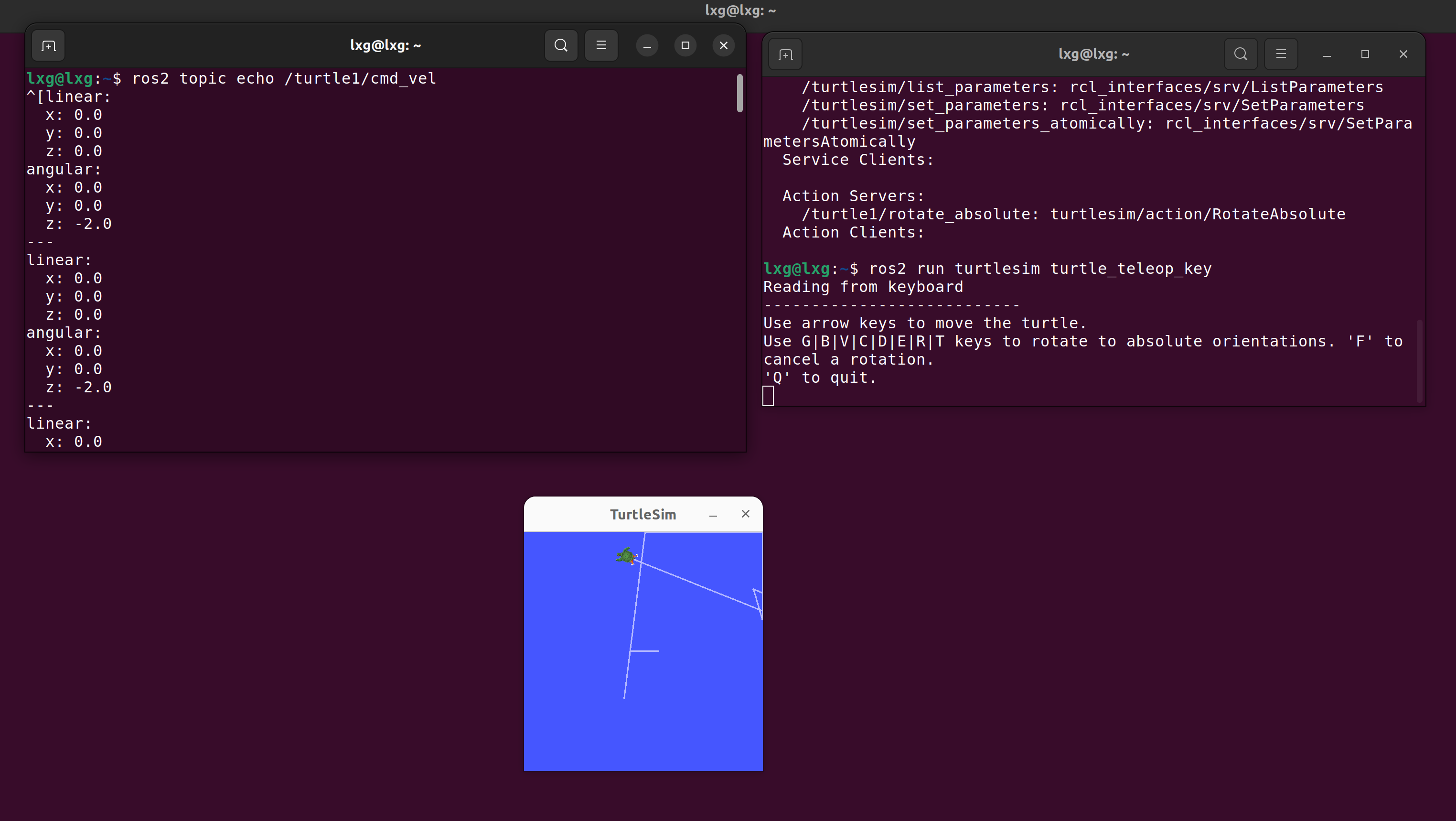
查看正在发布某个话题的数据
ros2 topic echo /turtle1/cmd_vel
查看话题的订阅者和发布者
lxg@lxg:~$ ros2 topic info /turtle1/cmd_vel
Type: geometry_msgs/msg/Twist
Publisher count: 1
Subscription count: 2
了解消息期望的数据结构
lxg@lxg:~$ ros2 interface show geometry_msgs/msg/Twist
# This expresses velocity in free space broken into its linear and angular parts.

Vector3  linear
	float64 x
	float64 y
	float64 z
Vector3  angular
	float64 x
	float64 y
	float64 z

# 比如数据

lxg@lxg:~$ ros2 topic echo /turtle1/cmd_vel
linear:
  x: 0.0
  y: 0.0
  z: 0.0
angular:
  x: 0.0
  y: 0.0
  z: -2.0
模拟消息发布
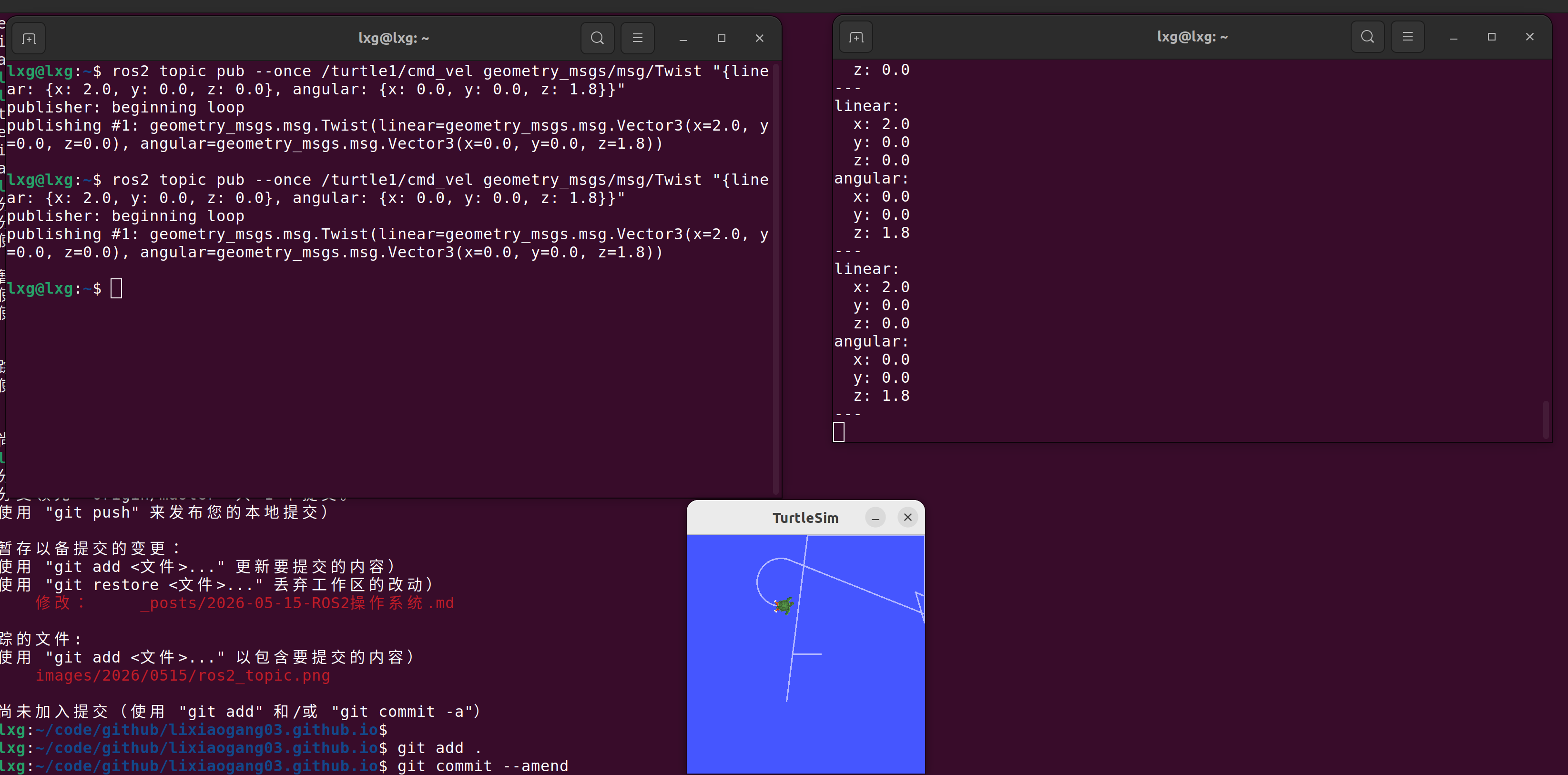
lxg@lxg:~$ ros2 topic pub --once /turtle1/cmd_vel geometry_msgs/msg/Twist "{linear: {x: 2.0, y: 0.0, z: 0.0}, angular: {x: 0.0, y: 0.0, z: 1.8}}"
publisher: beginning loop
publishing #1: geometry_msgs.msg.Twist(linear=geometry_msgs.msg.Vector3(x=2.0, y=0.0, z=0.0), angular=geometry_msgs.msg.Vector3(x=0.0, y=0.0, z=1.8))
对比与MQTT机制的差异
| 特性 | ROS 2 Topic | MQTT |
|---|---|---|
| 通信底层 | DDS(Data Distribution Service) | TCP/IP + Broker |
| 是否中心化 | 去中心化(点对点) | 中心化(Broker 必须存在) |
| QoS | 可配置可靠性(DDS QoS:可靠/不可靠、延迟、历史等) | MQTT QoS 0/1/2(最多一次/至少一次/仅一次) |
| 消息格式 | 任意 ROS 2 消息类型(严格类型) | 通常是字符串/二进制,松散格式 |
| 发现机制 | 自动发现节点(局域网广播 / Multicast) | 需要事先知道 Broker 地址 |
| 延迟 | 低延迟、适合实时控制 | 较高延迟,适合 IoT 数据传输 |
| 安全 | DDS 支持加密和身份验证(SROS2) | TLS / 用户认证,依赖 Broker |
| 分布式部署 | 可跨多台机器直接通信,无需服务器 | 必须通过 Broker 中转消息 |
服务 Service
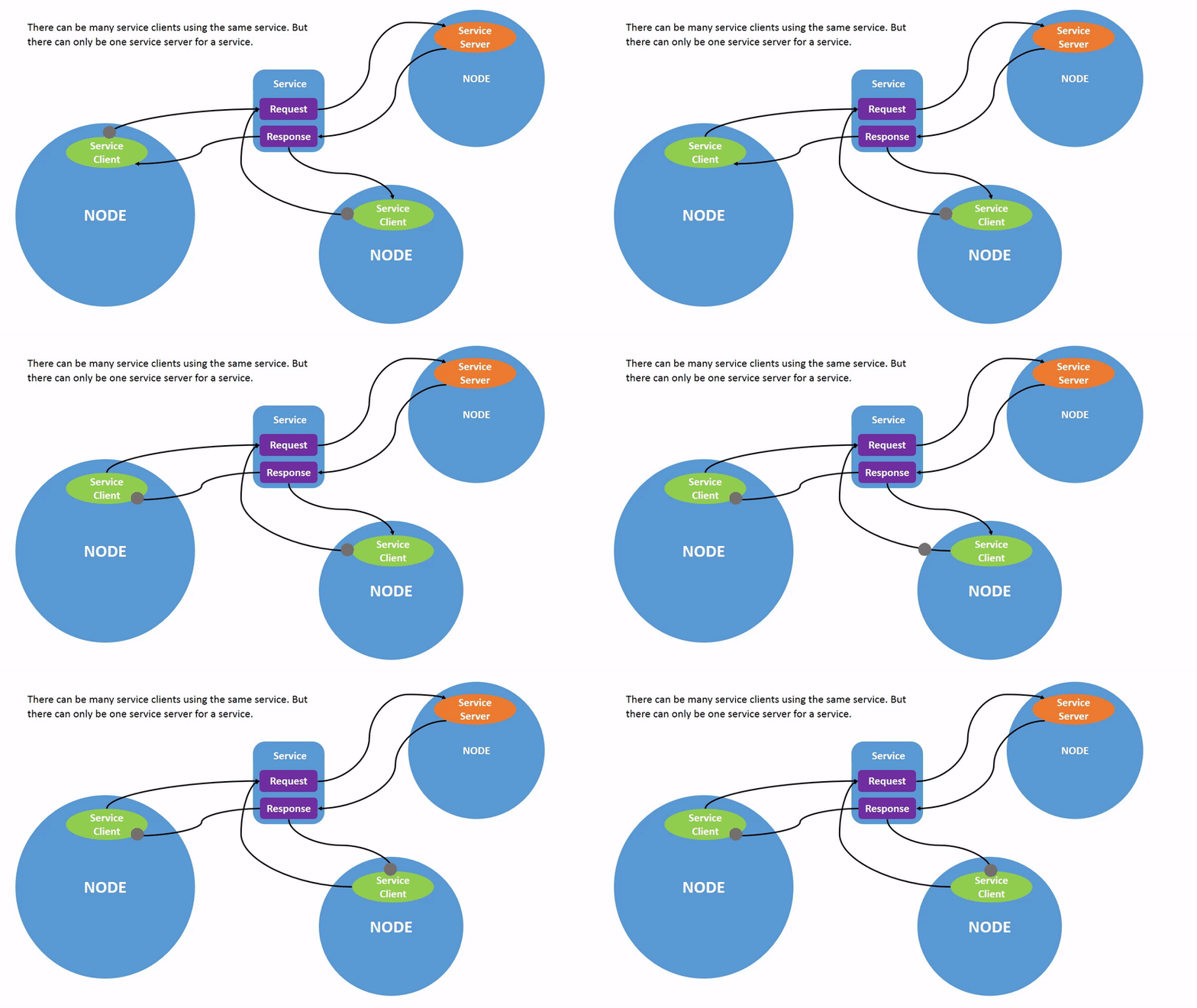
查看系统中的服务列表
ros2 service list
/clear                        # 清空画布(乌龟留下的轨迹)
/kill                         # 杀死(关闭)节点或乌龟
/reset                        # 重置 turtlesim 窗口和乌龟状态

# rqt GUI 节点相关参数服务
/rqt_gui_py_node_30675/describe_parameters        # 描述 rqt 节点的参数信息
/rqt_gui_py_node_30675/get_parameter_types        # 获取 rqt 节点参数类型
/rqt_gui_py_node_30675/get_parameters             # 获取 rqt 节点当前参数值
/rqt_gui_py_node_30675/list_parameters            # 列出 rqt 节点所有参数名
/rqt_gui_py_node_30675/set_parameters             # 设置 rqt 节点参数值
/rqt_gui_py_node_30675/set_parameters_atomically  # 原子方式批量设置参数(一次性修改多个参数)

/spawn                        # 在画布上生成新的乌龟
/teleop_turtle/describe_parameters        # 描述 teleop_turtle 节点参数信息
/teleop_turtle/get_parameter_types        # 获取 teleop_turtle 节点参数类型
/teleop_turtle/get_parameters             # 获取 teleop_turtle 节点当前参数值
/teleop_turtle/list_parameters            # 列出 teleop_turtle 节点所有参数名
/teleop_turtle/set_parameters             # 设置 teleop_turtle 节点参数值
/teleop_turtle/set_parameters_atomically  # 原子方式批量设置参数

/turtle1/set_pen                 # 设置乌龟画笔属性(颜色、粗细、是否画线)
/turtle1/teleport_absolute       # 将乌龟瞬间移动到指定绝对位置(x, y, 角度)
/turtle1/teleport_relative       # 将乌龟相对当前位置移动(dx, dy, dtheta)

# turtlesim 节点本身参数服务
/turtlesim/describe_parameters        # 描述 turtlesim 节点参数信息
/turtlesim/get_parameter_types        # 获取 turtlesim 节点参数类型
/turtlesim/get_parameters             # 获取 turtlesim 节点当前参数值
/turtlesim/list_parameters            # 列出 turtlesim 节点所有参数名
/turtlesim/set_parameters             # 设置 turtlesim 节点参数值
/turtlesim/set_parameters_atomically  # 原子方式批量设置参数
ros2 service listst -t
/clear [std_srvs/srv/Empty]
/kill [turtlesim/srv/Kill]
/reset [std_srvs/srv/Empty]
/rqt_gui_py_node_30675/describe_parameters [rcl_interfaces/srv/DescribeParameters]
/rqt_gui_py_node_30675/get_parameter_types [rcl_interfaces/srv/GetParameterTypes]
/rqt_gui_py_node_30675/get_parameters [rcl_interfaces/srv/GetParameters]
/rqt_gui_py_node_30675/list_parameters [rcl_interfaces/srv/ListParameters]
/rqt_gui_py_node_30675/set_parameters [rcl_interfaces/srv/SetParameters]
/rqt_gui_py_node_30675/set_parameters_atomically [rcl_interfaces/srv/SetParametersAtomically]
/spawn [turtlesim/srv/Spawn]
/teleop_turtle/describe_parameters [rcl_interfaces/srv/DescribeParameters]
/teleop_turtle/get_parameter_types [rcl_interfaces/srv/GetParameterTypes]
/teleop_turtle/get_parameters [rcl_interfaces/srv/GetParameters]
/teleop_turtle/list_parameters [rcl_interfaces/srv/ListParameters]
/teleop_turtle/set_parameters [rcl_interfaces/srv/SetParameters]
/teleop_turtle/set_parameters_atomically [rcl_interfaces/srv/SetParametersAtomically]
/turtle1/set_pen [turtlesim/srv/SetPen]
/turtle1/teleport_absolute [turtlesim/srv/TeleportAbsolute]
/turtle1/teleport_relative [turtlesim/srv/TeleportRelative]
/turtlesim/describe_parameters [rcl_interfaces/srv/DescribeParameters]
/turtlesim/get_parameter_types [rcl_interfaces/srv/GetParameterTypes]
/turtlesim/get_parameters [rcl_interfaces/srv/GetParameters]
/turtlesim/list_parameters [rcl_interfaces/srv/ListParameters]
/turtlesim/set_parameters [rcl_interfaces/srv/SetParameters]
/turtlesim/set_parameters_atomically [rcl_interfaces/srv/SetParametersAtomically]
| 组件 | 说明 |
|---|---|
| Service Server(服务端) | 提供服务的节点,实现具体逻辑 |
| Service Client(客户端) | 调用服务的节点,发起请求 |
| Request 消息类型 | 客户端发送的请求数据类型 |
| Response 消息类型 | 服务端返回的响应数据类型 |
清空画布
lxg@lxg:~$ ros2 service call /clear std_srvs/srv/Empty
waiting for service to become available...
requester: making request: std_srvs.srv.Empty_Request()

response:
std_srvs.srv.Empty_Response()
- /clear 是服务名
- std_srvs/srv/Empty 表示请求和响应都为空
- 客户端调用 → turtlesim 节点清空画布 → 响应完成
生成新乌龟
lxg@lxg:~$ ros2 service call /spawn turtlesim/srv/Spawn "{x: 5.0, y: 5.0, theta: 0.0, name: 'turtle2'}"
requester: making request: turtlesim.srv.Spawn_Request(x=5.0, y=5.0, theta=0.0, name='turtle2')

response:
turtlesim.srv.Spawn_Response(name='turtle2')
- /spawn 是服务
- 请求数据类型有 x, y, 角度、名字
- 响应返回新生成乌龟的名字
| 命令 | 作用 |
|---|---|
ros2 service list |
列出当前可用服务 |
ros2 service type <srv> |
查看服务消息类型 |
ros2 service call <srv> |
调用服务 |
参数
查看参数列表
lxg@lxg:~$ ros2 param list
/rqt_gui_py_node_30675:
  use_sim_time
/teleop_turtle:
  qos_overrides./parameter_events.publisher.depth
  qos_overrides./parameter_events.publisher.durability
  qos_overrides./parameter_events.publisher.history
  qos_overrides./parameter_events.publisher.reliability
  scale_angular
  scale_linear
  use_sim_time
/turtlesim:
  background_b
  background_g
  background_r
  qos_overrides./parameter_events.publisher.depth
  qos_overrides./parameter_events.publisher.durability
  qos_overrides./parameter_events.publisher.history
  qos_overrides./parameter_events.publisher.reliability
  use_sim_time
获取参数
lxg@lxg:~$ ros2 param get /turtlesim background_g
Integer value is: 86
现在知道 background_g 有一个整数值
保存当前参数
lxg@lxg:~$ ros2 param dump /turtlesim
/turtlesim:
  ros__parameters:
    background_b: 255
    background_g: 86
    background_r: 69
    qos_overrides:
      /parameter_events:
        publisher:
          depth: 1000
          durability: volatile
          history: keep_last
          reliability: reliable
    use_sim_time: false
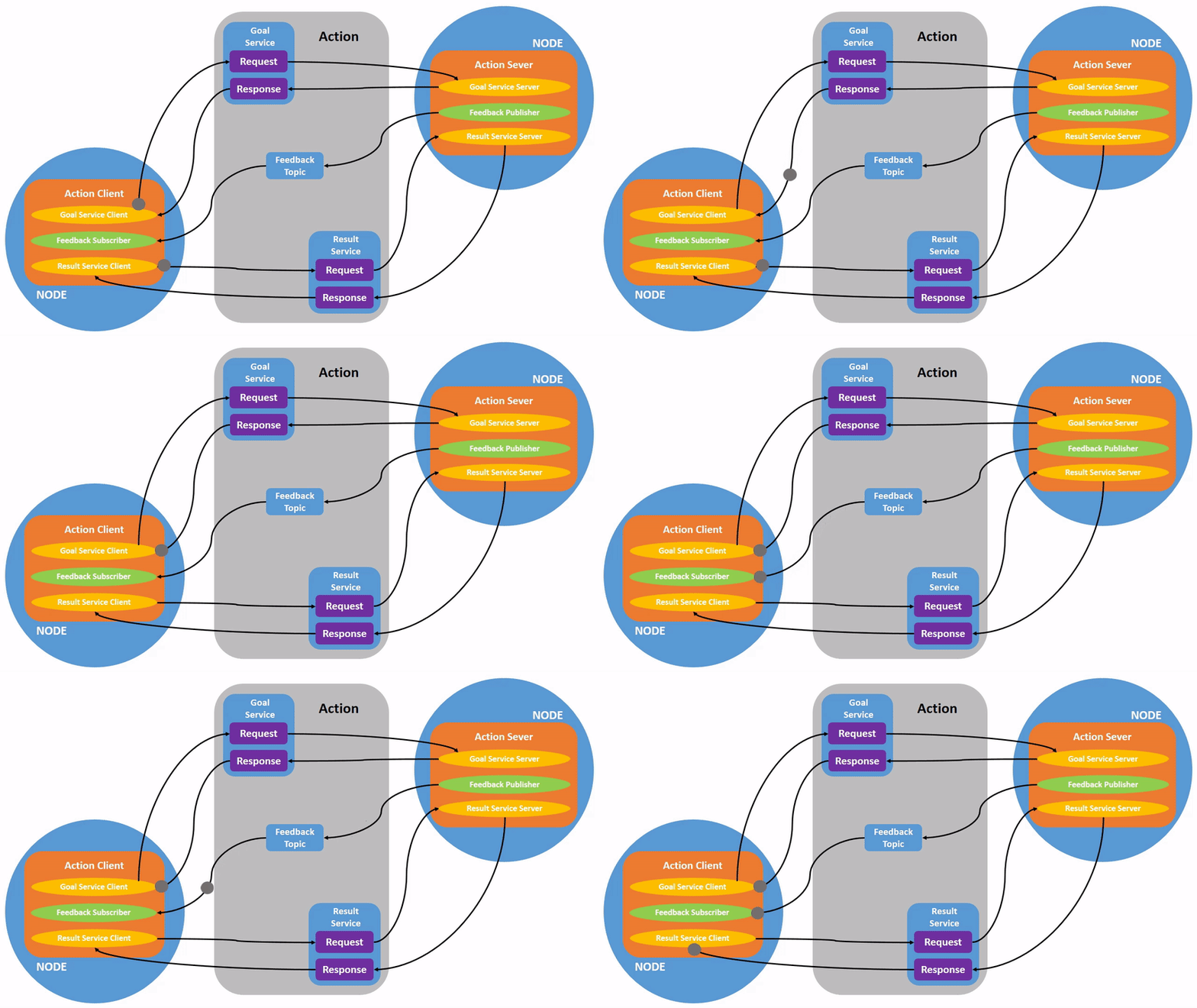
动作
查看动作信息
lxg@lxg:~$ ros2 action list -t
/turtle1/rotate_absolute [turtlesim/action/RotateAbsolute]
/turtle2/rotate_absolute [turtlesim/action/RotateAbsolute]

lxg@lxg:~$ ros2 action info /turtle1/rotate_absolute
Action: /turtle1/rotate_absolute
Action clients: 1
    /teleop_turtle
Action servers: 1
    /turtlesim

lxg@lxg:~$ ros2 interface show turtlesim/action/RotateAbsolute
# The desired heading in radians
float32 theta
---
# The angular displacement in radians to the starting position
float32 delta
---
# The remaining rotation in radians
float32 remaining
发送旋转Action
lxg@lxg:~$ ros2 action send_goal /turtle1/rotate_absolute turtlesim/action/RotateAbsolute "{theta: 1.8}"
Waiting for an action server to become available...
Sending goal:
     theta: 1.8

Goal accepted with ID: cc8f070ce2cc4b3391d433e7e83b4ea9

Result:
    delta: -0.23999999463558197

Goal finished with status: SUCCEEDED
feedback
lxg@lxg:~$ ros2 action send_goal /turtle1/rotate_absolute turtlesim/action/RotateAbsolute "{theta: -1.8}" --feedback
Waiting for an action server to become available...
Sending goal:
     theta: -1.8

Goal accepted with ID: d0fa8c0292ce4b28864deedcf3bdea17

Feedback:
    remaining: -0.21989500522613525

Feedback:
    remaining: -0.20389509201049805

Feedback:
    remaining: -0.1878950595855713

Feedback:
    remaining: -0.17189502716064453

Feedback:
    remaining: -0.15589499473571777

Feedback:
    remaining: -0.13989508152008057

Feedback:
    remaining: -0.12389504909515381

Feedback:
    remaining: -0.10789501667022705

Feedback:
    remaining: -0.09189510345458984

Feedback:
    remaining: -0.07589507102966309

Feedback:
    remaining: -0.05989503860473633

Feedback:
    remaining: -0.04389500617980957

Feedback:
    remaining: -0.027895092964172363

Feedback:
    remaining: -0.011895060539245605

Result:
    delta: 0.20800000429153442

Goal finished with status: SUCCEEDED
Action = 长时间操作的异步任务管理机制
- 支持异步:客户端发起任务后可以继续做别的事情
- 支持反馈:随时知道任务进度
- 支持取消:任务执行中可中止
使用场景:
- 移动机器人去某个目标
- 机械臂执行抓取任务
- 复杂计算或仿真过程
rqt_控制台
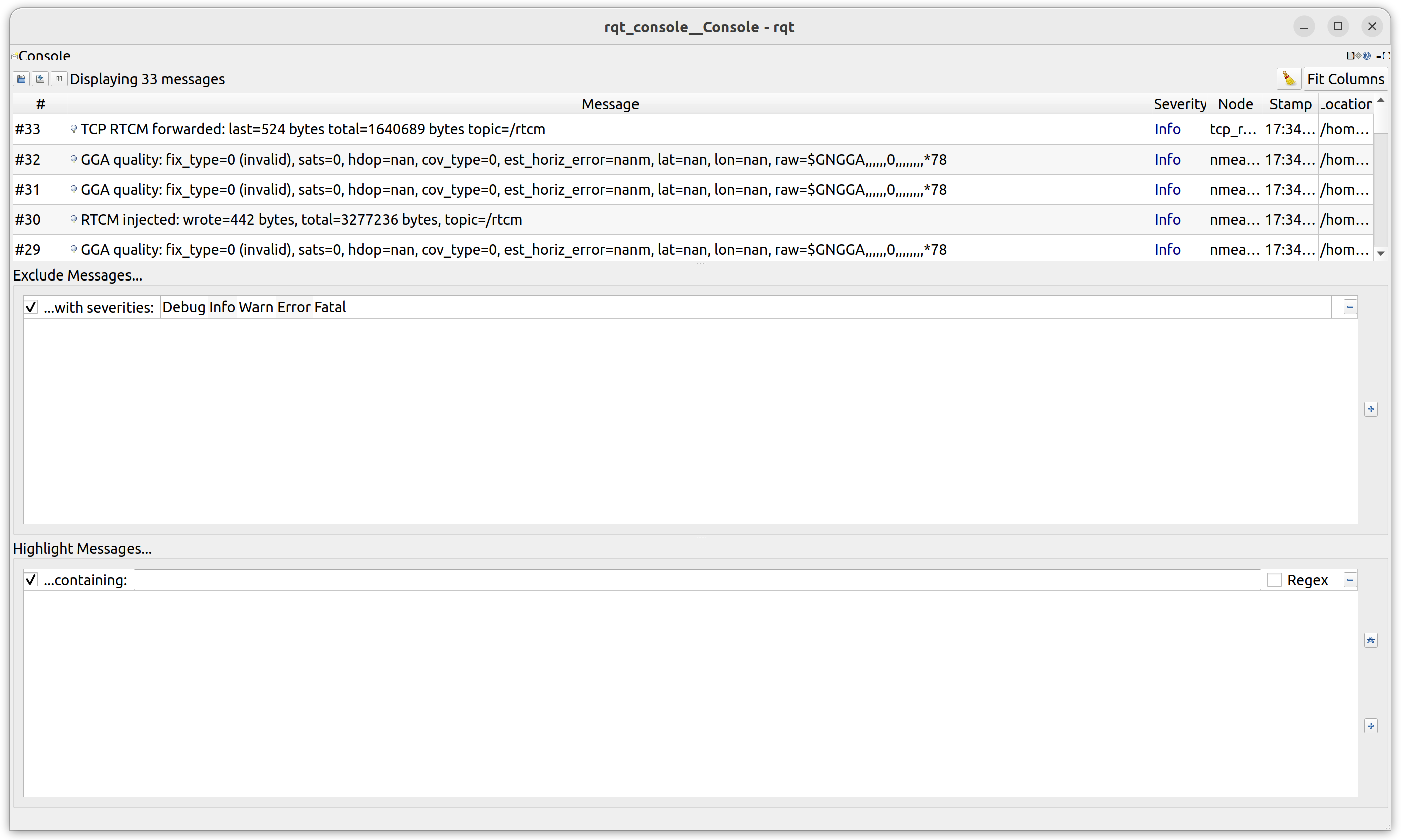
ROS 版的“系统日志 + 调试控制台 + 过滤器”
┌────────────────────────────┐
│ Log Viewer(日志列表)     │
├────────────────────────────┤
│ Filters(过滤器区域)⭐     │
├────────────────────────────┤
│ Logger Level(日志等级)    │
└────────────────────────────┘
launch
/opt/ros/humble/share/turtlesim/launch/multisim.launch.py
from launch import LaunchDescription
import launch_ros.actions

def generate_launch_description():
    return LaunchDescription([
        launch_ros.actions.Node(
            namespace= "turtlesim1", package='turtlesim', executable='turtlesim_node', output='screen'),
        launch_ros.actions.Node(
            namespace= "turtlesim2", package='turtlesim', executable='turtlesim_node', output='screen'),
    ])
运行此launch脚本
lxg@lxg:~/code$ ros2 launch turtlesim multisim.launch.py
[INFO] [launch]: All log files can be found below /home/lxg/.ros/log/2026-05-20-10-16-46-678238-lxg-22465
[INFO] [launch]: Default logging verbosity is set to INFO
[INFO] [turtlesim_node-1]: process started with pid [22466]
[INFO] [turtlesim_node-2]: process started with pid [22468]
[turtlesim_node-1] [INFO] [1779243406.798682692] [turtlesim1.turtlesim]: Starting turtlesim with node name /turtlesim1/turtlesim
[turtlesim_node-2] [INFO] [1779243406.800051012] [turtlesim2.turtlesim]: Starting turtlesim with node name /turtlesim2/turtlesim
[turtlesim_node-1] [INFO] [1779243406.802196952] [turtlesim1.turtlesim]: Spawning turtle [turtle1] at x=[5.544445], y=[5.544445], theta=[0.000000]
[turtlesim_node-2] [INFO] [1779243406.803346524] [turtlesim2.turtlesim]: Spawning turtle [turtle1] at x=[5.544445], y=[5.544445], theta=[0.000000]
记录和回放数据
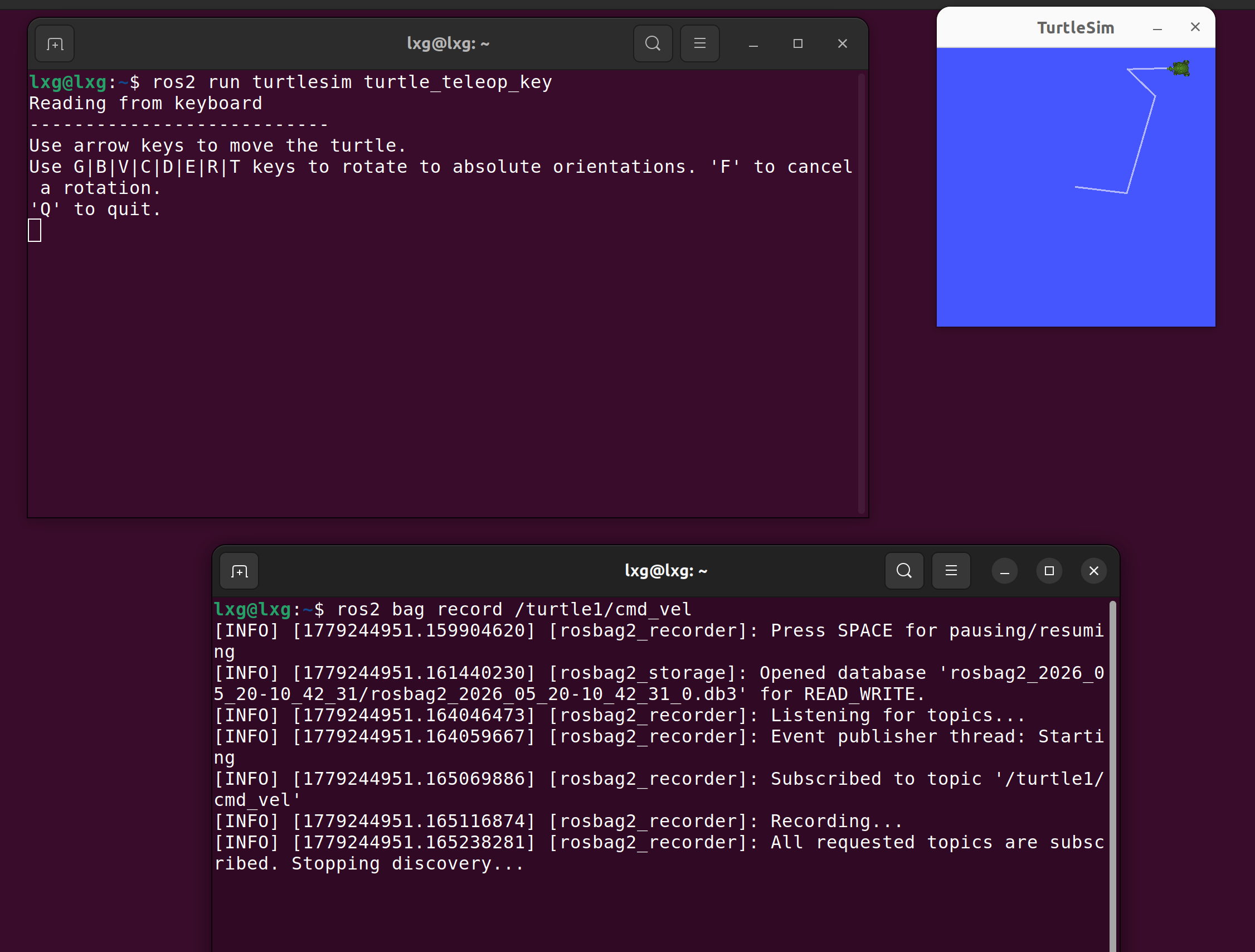
记录数据
lxg@lxg:~$ ros2 bag record /turtle1/cmd_vel
[INFO] [1779244951.159904620] [rosbag2_recorder]: Press SPACE for pausing/resuming
[INFO] [1779244951.161440230] [rosbag2_storage]: Opened database 'rosbag2_2026_05_20-10_42_31/rosbag2_2026_05_20-10_42_31_0.db3' for READ_WRITE.
[INFO] [1779244951.164046473] [rosbag2_recorder]: Listening for topics...
[INFO] [1779244951.164059667] [rosbag2_recorder]: Event publisher thread: Starting
[INFO] [1779244951.165069886] [rosbag2_recorder]: Subscribed to topic '/turtle1/cmd_vel'
[INFO] [1779244951.165116874] [rosbag2_recorder]: Recording...
[INFO] [1779244951.165238281] [rosbag2_recorder]: All requested topics are subscribed. Stopping discovery...
[INFO] [1779245110.346958634] [rosbag2_cpp]: Writing remaining messages from cache to the bag. It may take a while
[INFO] [1779245110.347670065] [rosbag2_recorder]: Event publisher thread: Exiting
[INFO] [1779245110.347746548] [rosbag2_recorder]: Recording stopped
流程
ROS节点运行
      ↓
Topic发布数据
      ↓
ros2 bag record
      ↓
保存到 .db3 数据库
      ↓
ros2 bag info
      ↓
查看数据内容
      ↓
ros2 bag play
      ↓
重新播放
ROS 包
创建包
lxg@lxg:~/code/ROS2/workspace/demo/src$ ros2 pkg create --build-type ament_cmake --node-name my_node my_package

lxg@lxg:~/code/ROS2/workspace/demo/src$ tree
.
└── my_package
    ├── CMakeLists.txt
    ├── include
    │   └── my_package
    ├── package.xml
    └── src
        └── my_node.cpp

4 directories, 3 files
构建包
lxg@lxg:~/code/ROS2/workspace/demo$ colcon build
Starting >>> my_package
Finished <<< my_package [0.30s]

Summary: 1 package finished [0.51s]


lxg@lxg:~/code/ROS2/workspace/demo$ tree -L 2
.
├── build
│   ├── COLCON_IGNORE
│   └── my_package
├── install
│   ├── COLCON_IGNORE
│   ├── local_setup.bash
│   ├── local_setup.ps1
│   ├── local_setup.sh
│   ├── _local_setup_util_ps1.py
│   ├── _local_setup_util_sh.py
│   ├── local_setup.zsh
│   ├── my_package
│   ├── setup.bash
│   ├── setup.ps1
│   ├── setup.sh
│   └── setup.zsh
├── log
│   ├── build_2026-05-21_14-03-15
│   ├── build_2026-05-21_14-05-41
│   ├── build_2026-05-21_14-05-53
│   ├── COLCON_IGNORE
│   ├── latest -> latest_build
│   └── latest_build -> build_2026-05-21_14-05-53
└── src
    └── my_package

12 directories, 13 files
清理上次构建结果
lxg@lxg:~/code/ROS2/workspace/demo$ pip install colcon-clean

# 清理整个工作区
lxg@lxg:~/code/ROS2/workspace/demo$ colcon clean workspace

lxg@lxg:~/code/ROS2/workspace/demo$ colcon clean packages --packages-select cpp_pubsub py_pubsub
并为主ROS 2安装源文件
把 ROS2 环境变量加载到当前终端里,让终端知道有哪些包、节点、库和命令可以用
lxg@lxg:~/code/ROS2/workspace/demo$ . install/setup.bash
lxg@lxg:~/code/ROS2/workspace/demo$ ros2 pkg list | grep my_
dummy_map_server
dummy_robot_bringup
dummy_sensors
my_package

lxg@lxg:~/code/ROS2/workspace/demo$ ros2 run my_package my_node
hello world my_package package
编写简单的发布者和订阅者
发布者
// Copyright 2016 Open Source Robotics Foundation, Inc.
//
// Licensed under the Apache License, Version 2.0 (the "License");
// you may not use this file except in compliance with the License.
// You may obtain a copy of the License at
//
//     http://www.apache.org/licenses/LICENSE-2.0
//
// Unless required by applicable law or agreed to in writing, software
// distributed under the License is distributed on an "AS IS" BASIS,
// WITHOUT WARRANTIES OR CONDITIONS OF ANY KIND, either express or implied.
// See the License for the specific language governing permissions and
// limitations under the License.

#include <chrono>
#include <memory>

#include "rclcpp/rclcpp.hpp"
#include "std_msgs/msg/string.hpp"

using namespace std::chrono_literals;

/* 这个例子创建了一个 Node 的子类,并使用 std::bind() 注册了一个
 * 成员函数作为定时器的回调函数。 */

class MinimalPublisher : public rclcpp::Node
{
public:
  MinimalPublisher()
  : Node("minimal_publisher"), count_(0)
  {
    // 创建一个发布者,话题名为 "topic",队列长度为 10
    publisher_ = this->create_publisher<std_msgs::msg::String>("topic", 10);
    // 创建一个定时器,每 500ms 调用一次 timer_callback
    timer_ = this->create_wall_timer(
      500ms, std::bind(&MinimalPublisher::timer_callback, this));
  }

private:
  void timer_callback()
  {
    // 创建一个 String 类型的消息
    auto message = std_msgs::msg::String();
    message.data = "Hello, world! " + std::to_string(count_++);
    // 使用 RCLCPP_INFO 打印日志
    RCLCPP_INFO(this->get_logger(), "Publishing: '%s'", message.data.c_str());
    // 发布消息
    publisher_->publish(message);
  }
  // 定时器和发布者的智能指针,以及计数器
  rclcpp::TimerBase::SharedPtr timer_;
  rclcpp::Publisher<std_msgs::msg::String>::SharedPtr publisher_;
  size_t count_;
};

int main(int argc, char * argv[])
{
  // 初始化 ROS 2
  rclcpp::init(argc, argv);
  // 开始运行节点
  rclcpp::spin(std::make_shared<MinimalPublisher>());
  // 关闭 ROS 2
  rclcpp::shutdown();
  return 0;
}
订阅者
// Copyright 2016 Open Source Robotics Foundation, Inc.
//
// Licensed under the Apache License, Version 2.0 (the "License");
// you may not use this file except in compliance with the License.
// You may obtain a copy of the License at
//
//     http://www.apache.org/licenses/LICENSE-2.0
//
// Unless required by applicable law or agreed to in writing, software
// distributed under the License is distributed on an "AS IS" BASIS,
// WITHOUT WARRANTIES OR CONDITIONS OF ANY KIND, either express or implied.
// See the License for the specific language governing permissions and
// limitations under the License.

// 文件说明:
// 这是一个最小的 ROS2 C++ 订阅者示例,演示如何使用 rclcpp 创建节点、
// 订阅话题并在回调中处理接收到的 `std_msgs::msg::String` 消息。
// 运行此节点后,它会订阅名为 "topic" 的话题,并在接收到消息时打印消息内容。

#include <memory>

#include "rclcpp/rclcpp.hpp"
#include "std_msgs/msg/string.hpp"
// 使用占位符 `_1` 便于在绑定成员函数回调时指定第一个参数位置
using std::placeholders::_1;

// `MinimalSubscriber` 节点:
// 继承自 `rclcpp::Node`,在构造函数中创建对名为 "topic" 的话题的订阅。
class MinimalSubscriber : public rclcpp::Node
{
public:
  MinimalSubscriber()
  : Node("minimal_subscriber")
  {
    // 创建订阅:模板参数为消息类型 `std_msgs::msg::String`
    // 第一个参数:话题名称("topic")
    // 第二个参数:队列深度/历史(10)
    // 第三个参数:回调函数,通过 `std::bind` 绑定成员函数
    subscription_ = this->create_subscription<std_msgs::msg::String>(
      "topic", 10, std::bind(&MinimalSubscriber::topic_callback, this, _1));
  }

private:
  // 当订阅到消息时会调用此回调函数
  // `msg` 为接收到的 `std_msgs::msg::String` 类型消息的共享指针
  void topic_callback(const std_msgs::msg::String::SharedPtr msg) const
  {
    // 将接收到的字符串内容打印到日志
    RCLCPP_INFO(this->get_logger(), "I heard: '%s'", msg->data.c_str());
  }
  // 订阅对象的智能指针,保存订阅句柄以确保订阅在对象生命周期内有效
  rclcpp::Subscription<std_msgs::msg::String>::SharedPtr subscription_;
};

int main(int argc, char * argv[])
{
  // 初始化 ROS 2 客户端库
  rclcpp::init(argc, argv);
  // 创建节点实例并进入事件循环(spin),直到收到退出信号
  rclcpp::spin(std::make_shared<MinimalSubscriber>());
  // 关闭并释放 ROS 2 资源
  rclcpp::shutdown();
  return 0;
}
编译
lxg@lxg:~/code/ROS2/workspace/demo$ colcon build --packages-select cpp_pubsub
Starting >>> cpp_pubsub
Finished <<< cpp_pubsub [5.82s]

Summary: 1 package finished [6.06s]
运行
lxg@lxg:~/code/ROS2/workspace/demo$ ros2 run cpp_pubsub talker
[INFO] [1779515600.899402768] [minimal_publisher]: Publishing: 'Hello, world! 0'
[INFO] [1779515601.399743017] [minimal_publisher]: Publishing: 'Hello, world! 1'
[INFO] [1779515601.899302197] [minimal_publisher]: Publishing: 'Hello, world! 2'
[INFO] [1779515602.399235189] [minimal_publisher]: Publishing: 'Hello, world! 3'
[INFO] [1779515602.899153936] [minimal_publisher]: Publishing: 'Hello, world! 4'
[INFO] [1779515603.399082279] [minimal_publisher]: Publishing: 'Hello, world! 5'
[INFO] [1779515603.899026368] [minimal_publisher]: Publishing: 'Hello, world! 6'
[INFO] [1779515604.398919740] [minimal_publisher]: Publishing: 'Hello, world! 7'

lxg@lxg:~/code/ROS2/workspace/demo$ . install/setup.sh
lxg@lxg:~/code/ROS2/workspace/demo$ ros2 run cpp_pubsub listener
[INFO] [1779515641.894192802] [minimal_subscriber]: I heard: 'Hello, world! 82'
[INFO] [1779515642.394169017] [minimal_subscriber]: I heard: 'Hello, world! 83'
[INFO] [1779515642.894011440] [minimal_subscriber]: I heard: 'Hello, world! 84'
[INFO] [1779515643.394162922] [minimal_subscriber]: I heard: 'Hello, world! 85'
[INFO] [1779515643.893860575] [minimal_subscriber]: I heard: 'Hello, world! 86'
[INFO] [1779515644.393901193] [minimal_subscriber]: I heard: 'Hello, world! 87'
[INFO] [1779515644.893725074] [minimal_subscriber]: I heard: 'Hello, world! 88'
[INFO] [1779515645.393865065] [minimal_subscriber]: I heard: 'Hello, world! 89'
ROS2 多语言框架
| 对比项 | C++ | Python |
|---|---|---|
| ROS2 客户端库 | rclcpp |
rclpy |
| 性能 | 高 | 较低 |
| 实时性 | 更好 | 一般 |
| 开发速度 | 较慢 | 很快 |
| 调试难度 | 较高 | 较低 |
| 适合场景 | 驱动、控制、算法、嵌入式 | 逻辑、AI、脚本、快速验证 |
| 部署资源 | 更省 | 较大 |
| 工业项目使用 | 很多 | 通常配合使用 |
例如机器人项目:
相机驱动        ---> C++
雷达驱动        ---> C++
运动控制        ---> C++
YOLO检测        ---> Python
路径规划        ---> C++
数据记录脚本     ---> Python