ROS2 命令
查看所有话题命令
lxg@lxg:~/code/xt/gitlab/ros2_learn_ws$ ros2 topic list
/clock                       仿真时间
/cmd_vel                     速度控制指令
/joint_states                diff-drive 车就是左右轮速度
/odom                        里程计(轮速积分 / VIO / LIO)
/parameter_events            参数动态更新事件(ROS2 特性)
/robot_description           URDF/Xacro 模型
/rosout                      日志
/scan                        2D 激光雷达(LaserScan)
/tf
/tf_static
查看某个 topic 内容
ros2 topic echo /odom

lxg@lxg:~/code/xt/gitlab/ros2_learn_ws$ ros2 topic echo /odom --once
header:
  stamp:
    sec: 1349
    nanosec: 528000000
  frame_id: odom
child_frame_id: base_link
pose:
  pose:
    position:
      x: -2.4061772566193e-16
      y: 3.439324033025337e-20
      z: 0.0
    orientation:
      x: 1.8564213169799222e-16
      y: 1.8418753201651656e-10
      z: 4.2665331719987095e-19
      w: 1.0
  covariance:
  - 0.0
  - 0.0
  - - -
  - 0.0
  - 0.0
twist:
  twist:
    linear:
      x: 0.0
      y: 0.0
      z: 0.0
    angular:
      x: 0.0
      y: 0.0
      z: 0.0
  covariance:
  - 0.0
  - 0.0
  - 0.0
  - - -
  - 0.0
---
查看topic类型
lxg@lxg:~/code/xt/gitlab/ros2_learn_ws$ ros2 topic type /scan
sensor_msgs/msg/LaserScan
查看 topic 发布频率
lxg@lxg:~/code/xt/gitlab/ros2_learn_ws$ ros2 topic hz /scan
average rate: 10.003
	min: 0.100s max: 0.100s std dev: 0.00015s window: 12
average rate: 10.000
	min: 0.100s max: 0.101s std dev: 0.00020s window: 22
average rate: 10.001
	min: 0.099s max: 0.101s std dev: 0.00038s window: 33
average rate: 10.000
	min: 0.099s max: 0.101s std dev: 0.00036s window: 44
查看 topic 带宽(调网络问题)
lxg@lxg:~/code/xt/gitlab/ros2_learn_ws$ ros2 topic bw /scan
WARNING: topic [/scan] does not appear to be published yet
Subscribed to [/scan]
29.59 KB/s from 10 messages
	Message size mean: 2.94 KB min: 2.94 KB max: 2.94 KB
29.52 KB/s from 20 messages
	Message size mean: 2.94 KB min: 2.94 KB max: 2.94 KB
29.49 KB/s from 30 messages
	Message size mean: 2.94 KB min: 2.94 KB max: 2.94 KB
29.48 KB/s from 40 messages
查看TF树
ros2 run tf2_tools view_frames

odom
  └── base_link (rate: 29.6 Hz, 缓冲: 5.0秒)
        ├── gps (rate: 10000 Hz, 无有效数据)
        ├── rear_gps (rate: 10000 Hz, 无有效数据)
        ├── lidar_left (rate: 10000 Hz, 无有效数据)
        ├── lidar_right (rate: 10000 Hz, 无有效数据)
        ├── lidar_link (rate: 10000 Hz, 无有效数据)
        ├── front_left_wheel_steer_link
        │     ├── front_left_wheel_link (rate: 10000 Hz, 无有效数据)
        │     └── front_left_wheel_motor_link (rate: 10000 Hz, 无有效数据)
        ├── front_right_wheel_steer_link
        │     ├── front_right_wheel_link (rate: 10000 Hz, 无有效数据)
        │     └── front_right_wheel_motor_link (rate: 10000 Hz, 无有效数据)
        ├── rear_left_wheel_steer_link
        │     ├── rear_left_wheel_link (rate: 10000 Hz, 无有效数据)
        │     └── rear_left_wheel_motor_link (rate: 10000 Hz, 无有效数据)
        └── rear_right_wheel_steer_link
              ├── rear_right_wheel_link (rate: 10000 Hz, 无有效数据)
              └── rear_right_wheel_motor_link (rate: 10000 Hz, 无有效数据)
查看所有节点命令
lxg@lxg:~/code/xt/gitlab/ros2_learn_ws$ ros2 node list
/robot_state_publisher
/ros_gz_bridge
查看单个节点信息命令
lxg@lxg:~/code/xt/gitlab/ros2_learn_ws$ ros2 node info /robot_state_publisher
/robot_state_publisher
  Subscribers:
    /clock: rosgraph_msgs/msg/Clock
    /joint_states: sensor_msgs/msg/JointState
    /parameter_events: rcl_interfaces/msg/ParameterEvent
  Publishers:
    /parameter_events: rcl_interfaces/msg/ParameterEvent
    /robot_description: std_msgs/msg/String
    /rosout: rcl_interfaces/msg/Log
    /tf: tf2_msgs/msg/TFMessage
    /tf_static: tf2_msgs/msg/TFMessage
  Service Servers:
    /robot_state_publisher/describe_parameters: rcl_interfaces/srv/DescribeParameters
    /robot_state_publisher/get_parameter_types: rcl_interfaces/srv/GetParameterTypes
    /robot_state_publisher/get_parameters: rcl_interfaces/srv/GetParameters
    /robot_state_publisher/list_parameters: rcl_interfaces/srv/ListParameters
    /robot_state_publisher/set_parameters: rcl_interfaces/srv/SetParameters
    /robot_state_publisher/set_parameters_atomically: rcl_interfaces/srv/SetParametersAtomically
  Service Clients:

  Action Servers:

  Action Clients:
查看节点通信关系图
rqt_graph
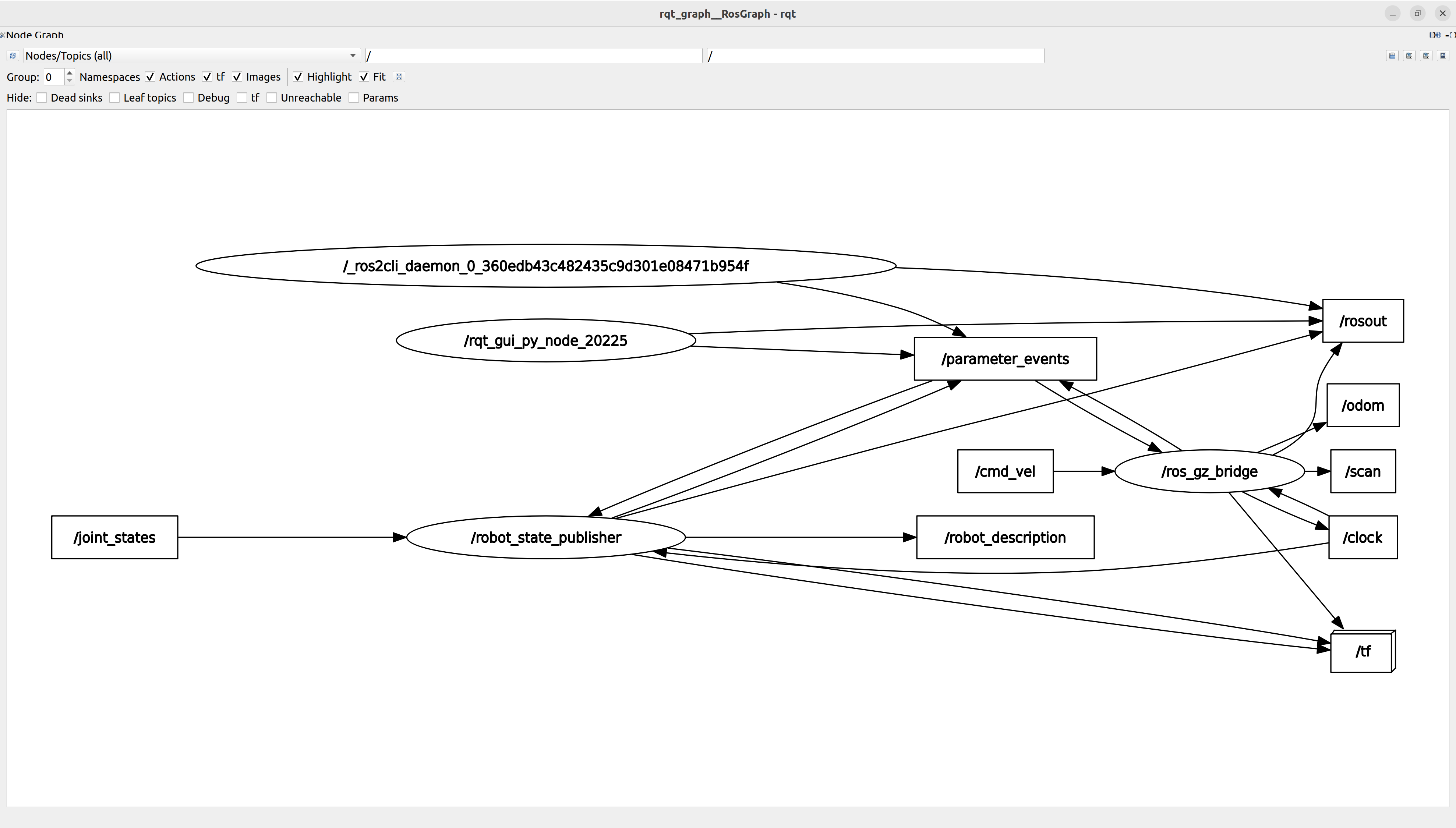
| 图形 | 含义 |
|---|---|
| 🟠 椭圆(oval) | Node(节点) |
| ⬛ 矩形(rectangle) | Topic(话题) |
| → 箭头 | 数据流方向 |
📌 规则一句话:
Node → Topic = 发布(publish) Topic → Node = 订阅(subscribe)
仿真脚本
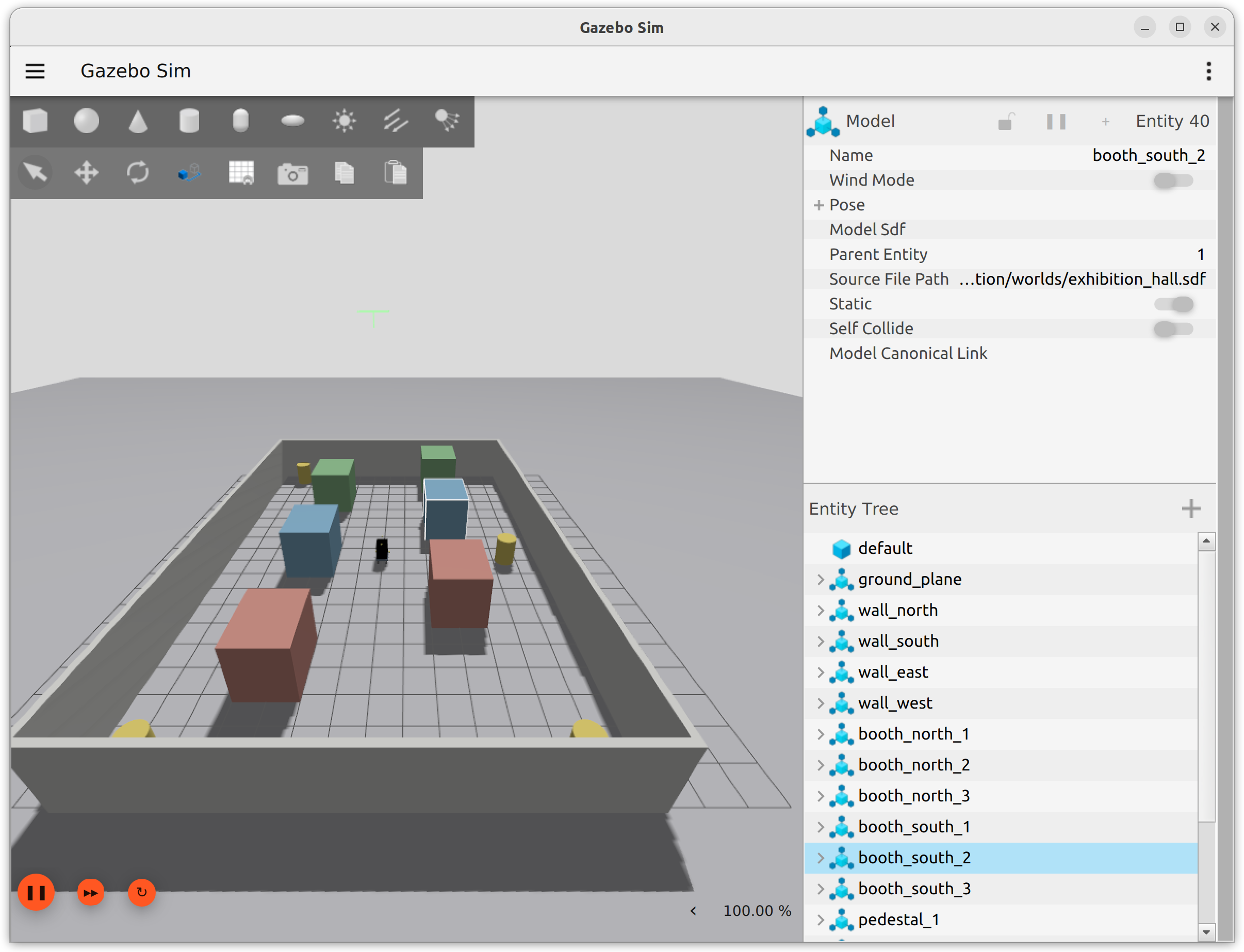
def _launch_setup(context, *, description_share):
    """启动设置主函数 —— 由 OpaqueFunction 在 launch 阶段回调执行。

    本函数负责:
      1. 从 launch 参数中读取配置文件和坐标信息
      2. 加载 YAML 配置并转换为 xacro 变量映射
      3. 使用 xacro 处理 URDF 宏定义文件,生成最终的机器人描述
      4. 裁剪掉仿真中不需要的相机子树
      5. 创建并返回三个核心节点:
         - robot_state_publisher:发布机器人 TF 和关节状态
         - ros_gz_sim create:在 Gazebo 中生成机器人实体
         - ros_gz_bridge:桥接 ROS 2 与 Gazebo 的 topic

    Args:
        context: Launch 上下文,用于解析 LaunchConfiguration。
        description_share: description 功能包的共享目录路径。
    """
    # ------------------------------------------------------------------
    # 1. 路径构造:指向仿真专用的 xacro 宏文件
    # ------------------------------------------------------------------
    xacro_path = os.path.join(description_share, "urdf", "omni_base_sim.urdf.xacro")

    # ------------------------------------------------------------------
    # 2. 解析所有运行时 launch 参数(用户在命令行传入的覆盖值)
    # ------------------------------------------------------------------
    config_file = LaunchConfiguration("config_file").perform(context)       # 车身几何配置 YAML
    robot_name = LaunchConfiguration("robot_name").perform(context)          # Gazebo 中的机器人名称
    spawn_x = LaunchConfiguration("x").perform(context)                      # 初始位置 X (m)
    spawn_y = LaunchConfiguration("y").perform(context)                      # 初始位置 Y (m)
    spawn_yaw = LaunchConfiguration("yaw").perform(context)                  # 初始朝向 (rad)
    bridge_config_file = LaunchConfiguration("bridge_config_file").perform(context)  # 桥接 topic 映射配置

    # ------------------------------------------------------------------
    # 3. 加载 YAML 车身配置 → 生成 xacro 变量映射表
    # ------------------------------------------------------------------
    config = _load_yaml(config_file)
    mapping = _mapping_from_config(config)
    mapping["robot_name"] = robot_name  # 将机器人名称注入映射,xacro 中可通过 ${robot_name} 引用

    # ------------------------------------------------------------------
    # 4. 处理 xacro 得到最终 URDF,并裁剪相机子树
    # ------------------------------------------------------------------
    robot_description = xacro.process_file(xacro_path, mappings=mapping).toxml()
    camera_tf_prefix = mapping.get("camera_tf_prefix", "oak")  # 相机前缀,默认为 "oak"
    robot_description = _strip_camera_subtree(robot_description, camera_tf_prefix)

    # ------------------------------------------------------------------
    # 5. 组装要启动的节点列表
    # ------------------------------------------------------------------
    nodes = [
        # ------------------------------------------------------------------
        # 5a. robot_state_publisher
        #     将 URDF 发布到 /robot_description 话题,
        #     并根据关节状态发布 TF 变换树。
        # ------------------------------------------------------------------
        Node(
            package="robot_state_publisher",
            executable="robot_state_publisher",
            name="robot_state_publisher",
            output="screen",
            parameters=[
                {
                    "use_sim_time": True,           # 使用 Gazebo 的仿真时间
                    "publish_frequency": 30.0,       # TF 发布频率 (Hz)
                    "robot_description": robot_description,  # 处理后的 URDF 内容
                }
            ],
        ),
        # ------------------------------------------------------------------
        # 5b. ros_gz_sim create
        #     在 Gazebo 仿真环境中生成机器人实体。
        #     它从 /robot_description 话题读取 URDF 来实例化模型。
        # ------------------------------------------------------------------
        Node(
            package="ros_gz_sim",
            executable="create",
            name="spawn_robot",
            output="screen",
            arguments=[
                "-name", robot_name,          # 实体在 Gazebo 中的名称
                "-topic", "robot_description", # 从该 topic 读取 URDF
                "-x", spawn_x,                # X 坐标
                "-y", spawn_y,                # Y 坐标
                "-z", "0.05",                 # Z 坐标(略高于地面,防止穿透)
                "-Y", spawn_yaw,              # 偏航角
            ],
        ),
        # ------------------------------------------------------------------
        # 5c. ros_gz_bridge (parameter_bridge)
        #     在 ROS 2 和 Gazebo 之间双向桥接指定的 topic。
        #     桥接规则由 YAML 配置文件(sim_bridge.yaml)定义。
        # ------------------------------------------------------------------
        Node(
            package="ros_gz_bridge",
            executable="parameter_bridge",
            name="ros_gz_bridge",
            output="screen",
            parameters=[{"config_file": bridge_config_file, "use_sim_time": True}],
        ),
    ]

    return nodes


# ============================================================
# launch 文件入口函数(ROS 2 launch 系统要求必须存在)
# ============================================================
def generate_launch_description():
    """生成并返回仿真机器人的完整 LaunchDescription。

    整体流程:
      1. 获取 description 和 ros_gz_sim 功能包的共享目录
      2. 设置所有 launch 参数的默认值
      3. 启动 Gazebo 仿真器(含/不含 GUI)
      4. 通过 OpaqueFunction 延迟调用 _launch_setup,依次完成:
         - 配置加载 → xacro 处理 → 相机子树裁剪
         - 启动 robot_state_publisher、spawn 实体、ros_gz_bridge

    可覆盖的 launch 参数:
      - world_file        : Gazebo 世界文件路径(.sdf)
      - config_file       : 机器人几何配置 YAML
      - bridge_config_file: ROS-Gazebo 桥接配置文件
      - robot_name        : 机器人在 Gazebo 中的名称
      - x, y, yaw         : 初始位姿
      - headless          : 是否无头模式(不启动 GUI)
    """

    # ============================================================
    # 1. 获取各功能包共享目录路径(install/<pkg>/share)
    # ============================================================
    description_share = get_package_share_directory("description")       # description 包目录
    ros_gz_sim_share = get_package_share_directory("ros_gz_sim")         # ros_gz_sim 包目录

    # ============================================================
    # 2. 设置各项 launch 参数的默认值(用户可用命令行覆盖)
    # ============================================================
    default_world = os.path.join(description_share, "worlds", "exhibition_hall.sdf")
    default_config = os.path.join(description_share, "config", "omni_base.yaml")
    default_bridge_config = os.path.join(description_share, "config", "sim_bridge.yaml")

    # ---- 2a. Gazebo 世界文件 ----
    world_file_arg = DeclareLaunchArgument(
        "world_file",
        default_value=default_world,
        description="Gazebo 世界文件的绝对路径(.sdf 格式)。",
    )

    # ---- 2b. 机器人几何配置(与实车共用) ----
    config_file_arg = DeclareLaunchArgument(
        "config_file",
        default_value=default_config,
        description="机器人几何参数 YAML 的绝对路径(与实车 launch 共享同一份配置)。",
    )

    # ---- 2c. ROS ← → Gazebo 桥接话题映射 ----
    bridge_config_file_arg = DeclareLaunchArgument(
        "bridge_config_file",
        default_value=default_bridge_config,
        description="ros_gz_bridge 话题映射配置 YAML 的绝对路径。",
    )

    # ---- 2d. 仿真机器人名称 ----
    robot_name_arg = DeclareLaunchArgument(
        "robot_name",
        default_value="xintiangui_omni_sim",
        description="机器人在 Gazebo 场景中的实体名称。",
    )

    # ---- 2e. 初始位姿 ----
    x_arg = DeclareLaunchArgument("x", default_value="0.0", description="生成位置的 X 坐标(米)。")
    y_arg = DeclareLaunchArgument("y", default_value="0.0", description="生成位置的 Y 坐标(米)。")
    yaw_arg = DeclareLaunchArgument("yaw", default_value="0.0", description="生成朝向偏航角(弧度)。")

    # ---- 2f. 无头模式 ----
    headless_arg = DeclareLaunchArgument(
        "headless",
        default_value="false",
        description="设为 true 时仅启动 Gazebo server 而不打开 GUI 窗口(等效于 -s 参数)。",
    )

    # ============================================================
    # 3. 生成 Gazebo 启动参数标志
    #    PythonExpression 在运行时求值:
    #      - headless == "true"  → "-r -s "(-s 表示无 GUI)
    #      - 否则                → "-r "    (-r 表示自动开始仿真)
    # ============================================================
    gz_sim_flags = PythonExpression(
        ["'-r -s ' if '", LaunchConfiguration("headless"), "' == 'true' else '-r '"]
    )

    # ============================================================
    # 4. 嵌套包含 ros_gz_sim 软件包中的 gz_sim.launch.py
    #    向其传递 gz_args 参数:由仿真标志 + 世界文件路径拼接而成
    # ============================================================
    gz_sim = IncludeLaunchDescription(
        PythonLaunchDescriptionSource(
            os.path.join(ros_gz_sim_share, "launch", "gz_sim.launch.py")
        ),
        launch_arguments={
            "gz_args": [gz_sim_flags, LaunchConfiguration("world_file")],
        }.items(),
    )

    # ============================================================
    # 5. 组装并返回完整的 LaunchDescription
    #    用 OpaqueFunction 包裹 _launch_setup 确保其在所有参数
    #    解析完成后才延迟执行(此时 LaunchConfiguration 已可用)
    # ============================================================
    return LaunchDescription(
        [
            # ---- 参数声明 ----
            world_file_arg,
            config_file_arg,
            bridge_config_file_arg,
            robot_name_arg,
            x_arg,
            y_arg,
            yaw_arg,
            headless_arg,
            # ---- 动作 ----
            gz_sim,           # 启动 Gazebo 仿真器
            OpaqueFunction(
                function=lambda context: _launch_setup(
                    context, description_share=description_share
                )
            ),                # 延迟执行:加载配置并启动机器人相关节点
        ]
    )
slam_toolbox
slam_toolbox = 用 2D 激光雷达 + 里程计,实时生成地图(map)并做定位
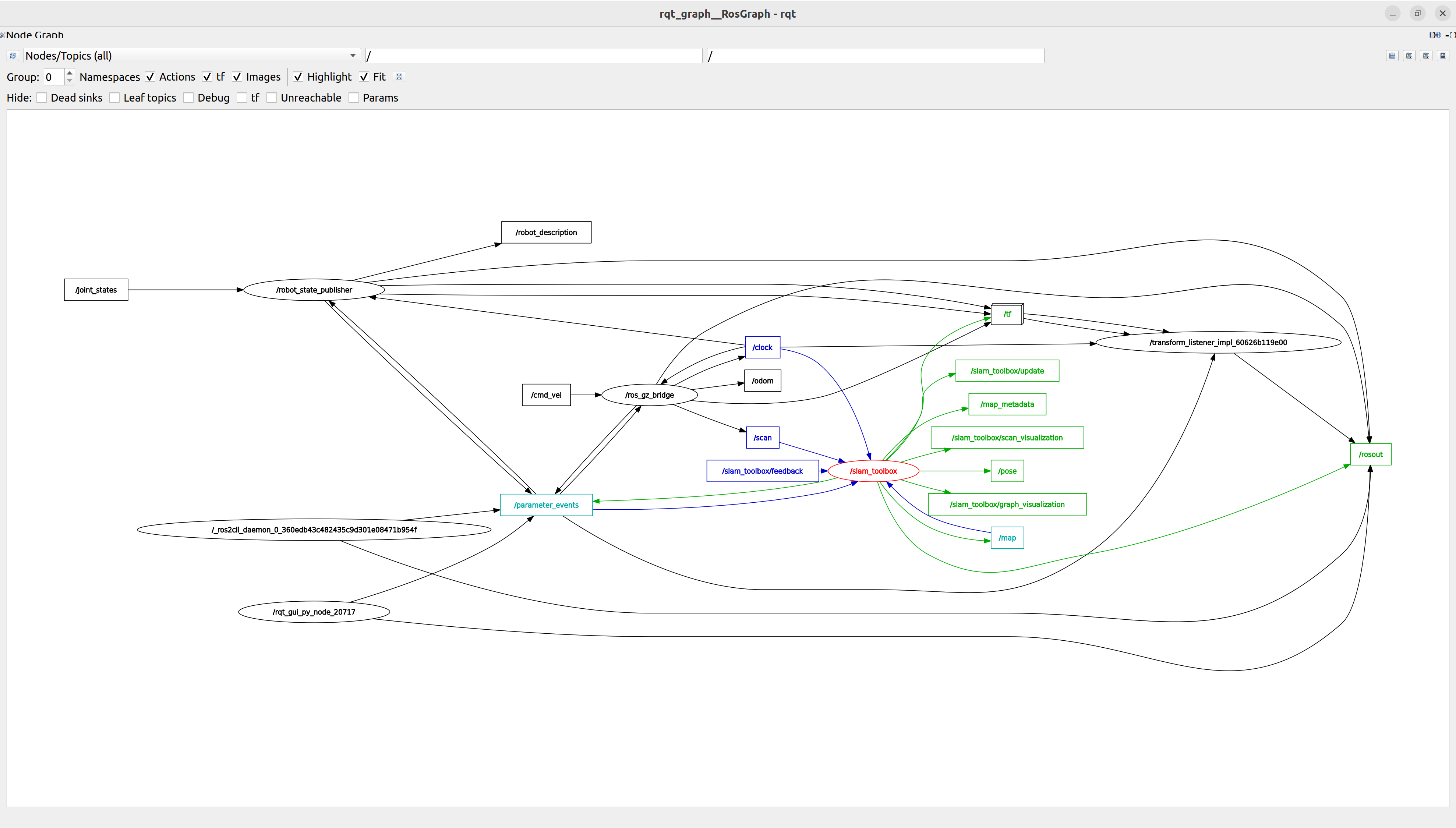
slam_toolbox 输入输出
输入
| 数据 | 来源 |
|---|---|
| /scan | 激光雷达 |
| /tf | 机器人位姿 |
| /odom | 里程计(可选但推荐) |
输出
| 输出 | 作用 |
|---|---|
| /map | 栅格地图 |
| map → odom | 位姿修正 |
| /pose | 当前机器人位置 |
slam_toolbox_mapping_sim.yaml
# slam_toolbox 建图模式参数(仿真专用)
# 基于 /opt/ros/humble/share/slam_toolbox/config/mapper_params_online_async.yaml 复制,
# 仅修改 base_frame(本工作区机器人 TF 树以 base_link 为基座,无 base_footprint)。
# 用于 mapping_sim.sh:Gazebo + slam_toolbox(online_async) 建图。
slam_toolbox:
  ros__parameters:

    # ---- 后端图优化求解器(Ceres Solver) ----
    solver_plugin: solver_plugins::CeresSolver                           # 求解器类型
    ceres_linear_solver: SPARSE_NORMAL_CHOLESKY                           # 稀疏 Cholesky 分解
    ceres_preconditioner: SCHUR_JACOBI                                    # Schur 补 + Jacobi 预处理
    ceres_trust_strategy: LEVENBERG_MARQUARDT                             # LM 信赖域策略
    ceres_dogleg_type: TRADITIONAL_DOGLEG                                 # Dogleg 方法(仅 DOGLEG 策略时生效)
    ceres_loss_function: None                                             # 鲁棒核函数(None=无,可选 HuberLoss)

    # ---- 坐标系与话题 ----
    odom_frame: odom                                                      # 里程计坐标系
    map_frame: map                                                         # 全局地图坐标系
    base_frame: base_link                                                  # 机器人基座坐标系(本车为 base_link)
    scan_topic: /scan                                                      # 激光雷达话题名
    use_map_saver: true                                                    # 是否允许运行时保存地图
    mode: mapping                                                          # 工作模式:mapping / localization

    # ---- 通用参数 ----
    debug_logging: false                                                   # 启用调试日志
    throttle_scans: 1                                                      # 扫描降采样(1=全处理)
    transform_publish_period: 0.02                                         # map->odom TF 发布间隔(秒)
    map_update_interval: 5.0                                               # 地图栅格更新间隔(秒)
    resolution: 0.05                                                       # 地图分辨率(米/像素)
    min_laser_range: 0.15                                                  # 激光有效最小距离(米)
    max_laser_range: 20.0                                                  # 激光有效最大距离(米)
    minimum_time_interval: 0.5                                             # 帧间最小时间间隔(秒)
    transform_timeout: 0.2                                                 # TF 查询超时(秒)
    tf_buffer_duration: 30.                                                # TF 缓冲区时长(秒)
    stack_size_to_use: 40000000                                            # 线程栈大小(字节,防深递归崩溃)
    enable_interactive_mode: true                                          # 允许 RViz 交互面板控制

    # ---- 前端扫描匹配 ----
    use_scan_matching: true                                                # 启用激光扫描匹配
    use_scan_barycenter: true                                              # 使用扫描质心辅助对齐
    minimum_travel_distance: 0.3                                           # 新增节点最小平移距离(米)
    minimum_travel_heading: 0.3                                            # 新增节点最小旋转角度(弧度)
    scan_buffer_size: 10                                                   # 子图保留的扫描帧数
    scan_buffer_maximum_scan_distance: 10.0                                # 缓冲区保留的最大扫描距离(米)
    link_match_minimum_response_fine: 0.1                                  # 精细链路匹配最小响应阈值
    link_scan_maximum_distance: 1.5                                        # 链路连接最大距离(米)
    loop_search_maximum_distance: 3.0                                      # 回环搜索半径(米)
    do_loop_closing: true                                                  # 启用回环检测
    loop_match_minimum_chain_size: 10                                      # 回环候选最小连续节点数
    loop_match_maximum_variance_coarse: 3.0                                # 粗匹配最大方差
    loop_match_minimum_response_coarse: 0.35                               # 粗匹配最小响应阈值
    loop_match_minimum_response_fine: 0.45                                 # 精细匹配最小响应阈值

    # ---- 前端相关性搜索空间(scan-to-map) ----
    correlation_search_space_dimension: 0.5                                # 搜索窗口半边长(米)
    correlation_search_space_resolution: 0.01                              # 搜索步长(米)
    correlation_search_space_smear_deviation: 0.1                          # 高斯模糊标准差,平滑代价地图

    # ---- 后端回环搜索空间 ----
    loop_search_space_dimension: 8.0                                       # 回环搜索窗口半边长(米)
    loop_search_space_resolution: 0.05                                     # 回环搜索步长(米)
    loop_search_space_smear_deviation: 0.03                                # 回环搜索模糊标准差

    # ---- 位姿方差惩罚 ----
    distance_variance_penalty: 0.5                                         # 平移变化惩罚权重
    angle_variance_penalty: 1.0                                            # 旋转变化惩罚权重

    # ---- 角度搜索参数 ----
    fine_search_angle_offset: 0.00349                                      # 精细搜索角度偏移(弧度,≈0.2°)
    coarse_search_angle_offset: 0.349                                      # 粗搜索角度偏移(弧度,≈20°)
    coarse_angle_resolution: 0.0349                                        # 粗搜索角度步长(弧度,≈2°)
    minimum_angle_penalty: 0.9                                             # 角度匹配最小惩罚因子
    minimum_distance_penalty: 0.5                                          # 距离匹配最小惩罚因子
    use_response_expansion: true                                           # 动态扩展搜索范围
    min_pass_through: 2                                                    # 栅格通过计数阈值
    occupancy_threshold: 0.1                                               # 栅格占据概率阈值
ROS log
lxg@lxg:~/.ros$ tree
.
├── log
│   ├── 2026-07-06-11-20-26-996329-lxg-21071
│   │   └── launch.log
│   ├── async_slam_toolbox_node_21422_1783308050714.log   ← SLAM核心节点
│   ├── create_21076_1783308027103.log
│   ├── parameter_bridge_21079_1783308027109.log
│   ├── robot_state_publisher_21074_1783308027094.log     ← TF生成
│   └── rviz2_21474_1783308093083.log
RVIZ
source /opt/ros/humble/setup.bash
source /home/lxg/code/xt/gitlab/ros2_learn_ws/install/setup.bash
export ROS_LOCALHOST_ONLY=1
export ROS_DOMAIN_ID=0
cd /home/lxg/code/xt/gitlab/ros2_learn_ws
rviz2 -d '/home/lxg/code/xt/gitlab/ros2_learn_ws/config/mapping_sim.rviz' --ros-args -p use_sim_time:=true
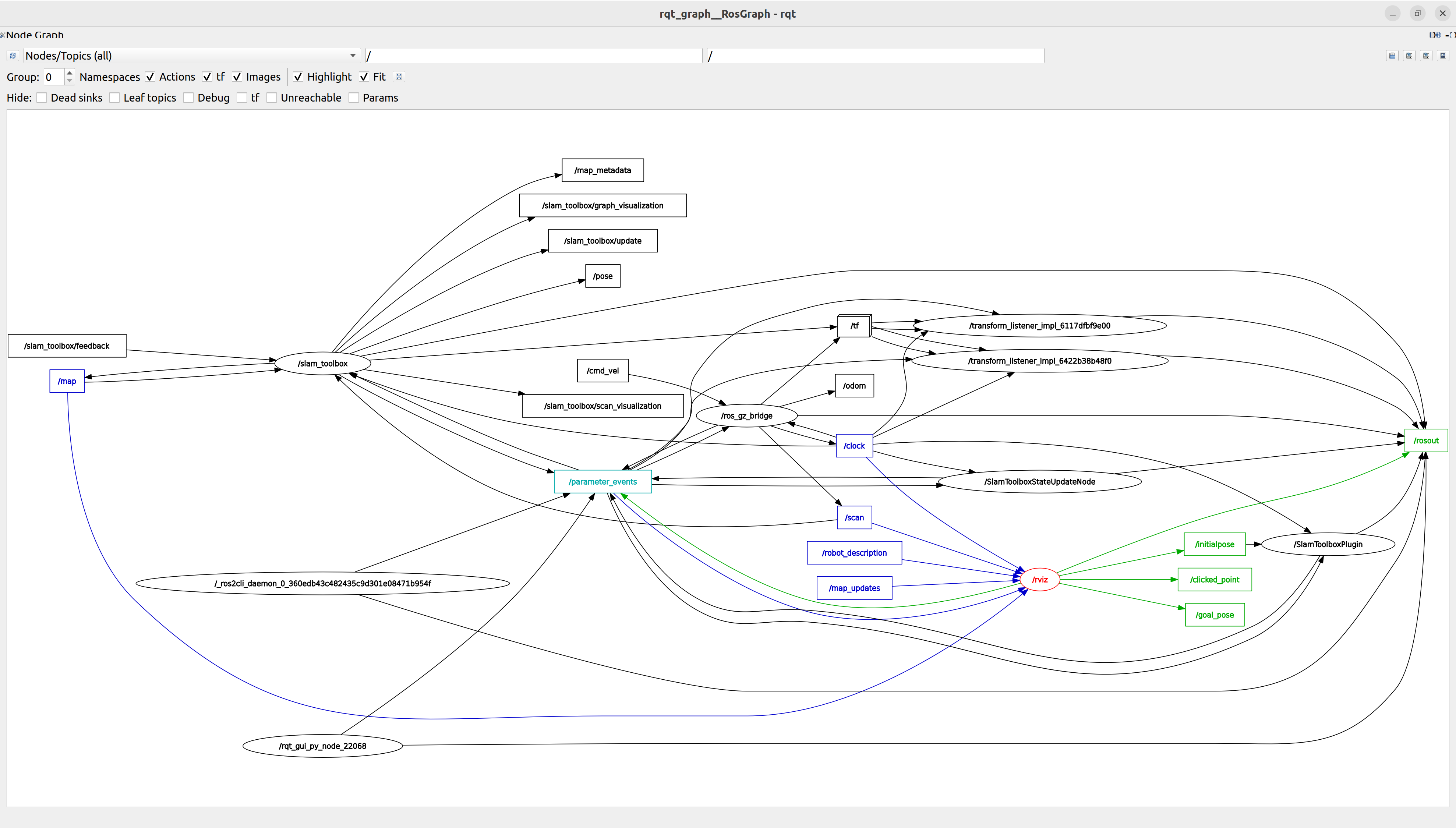
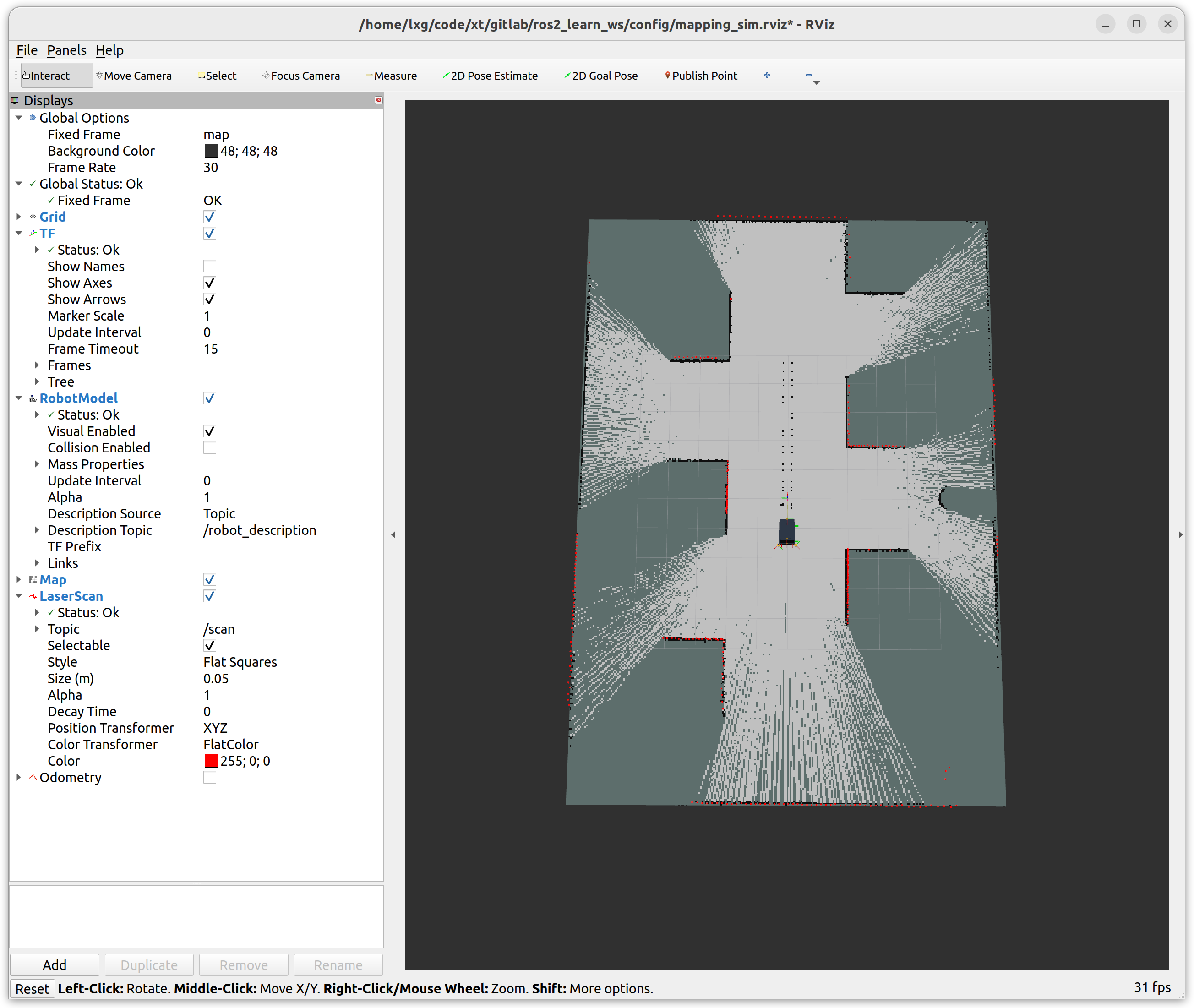
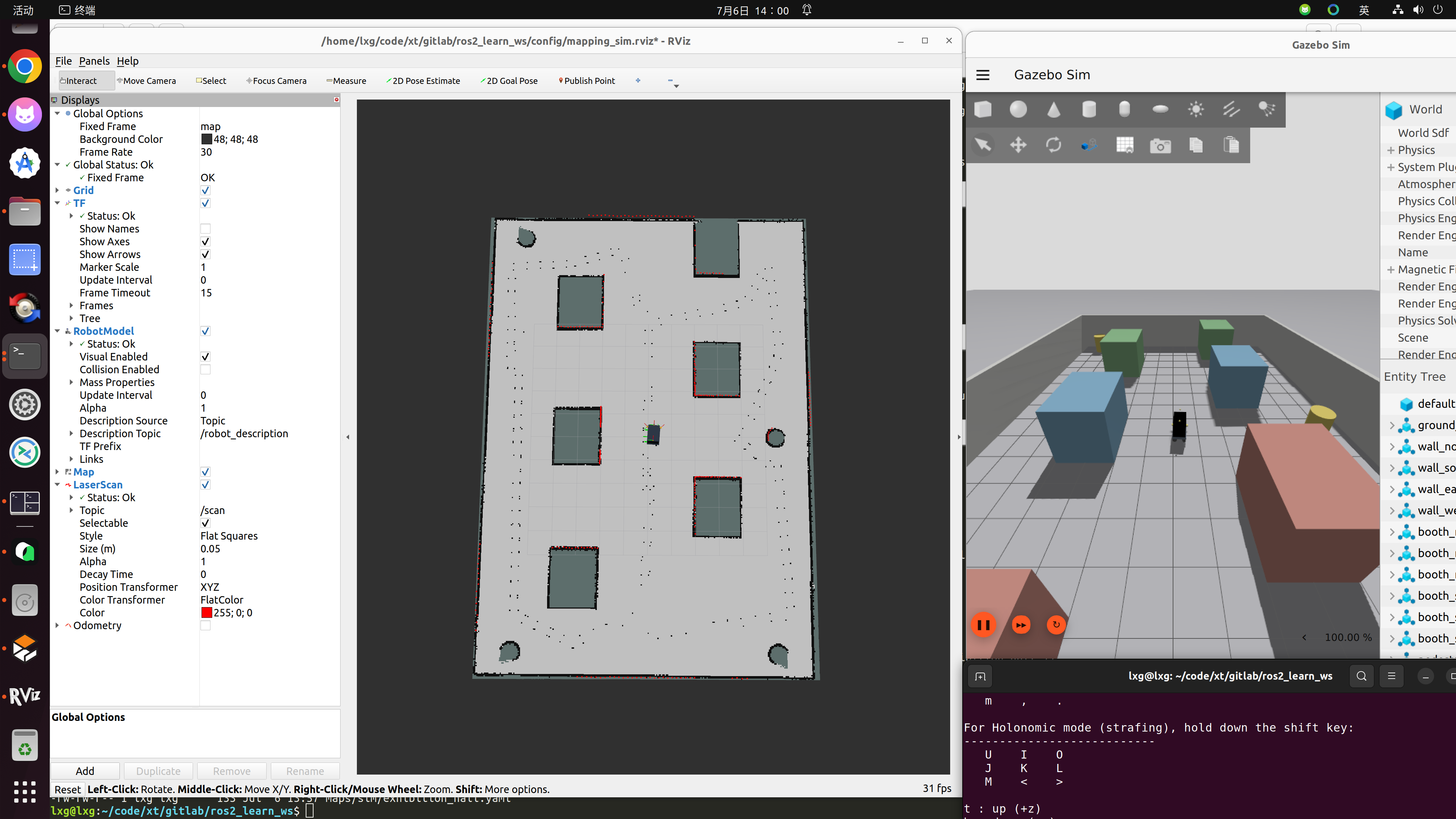
建图完成后保存的文件
lxg@lxg:~/code/xt/gitlab/ros2_learn_ws$ ls -al maps/sim/exhibition_hall.*
-rw-rw-r-- 1 lxg lxg  2144051 Jul  6 13:56 maps/sim/exhibition_hall.data
-rw-rw-r-- 1 lxg lxg   112533 Jul  6 13:57 maps/sim/exhibition_hall.pgm        # 栅格地图(给 Nav2 用)
-rw-rw-r-- 1 lxg lxg 13551227 Jul  6 13:56 maps/sim/exhibition_hall.posegraph
-rw-rw-r-- 1 lxg lxg      133 Jul  6 13:57 maps/sim/exhibition_hall.yaml       #
栅格地图(给 Nav2 用)
| 文件 | 作用 |
|---|---|
| .pgm | 黑白栅格地图(占据网格) |
| .yaml | 地图描述(分辨率/原点) |
原始 SLAM数据(核心)
exhibition_hall.data
👉 含义:
- SLAM扫描数据缓存
- 用于重新优化地图
- 类似“原始感知数据”
位姿图(非常关键)
exhibition_hall.posegraph
👉 这是:
🧠 SLAM 的“脑子”
包含:
- 节点(机器人位置)
- 回环约束
- 位姿优化关系
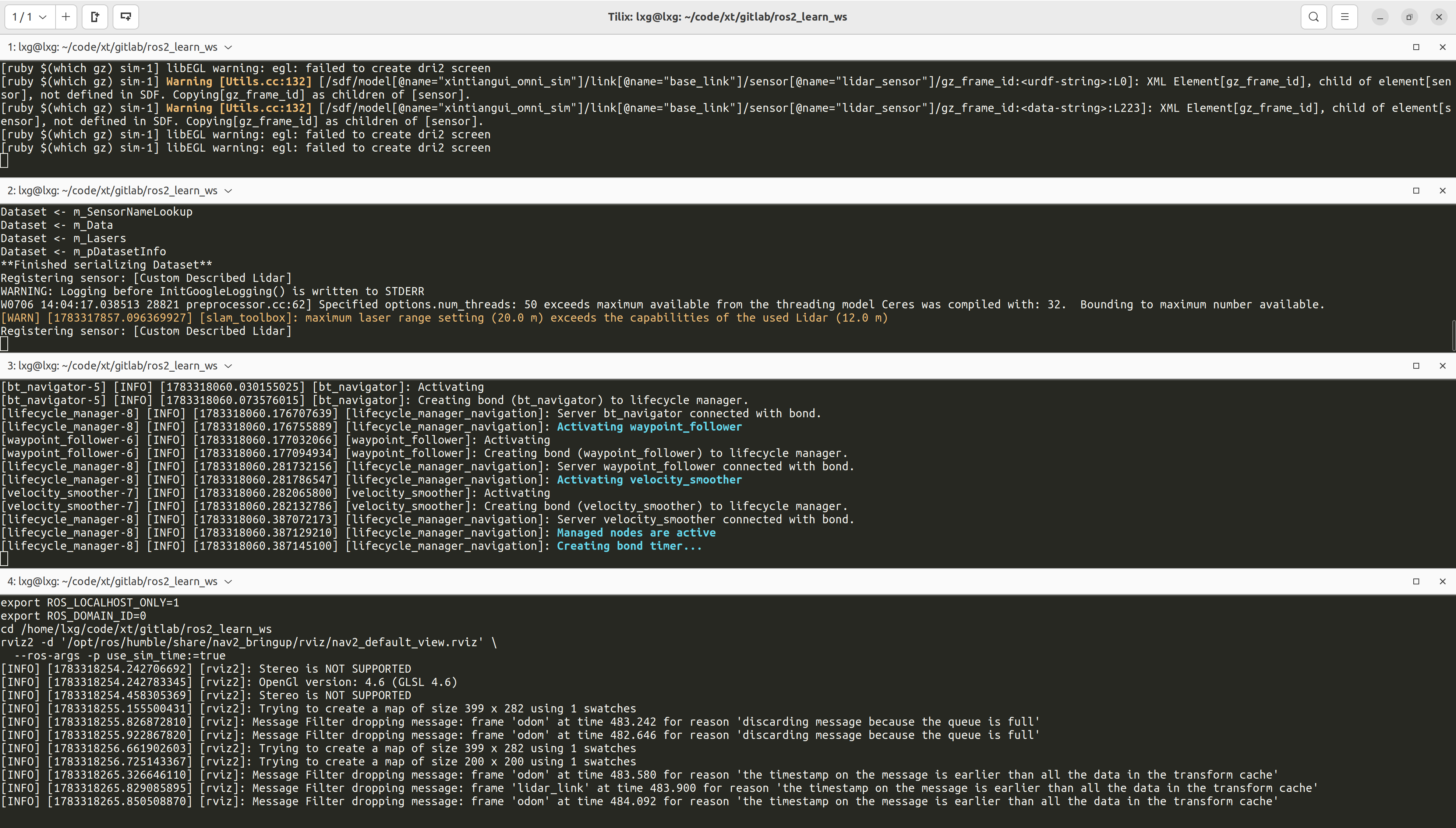
导航
Gazebo 仿真(机器人 + 展厅世界 + 话题桥接)
source /opt/ros/humble/setup.bash
source /home/lxg/code/xt/gitlab/ros2_learn_ws/install/setup.bash
export ROS_LOCALHOST_ONLY=1
export ROS_DOMAIN_ID=0
cd /home/lxg/code/xt/gitlab/ros2_learn_ws
ros2 launch description sim_robot.launch.py \
  world_file:='/home/lxg/code/xt/gitlab/ros2_learn_ws/src/description/worlds/exhibition_hall.sdf' \
  config_file:='/home/lxg/code/xt/gitlab/ros2_learn_ws/src/description/config/omni_base.yaml' \
  bridge_config_file:='/home/lxg/code/xt/gitlab/ros2_learn_ws/src/description/config/sim_bridge.yaml' \
  headless:=false \
  x:=0.0 \
  y:=0.0 \
  yaw:=0.0
作用:加载展厅世界模型、生成仿真机器人、启用 ROS 话题桥接,发布 /scan 激光扫描数据。
SLAM Toolbox(定位模式)
source /opt/ros/humble/setup.bash
source /home/lxg/code/xt/gitlab/ros2_learn_ws/install/setup.bash
export ROS_LOCALHOST_ONLY=1
export ROS_DOMAIN_ID=0
cd /home/lxg/code/xt/gitlab/ros2_learn_ws
ros2 run slam_toolbox localization_slam_toolbox_node \
  --ros-args --params-file '/home/lxg/code/xt/gitlab/ros2_learn_ws/config/slam_toolbox_localization_sim.yaml' \
  -p use_sim_time:=true \
  -p map_file_name:='/home/lxg/code/xt/gitlab/ros2_learn_ws/maps/sim/exhibition_hall' \
  -p map_start_pose:='[0.0, 0.0, 0.0]'
前置:终端 1 的 Gazebo 已完全启动,/scan 话题有数据。
作用:加载预先保存的地图位姿图,对机器人进行定位(不再建图),发布 map → odom → base_link 的转换树。
slam_toolbox_localization_sim.yaml
# =============================================================================
# slam_toolbox 定位模式参数配置(仿真专用)
# =============================================================================
# 基于 ROS 2 Humble 官方默认配置修改:
#   /opt/ros/humble/share/slam_toolbox/config/mapper_params_localization.yaml
#
# 修改内容:
#   仅将 base_frame 从默认的 base_footprint 改为 base_link,
#   因为本工作区机器人的 TF 树以 base_link 为基座,没有 base_footprint 坐标系。
#
# 用于 nav2_sim.sh 启动流程:
#   加载 mapping_sim.sh 阶段保存的地图(serialize_map),只做重定位(localization),
#   不再建图更新。
# =============================================================================

slam_toolbox:
  ros__parameters:

    # ---- 后端图优化求解器(Ceres Solver) ----
    solver_plugin: solver_plugins::CeresSolver              # 求解器类型
    ceres_linear_solver: SPARSE_NORMAL_CHOLESKY              # 稀疏 Cholesky 分解
    ceres_preconditioner: SCHUR_JACOBI                       # Schur 补 + Jacobi 预处理
    ceres_trust_strategy: LEVENBERG_MARQUARDT                # LM 信赖域策略
    ceres_dogleg_type: TRADITIONAL_DOGLEG                    # Dogleg 方法(仅 DOGLEG 策略时生效)
    ceres_loss_function: None                                # 鲁棒核函数(None=无,可选 HuberLoss)

    # ---- 坐标系与话题 ----
    odom_frame: odom                                         # 里程计坐标系
    map_frame: map                                           # 全局地图坐标系
    base_frame: base_link                                    # 机器人基座坐标系(本车为 base_link)
    scan_topic: /scan                                        # 激光雷达话题名
    mode: localization                                       # 工作模式:localization(仅定位,不更新地图)

    # ---- 通用参数 ----
    debug_logging: false                                     # 启用调试日志
    throttle_scans: 1                                        # 扫描降采样(1=全处理)
    transform_publish_period: 0.02                           # map->odom TF 发布间隔(秒)
    map_update_interval: 5.0                                 # 地图栅格更新间隔(秒)
    resolution: 0.05                                         # 地图分辨率(米/像素)
    min_laser_range: 0.15                                    # 激光有效最小距离(米)
    max_laser_range: 20.0                                    # 激光有效最大距离(米)
    minimum_time_interval: 0.5                               # 帧间最小时间间隔(秒)
    transform_timeout: 0.2                                   # TF 查询超时(秒)
    tf_buffer_duration: 30.                                  # TF 缓冲区时长(秒)
    stack_size_to_use: 40000000                              # 线程栈大小(字节,防深递归崩溃)

    # ---- 前端扫描匹配 ----
    use_scan_matching: true                                  # 启用激光扫描匹配
    use_scan_barycenter: true                                # 使用扫描质心辅助对齐
    minimum_travel_distance: 0.3                             # 新增节点最小平移距离(米)
    minimum_travel_heading: 0.3                              # 新增节点最小旋转角度(弧度)
    scan_buffer_size: 3                                      # 子图保留扫描帧数(定位模式较小,3 帧即可)
    scan_buffer_maximum_scan_distance: 10.0                  # 缓冲区保留的最大扫描距离(米)
    link_match_minimum_response_fine: 0.1                    # 精细链路匹配最小响应阈值
    link_scan_maximum_distance: 1.5                          # 链路连接最大距离(米)
    do_loop_closing: true                                    # 启用回环检测
    loop_match_minimum_chain_size: 3                         # 回环候选最小连续节点数(定位模式较小)
    loop_match_maximum_variance_coarse: 3.0                  # 粗匹配最大方差
    loop_match_minimum_response_coarse: 0.35                 # 粗匹配最小响应阈值
    loop_match_minimum_response_fine: 0.45                   # 精细匹配最小响应阈值

    # ---- 前端相关性搜索空间(scan-to-map) ----
    correlation_search_space_dimension: 0.5                  # 搜索窗口半边长(米)
    correlation_search_space_resolution: 0.01                # 搜索步长(米)
    correlation_search_space_smear_deviation: 0.1            # 高斯模糊标准差,平滑代价地图

    # ---- 后端回环搜索空间 ----
    loop_search_space_dimension: 8.0                         # 回环搜索窗口半边长(米)
    loop_search_space_resolution: 0.05                       # 回环搜索步长(米)
    loop_search_space_smear_deviation: 0.03                  # 回环搜索模糊标准差
    loop_search_maximum_distance: 3.0                        # 回环搜索半径(米)

    # ---- 位姿方差惩罚 ----
    distance_variance_penalty: 0.5                           # 平移变化惩罚权重
    angle_variance_penalty: 1.0                              # 旋转变化惩罚权重

    # ---- 角度搜索参数 ----
    fine_search_angle_offset: 0.00349                        # 精细搜索角度偏移(弧度,≈0.2°)
    coarse_search_angle_offset: 0.349                        # 粗搜索角度偏移(弧度,≈20°)
    coarse_angle_resolution: 0.0349                          # 粗搜索角度步长(弧度,≈2°)
    minimum_angle_penalty: 0.9                               # 角度匹配最小惩罚因子
    minimum_distance_penalty: 0.5                            # 距离匹配最小惩罚因子
    use_response_expansion: true                             # 动态扩展搜索范围
    min_pass_through: 2                                      # 栅格通过计数阈值
    occupancy_threshold: 0.1                                 # 栅格占据概率阈值
Nav导航
source /opt/ros/humble/setup.bash
source /home/lxg/code/xt/gitlab/ros2_learn_ws/install/setup.bash
export ROS_LOCALHOST_ONLY=1
export ROS_DOMAIN_ID=0
cd /home/lxg/code/xt/gitlab/ros2_learn_ws
ros2 launch nav2_bringup navigation_launch.py \
  use_sim_time:=true \
  params_file:='/home/lxg/code/xt/gitlab/ros2_learn_ws/config/nav2_sim.yaml' \
  autostart:=true \
  use_composition:=False \
  use_respawn:=False \
  log_level:=info
前置:终端 2 的 SLAM Toolbox 已启动并定位就绪。
作用:启动 Nav2 导航栈,使用官方 nav2_mppi_controller::MPPIController 进行路径规划和控制。
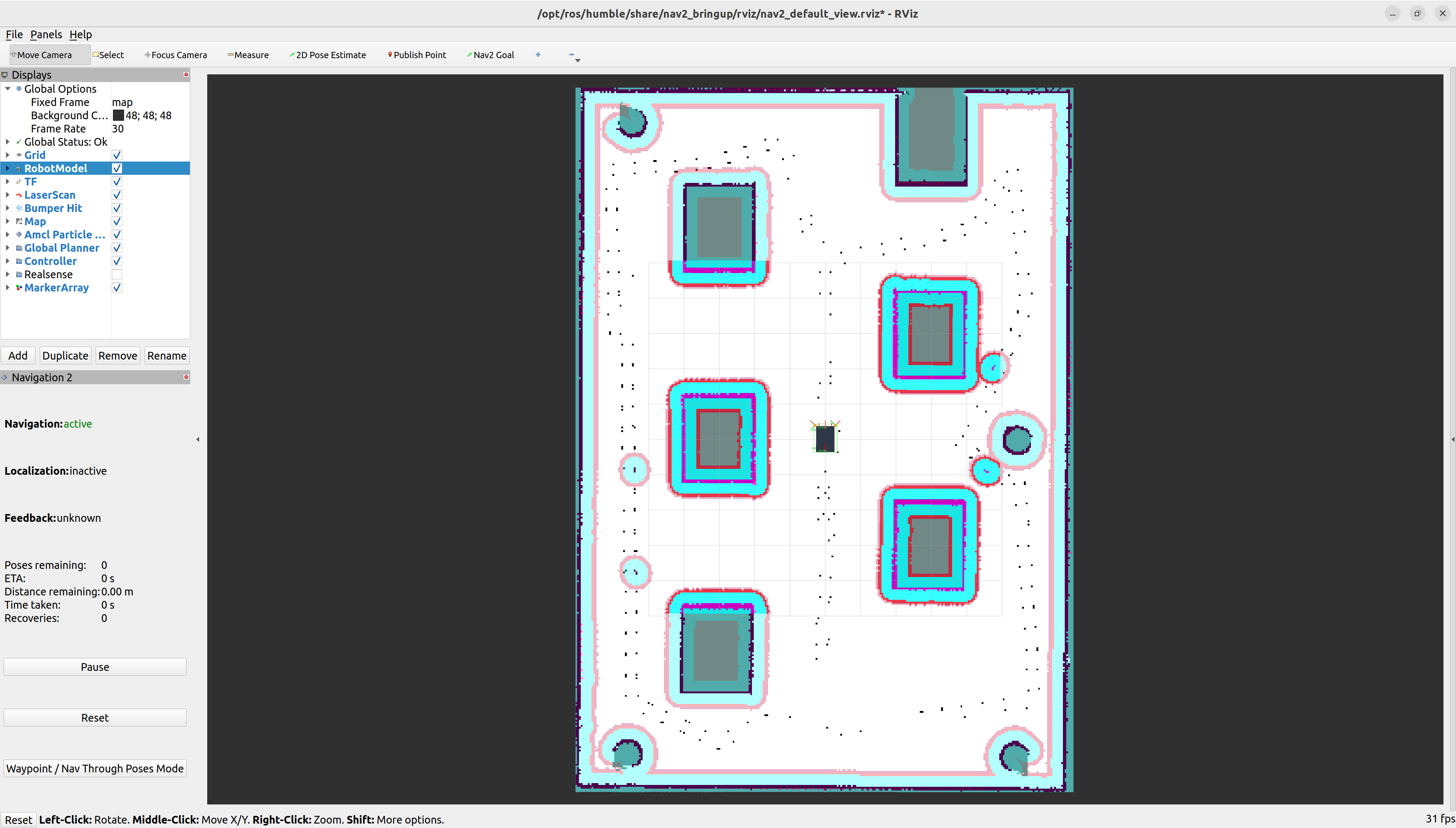
RVIZ2
source /opt/ros/humble/setup.bash
source /home/lxg/code/xt/gitlab/ros2_learn_ws/install/setup.bash
export ROS_LOCALHOST_ONLY=1
export ROS_DOMAIN_ID=0
cd /home/lxg/code/xt/gitlab/ros2_learn_ws
rviz2 -d '/opt/ros/humble/share/nav2_bringup/rviz/nav2_default_view.rviz' \
  --ros-args -p use_sim_time:=true
前置:终端 1-3 已启动完成。
作用:提供可视化界面,显示地图、机器人状态、成本地图、规划路径等;交互下发导航目标。
rqt_graph
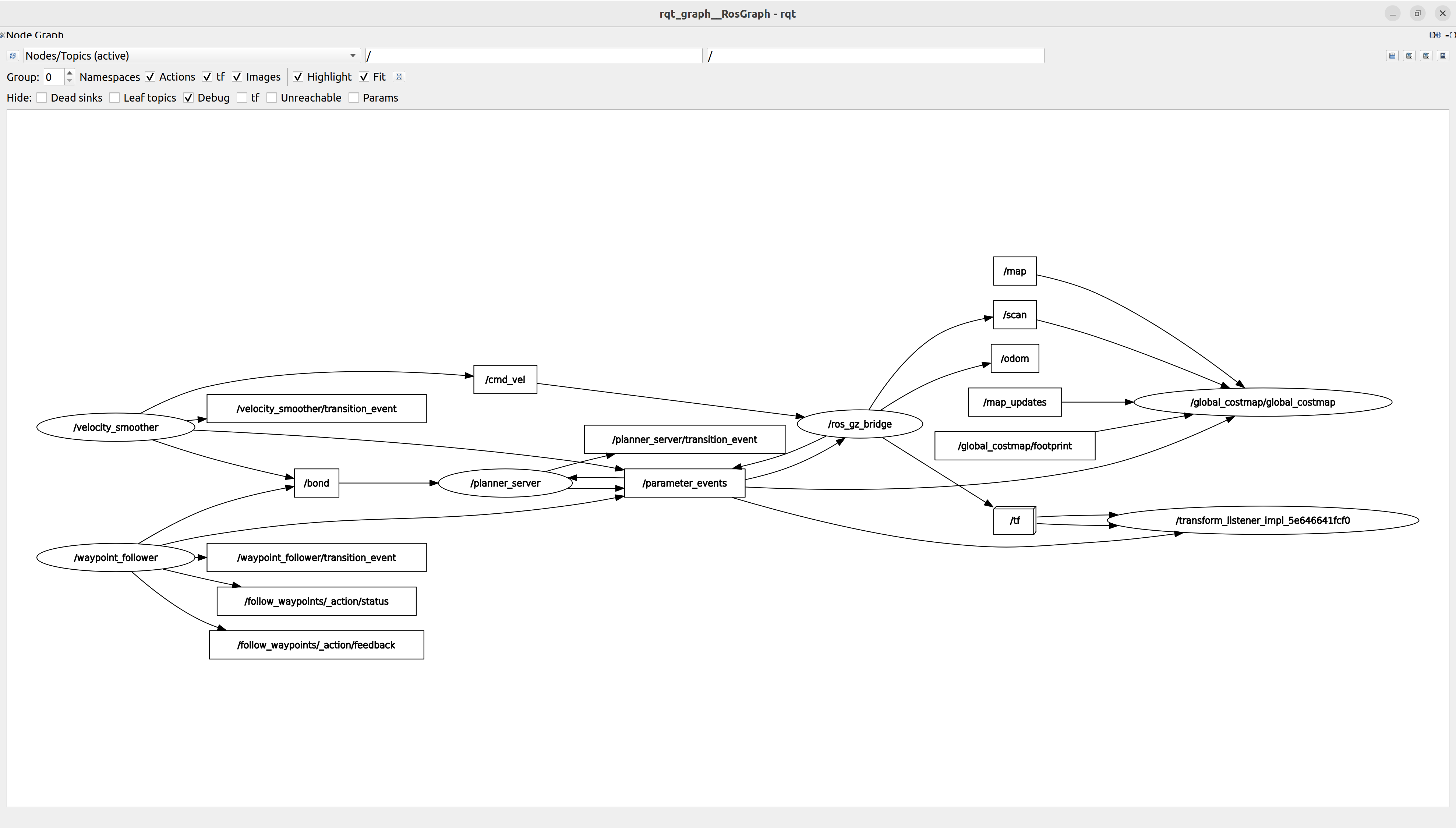
ROS2 Nav2 + Gazebo 等价文字通信图
┌────────────────────────────────────────────────────────────┐
│                    🌍 Gazebo 仿真层                         │
│                                                            │
│  gz sim server / gz sim gui                                │
│  (物理世界 + 机器人运动)                                    │
└───────────────┬────────────────────────────────────────────┘
                │
                ▼
┌────────────────────────────────────────────────────────────┐
│              🔌 ros_gz_bridge(核心枢纽)                  │
│                                                            │
│  转换 Gazebo → ROS2 Topics                                 │
│                                                            │
│  输出:                                                     │
│   /scan                                                    │
│   /odom                                                    │
│   /map                                                     │
│   /tf                                                      │
└───────────────┬────────────────────────────────────────────┘
                │
                ▼
┌────────────────────────────────────────────────────────────┐
│                 🧭 SLAM / 地图融合层                       │
│                                                            │
│  slam_toolbox (localization mode)                          │
│                                                            │
│  输入: /scan / odom / tf                                  │
│  输出: /map + map → odom 修正 TF                           │
└───────────────┬────────────────────────────────────────────┘
                │
                ▼
┌────────────────────────────────────────────────────────────┐
│               🗺️ Costmap 感知层                            │
│                                                            │
│  global_costmap                                            │
│                                                            │
│  输入:                                                     │
│    /map                                                     │
│    /scan                                                    │
│    /tf                                                      │
│                                                            │
│  输出:                                                     │
│    costmap grid                                            │
└───────────────┬────────────────────────────────────────────┘
                │
                ▼
┌────────────────────────────────────────────────────────────┐
│                 🧠 Nav2 规划层                             │
│                                                            │
│  planner_server                                            │
│                                                            │
│  输入: costmap + tf                                        │
│  输出: global path                                         │
└───────────────┬────────────────────────────────────────────┘
                │
                ▼
┌────────────────────────────────────────────────────────────┐
│                🎯 Nav2 控制层                              │
│                                                            │
│  controller_server                                         │
│        │                                                   │
│        ▼                                                   │
│  velocity_smoother                                         │
│        │                                                   │
│        ▼                                                   │
│     /cmd_vel                                               │
└───────────────┬────────────────────────────────────────────┘
                │
                ▼
┌────────────────────────────────────────────────────────────┐
│                🚗 Gazebo 执行层                            │
│                                                            │
│  robot motion (差速/底盘模型)                              │
│                                                            │
│  执行 /cmd_vel → 更新 /odom / tf                           │
└────────────────────────────────────────────────────────────┘
TF(系统“骨架网络”)
          map
           │
           ▼
          odom
           │
           ▼
        base_link
           │
   ┌───────┼────────┐
   ▼       ▼        ▼
camera   laser   wheels
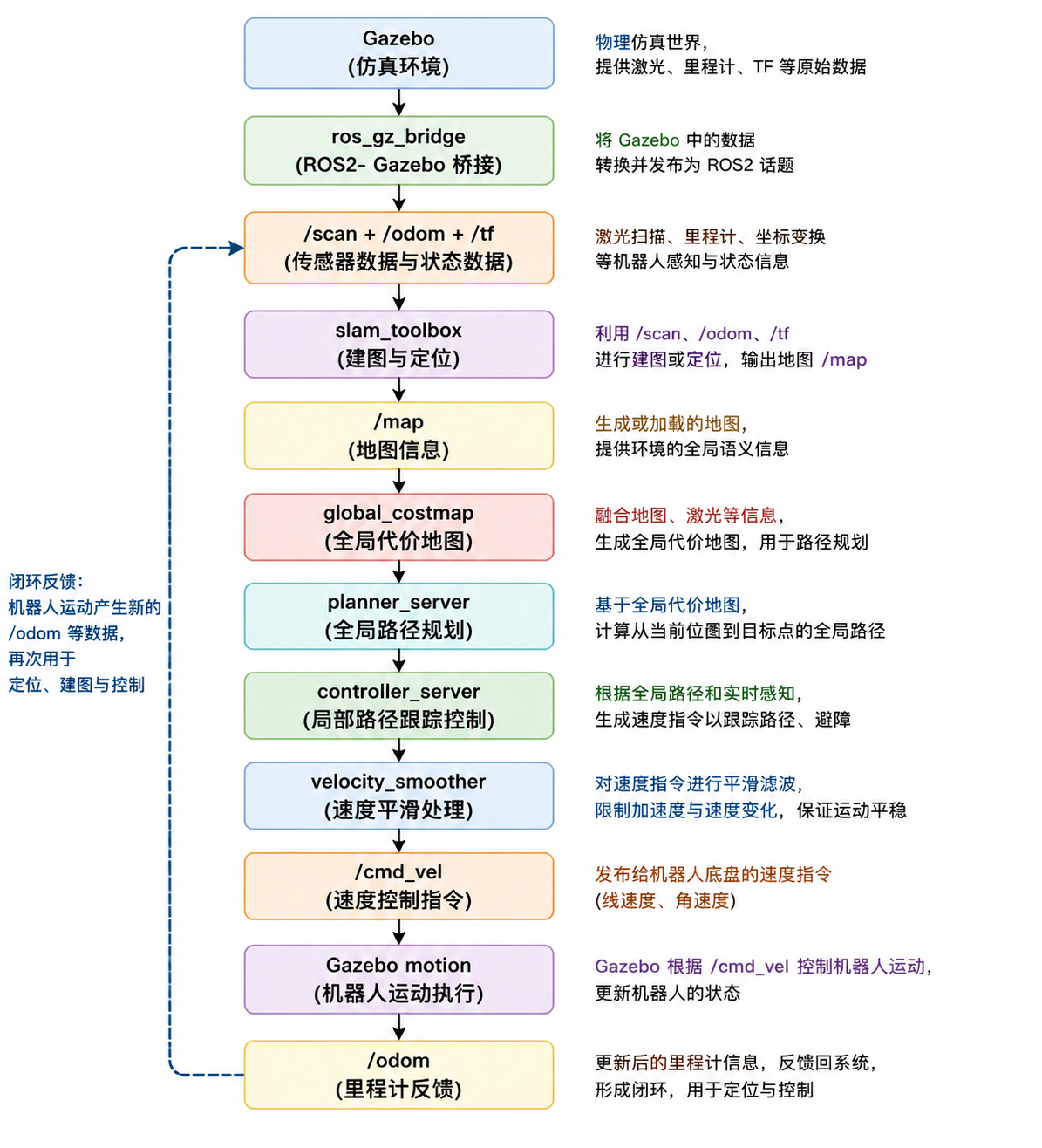
整系统真实数据流
查看ROS2进程
仿真与物理层(Gazebo / gz sim)
| 进程 | 完整路径 | 作用 |
|---|---|---|
| gz sim server | /usr/bin/gz sim server(内部启动) |
物理引擎(动力学计算) |
| gz sim gui | /usr/bin/gz sim gui |
Gazebo可视化界面 |
| gz sim | /usr/bin/gz |
仿真启动入口 |
| ros_gz_bridge | /opt/ros/humble/lib/ros_gz_bridge/parameter_bridge |
ROS ↔ Gazebo通信桥 |
机器人状态与TF层
| 进程 | 完整路径 | 作用 |
|---|---|---|
| robot_state_publisher | /opt/ros/humble/lib/robot_state_publisher/robot_state_publisher |
发布 TF 树 |
| joint_state_publisher | ~ros2_learn_ws/install/description/share/description/scripts/default_joint_state_publisher.py |
机器人关节状态 |
SLAM / 定位层
| 进程 | 完整路径 | 作用 |
|---|---|---|
| slam_toolbox | /opt/ros/humble/lib/slam_toolbox/localization_slam_toolbox_node |
SLAM定位 + 建图 |
Nav2 导航系统(核心)
| 进程 | 完整路径 | 作用 |
|---|---|---|
| planner_server | /opt/ros/humble/lib/nav2_planner/planner_server |
全局路径规划 |
| controller_server | /opt/ros/humble/lib/nav2_controller/controller_server |
轨迹控制 |
| bt_navigator | /opt/ros/humble/lib/nav2_bt_navigator/bt_navigator |
行为树执行 |
| behavior_server | /opt/ros/humble/lib/nav2_behaviors/behavior_server |
recovery /行为插件 |
| waypoint_follower | /opt/ros/humble/lib/nav2_waypoint_follower/waypoint_follower |
路径点跟随 |
| velocity_smoother | /opt/ros/humble/lib/nav2_velocity_smoother/velocity_smoother |
速度平滑 |
| lifecycle_manager | /opt/ros/humble/lib/nav2_lifecycle_manager/lifecycle_manager |
生命周期管理 |
可视化层
| 进程 | 完整路径 | 作用 |
|---|---|---|
| rviz2 | /usr/bin/rviz2 |
ROS可视化工具 |
控制输入层
| 进程 | 完整路径 | 作用 |
|---|---|---|
| teleop_twist_keyboard | /opt/ros/humble/lib/teleop_twist_keyboard/teleop_twist_keyboard |
键盘控制机器人 |
数据记录和回放
录制全部话题
lxg@lxg:~/code/xt/gitlab/ros2_learn_ws$ ros2 bag record -a
[INFO] [1783325865.596645224] [rosbag2_recorder]: Press SPACE for pausing/resuming
[INFO] [1783325865.598562402] [rosbag2_storage]: Opened database 'rosbag2_2026_07_06-16_17_45/rosbag2_2026_07_06-16_17_45_0.db3' for READ_WRITE.
[INFO] [1783325865.600022911] [rosbag2_recorder]: Listening for topics...
[INFO] [1783325865.600037799] [rosbag2_recorder]: Event publisher thread: Starting
[INFO] [1783325865.602245353] [rosbag2_recorder]: Subscribed to topic '/velocity_smoother/transition_event'
[INFO] [1783325865.604429914] [rosbag2_recorder]: Subscribed to topic '/rosout'
[INFO] [1783325865.606194314] [rosbag2_recorder]: Subscribed to topic '/joint_states'
[INFO] [1783325865.606934888] [rosbag2_recorder]: Subscribed to topic '/events/write_split'
[INFO] [1783325865.608227771] [rosbag2_recorder]: Subscribed to topic '/parameter_events'
[INFO] [1783325865.609567953] [rosbag2_recorder]: Subscribed to topic '/diagnostics'
[INFO] [1783325865.610175647] [rosbag2_recorder]: Subscribed to topic '/controller_server/transition_event'
[INFO] [1783325865.610253112] [rosbag2_recorder]: Recording...
[WARN] [1783325865.611329338] [ROSBAG2_TRANSPORT]: Hidden topics are not recorded. Enable them with --include-hidden-topics
[INFO] [1783325865.612593667] [rosbag2_recorder]: Subscribed to topic '/scan'
[INFO] [1783325865.614030742] [rosbag2_recorder]: Subscribed to topic '/odom'
[INFO] [1783325865.614831639] [rosbag2_recorder]: Subscribed to topic '/plan_smoothed'
[INFO] [1783325865.616327143] [rosbag2_recorder]: Subscribed to topic '/cmd_vel'
[INFO] [1783325865.618611712] [rosbag2_recorder]: Subscribed to topic '/bond'
[INFO] [1783325865.619436434] [rosbag2_recorder]: Subscribed to topic '/smoother_server/transition_event'
[INFO] [1783325865.620262449] [rosbag2_recorder]: Subscribed to topic '/clock'
[INFO] [1783325865.621928735] [rosbag2_recorder]: Subscribed to topic '/tf'
[INFO] [1783325865.622520629] [rosbag2_recorder]: Subscribed to topic '/waypoint_follower/transition_event'
[INFO] [1783325865.623556879] [rosbag2_recorder]: Subscribed to topic '/robot_description'
[INFO] [1783325865.624195831] [rosbag2_recorder]: Subscribed to topic '/tf_static'
[INFO] [1783325865.727418563] [rosbag2_recorder]: Subscribed to topic '/plan'
[INFO] [1783325865.728008664] [rosbag2_recorder]: Subscribed to topic '/map'
[INFO] [1783325865.728468229] [rosbag2_recorder]: Subscribed to topic '/slam_toolbox/scan_visualization'
[INFO] [1783325865.729058991] [rosbag2_recorder]: Subscribed to topic '/local_costmap/published_footprint'
[INFO] [1783325865.729522573] [rosbag2_recorder]: Subscribed to topic '/local_costmap/local_costmap/transition_event'
[INFO] [1783325865.730396688] [rosbag2_recorder]: Subscribed to topic '/local_costmap/costmap_updates'
[INFO] [1783325865.731539479] [rosbag2_recorder]: Subscribed to topic '/local_costmap/costmap_raw'
[INFO] [1783325865.732008902] [rosbag2_recorder]: Subscribed to topic '/local_costmap/costmap'
[INFO] [1783325865.732487232] [rosbag2_recorder]: Subscribed to topic '/global_costmap/global_costmap/transition_event'
[INFO] [1783325865.732935666] [rosbag2_recorder]: Subscribed to topic '/planner_server/transition_event'
[INFO] [1783325865.733564710] [rosbag2_recorder]: Subscribed to topic '/behavior_tree_log'
[INFO] [1783325865.734033622] [rosbag2_recorder]: Subscribed to topic '/transformed_global_plan'
[INFO] [1783325865.734491594] [rosbag2_recorder]: Subscribed to topic '/global_costmap/published_footprint'
[INFO] [1783325865.734945769] [rosbag2_recorder]: Subscribed to topic '/global_costmap/costmap_updates'
[INFO] [1783325865.735404572] [rosbag2_recorder]: Subscribed to topic '/bt_navigator/transition_event'
[INFO] [1783325865.735879476] [rosbag2_recorder]: Subscribed to topic '/unsmoothed_plan'
[INFO] [1783325865.737397152] [rosbag2_recorder]: Subscribed to topic '/slam_toolbox/update'
[INFO] [1783325865.737970080] [rosbag2_recorder]: Subscribed to topic '/slam_toolbox/graph_visualization'
[INFO] [1783325865.738548188] [rosbag2_recorder]: Subscribed to topic '/pose'
[INFO] [1783325865.738991312] [rosbag2_recorder]: Subscribed to topic '/behavior_server/transition_event'
[INFO] [1783325865.739483288] [rosbag2_recorder]: Subscribed to topic '/global_costmap/costmap'
[INFO] [1783325865.739945117] [rosbag2_recorder]: Subscribed to topic '/map_metadata'
[INFO] [1783325865.740426813] [rosbag2_recorder]: Subscribed to topic '/global_costmap/costmap_raw'
[INFO] [1783325865.740909712] [rosbag2_recorder]: Subscribed to topic '/trajectories'
[INFO] [1783325865.741390106] [rosbag2_recorder]: Subscribed to topic '/cmd_vel_nav'
[INFO] [1783325865.953328959] [rosbag2_recorder]: Subscribed to topic '/initialpose'
[INFO] [1783325865.954540238] [rosbag2_recorder]: Subscribed to topic '/clicked_point'
[INFO] [1783325865.955586978] [rosbag2_recorder]: Subscribed to topic '/waypoints'
录制的数据路径
lxg@lxg:~/code/xt/gitlab/ros2_learn_ws$ ls rosbag2_2026_07_06-16_17_45/
metadata.yaml  rosbag2_2026_07_06-16_17_45_0.db3
sqlitebrowser打开数据库
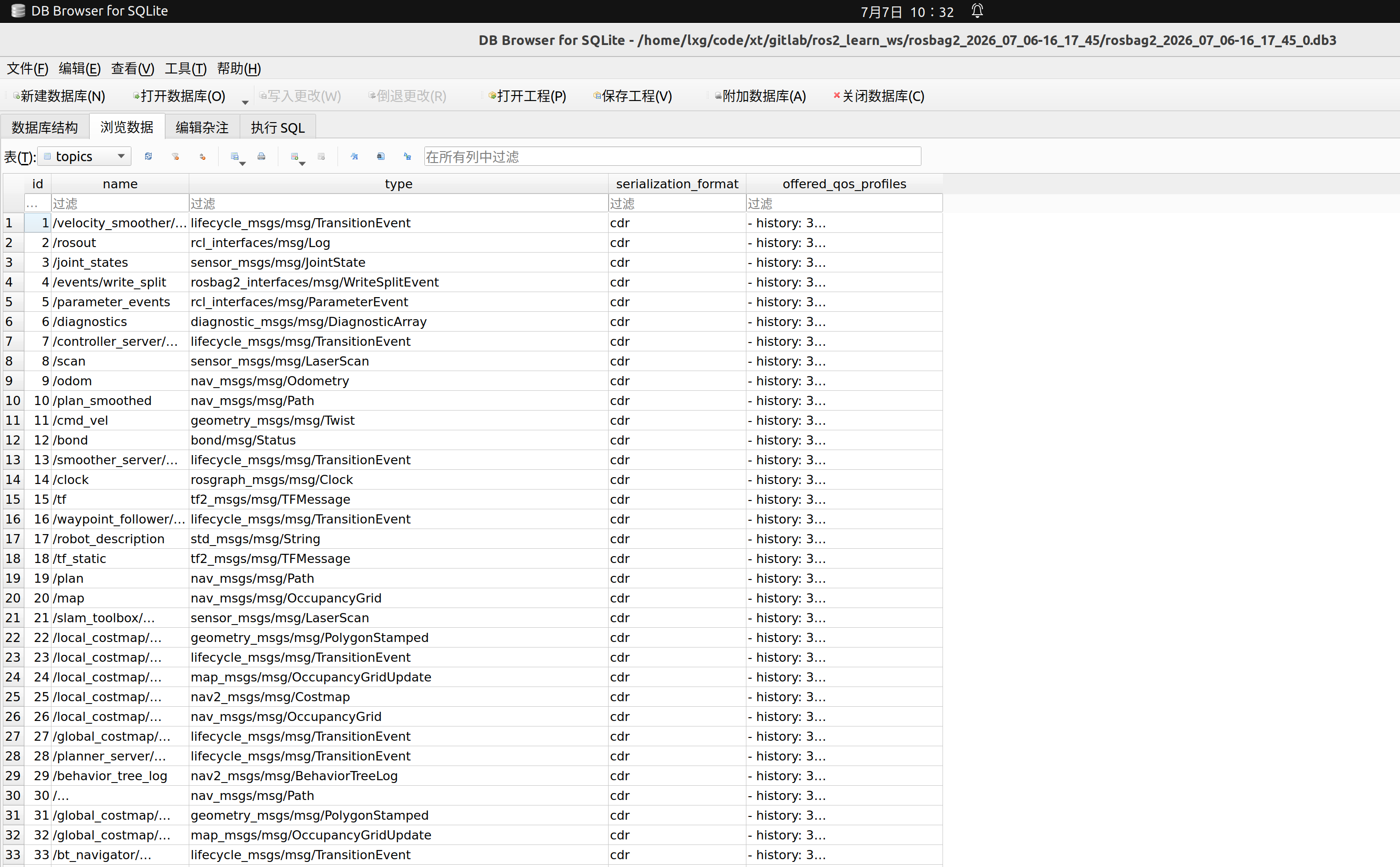
查看数据库信息
lxg@lxg:~/code/xt/gitlab/ros2_learn_ws/rosbag2_2026_07_06-16_17_45$ ros2 bag info rosbag2_2026_07_06-16_17_45_0.db3

closing.

closing.
[INFO] [1783391713.196456309] [rosbag2_storage]: Opened database 'rosbag2_2026_07_06-16_17_45_0.db3' for READ_ONLY.

Files:             rosbag2_2026_07_06-16_17_45_0.db3
Bag size:          819.9 MiB
Storage id:        sqlite3
Duration:          135.266113583s
Start:             Jul  6 2026 16:17:45.621216194 (1783325865.621216194)
End:               Jul  6 2026 16:20:00.887329777 (1783326000.887329777)
Messages:          184433
Topic information: Topic: /velocity_smoother/transition_event | Type: lifecycle_msgs/msg/TransitionEvent | Count: 0 | Serialization Format: cdr
                   Topic: /rosout | Type: rcl_interfaces/msg/Log | Count: 72 | Serialization Format: cdr
                   Topic: /joint_states | Type: sensor_msgs/msg/JointState | Count: 4058 | Serialization Format: cdr
                   Topic: /events/write_split | Type: rosbag2_interfaces/msg/WriteSplitEvent | Count: 0 | Serialization Format: cdr
                   Topic: /parameter_events | Type: rcl_interfaces/msg/ParameterEvent | Count: 0 | Serialization Format: cdr
                   Topic: /diagnostics | Type: diagnostic_msgs/msg/DiagnosticArray | Count: 134 | Serialization Format: cdr
                   Topic: /controller_server/transition_event | Type: lifecycle_msgs/msg/TransitionEvent | Count: 0 | Serialization Format: cdr
                   Topic: /scan | Type: sensor_msgs/msg/LaserScan | Count: 1343 | Serialization Format: cdr
                   Topic: /odom | Type: nav_msgs/msg/Odometry | Count: 3950 | Serialization Format: cdr
                   Topic: /plan_smoothed | Type: nav_msgs/msg/Path | Count: 0 | Serialization Format: cdr
                   Topic: /cmd_vel | Type: geometry_msgs/msg/Twist | Count: 519 | Serialization Format: cdr
                   Topic: /bond | Type: bond/msg/Status | Count: 18799 | Serialization Format: cdr
                   Topic: /smoother_server/transition_event | Type: lifecycle_msgs/msg/TransitionEvent | Count: 0 | Serialization Format: cdr
                   Topic: /clock | Type: rosgraph_msgs/msg/Clock | Count: 134276 | Serialization Format: cdr
                   Topic: /tf | Type: tf2_msgs/msg/TFMessage | Count: 14692 | Serialization Format: cdr
                   Topic: /waypoint_follower/transition_event | Type: lifecycle_msgs/msg/TransitionEvent | Count: 0 | Serialization Format: cdr
                   Topic: /robot_description | Type: std_msgs/msg/String | Count: 1 | Serialization Format: cdr
                   Topic: /tf_static | Type: tf2_msgs/msg/TFMessage | Count: 1 | Serialization Format: cdr
                   Topic: /plan | Type: nav_msgs/msg/Path | Count: 25 | Serialization Format: cdr
                   Topic: /map | Type: nav_msgs/msg/OccupancyGrid | Count: 28 | Serialization Format: cdr
                   Topic: /slam_toolbox/scan_visualization | Type: sensor_msgs/msg/LaserScan | Count: 0 | Serialization Format: cdr
                   Topic: /local_costmap/published_footprint | Type: geometry_msgs/msg/PolygonStamped | Count: 2015 | Serialization Format: cdr
                   Topic: /local_costmap/local_costmap/transition_event | Type: lifecycle_msgs/msg/TransitionEvent | Count: 0 | Serialization Format: cdr
                   Topic: /local_costmap/costmap_updates | Type: map_msgs/msg/OccupancyGridUpdate | Count: 0 | Serialization Format: cdr
                   Topic: /local_costmap/costmap_raw | Type: nav2_msgs/msg/Costmap | Count: 1008 | Serialization Format: cdr
                   Topic: /local_costmap/costmap | Type: nav_msgs/msg/OccupancyGrid | Count: 1008 | Serialization Format: cdr
                   Topic: /global_costmap/global_costmap/transition_event | Type: lifecycle_msgs/msg/TransitionEvent | Count: 0 | Serialization Format: cdr
                   Topic: /planner_server/transition_event | Type: lifecycle_msgs/msg/TransitionEvent | Count: 0 | Serialization Format: cdr
                   Topic: /behavior_tree_log | Type: nav2_msgs/msg/BehaviorTreeLog | Count: 76 | Serialization Format: cdr
                   Topic: /transformed_global_plan | Type: nav_msgs/msg/Path | Count: 500 | Serialization Format: cdr
                   Topic: /global_costmap/published_footprint | Type: geometry_msgs/msg/PolygonStamped | Count: 404 | Serialization Format: cdr
                   Topic: /global_costmap/costmap_updates | Type: map_msgs/msg/OccupancyGridUpdate | Count: 0 | Serialization Format: cdr
                   Topic: /bt_navigator/transition_event | Type: lifecycle_msgs/msg/TransitionEvent | Count: 0 | Serialization Format: cdr
                   Topic: /unsmoothed_plan | Type: nav_msgs/msg/Path | Count: 25 | Serialization Format: cdr
                   Topic: /slam_toolbox/update | Type: visualization_msgs/msg/InteractiveMarkerUpdate | Count: 0 | Serialization Format: cdr
                   Topic: /slam_toolbox/graph_visualization | Type: visualization_msgs/msg/MarkerArray | Count: 27 | Serialization Format: cdr
                   Topic: /pose | Type: geometry_msgs/msg/PoseWithCovarianceStamped | Count: 37 | Serialization Format: cdr
                   Topic: /behavior_server/transition_event | Type: lifecycle_msgs/msg/TransitionEvent | Count: 0 | Serialization Format: cdr
                   Topic: /global_costmap/costmap | Type: nav_msgs/msg/OccupancyGrid | Count: 202 | Serialization Format: cdr
                   Topic: /map_metadata | Type: nav_msgs/msg/MapMetaData | Count: 28 | Serialization Format: cdr
                   Topic: /global_costmap/costmap_raw | Type: nav2_msgs/msg/Costmap | Count: 202 | Serialization Format: cdr
                   Topic: /trajectories | Type: visualization_msgs/msg/MarkerArray | Count: 500 | Serialization Format: cdr
                   Topic: /cmd_vel_nav | Type: geometry_msgs/msg/Twist | Count: 501 | Serialization Format: cdr
                   Topic: /initialpose | Type: geometry_msgs/msg/PoseWithCovarianceStamped | Count: 0 | Serialization Format: cdr
                   Topic: /clicked_point | Type: geometry_msgs/msg/PointStamped | Count: 0 | Serialization Format: cdr
                   Topic: /waypoints | Type: visualization_msgs/msg/MarkerArray | Count: 2 | Serialization Format: cdr
播放某个topic消息
lxg@lxg:~/code/xt/gitlab/ros2_learn_ws/rosbag2_2026_07_06-16_17_45$ ros2 bag play . --topics /scan
[INFO] [1783392018.656932450] [rosbag2_storage]: Opened database './rosbag2_2026_07_06-16_17_45_0.db3' for READ_ONLY.
[INFO] [1783392018.656984897] [rosbag2_player]: Set rate to 1
[INFO] [1783392018.659507642] [rosbag2_player]: Adding keyboard callbacks.
[INFO] [1783392018.659522850] [rosbag2_player]: Press SPACE for Pause/Resume
[INFO] [1783392018.659530124] [rosbag2_player]: Press CURSOR_RIGHT for Play Next Message
[INFO] [1783392018.659539260] [rosbag2_player]: Press CURSOR_UP for Increase Rate 10%
[INFO] [1783392018.659544620] [rosbag2_player]: Press CURSOR_DOWN for Decrease Rate 10%
[INFO] [1783392018.659778752] [rosbag2_storage]: Opened database './rosbag2_2026_07_06-16_17_45_0.db3' for READ_ONLY.

lxg@lxg:~$ ros2 topic echo /scan --once
header:
  stamp:
    sec: 8160
    nanosec: 900000000
  frame_id: lidar_link
angle_min: -3.1415927410125732
angle_max: 3.1415927410125732
angle_increment: 0.017501909285783768
time_increment: 0.0
scan_time: 0.0
range_min: 0.10000000149011612
range_max: 12.0
ranges:
- 6.5139336585998535
- 6.515450954437256
- 6.528770446777344
- 6.544147968292236
- 6.555278301239014
- 6.572814464569092
- 6.601404666900635
- 6.603858947753906
- 6.636778831481934
- 6.656098365783691
- 6.710161209106445
- 6.716189861297607
- 6.752004146575928
- 6.786407470703125
- 0.5626450181007385
- 0.5468443036079407
- 0.5321483016014099
- 0.5454177260398865
- 0.5433482527732849
- 0.5595150589942932
- 0.5684111714363098
- 7.1453776359558105
- 7.195556640625
- 7.295341491699219
- 7.311167240142822
- 7.366893768310547
- 7.478985786437988
- 7.540508270263672
- 7.640517711639404
- 7.705826282501221
- 7.822203636169434
- 7.885489463806152
- 8.012693405151367
- 8.082935333251953
- 8.215164184570312
- 8.287344932556152
- 8.418929100036621
- 8.554007530212402
- 8.727025032043457
- 8.857893943786621
- 8.934542655944824
- 9.106559753417969
- 9.269510269165039
- 9.415003776550293
- 9.667091369628906
- 9.853026390075684
- 10.036652565002441
- 10.218036651611328
- 5.609433174133301
- 5.528319358825684
- 5.462650299072266
- 5.382833480834961
- 5.305110454559326
- 5.253544807434082
- 5.2152886390686035
- 5.151284694671631
- 5.080557823181152
- 5.046807289123535
- 4.99134635925293
- 4.963139533996582
- 4.898598670959473
- 4.879347801208496
- 4.790185451507568
- 4.788494110107422
- 4.740077972412109
- 0.17492152750492096
- 0.15304841101169586
- 0.15981997549533844
- 0.14782504737377167
- 0.17328184843063354
- 0.15822705626487732
- 0.1502823680639267
- 0.16361887753009796
- 0.15073373913764954
- 0.15418685972690582
- 0.1414814442396164
- 0.1382373720407486
- 0.15625548362731934
- 0.14667102694511414
- 0.15125085413455963
- 0.1294000893831253
- 0.17744556069374084
- 0.16380272805690765
- 0.15007640421390533
- 0.15540887415409088
- 0.14699319005012512
- 0.16918684542179108
- 0.18253017961978912
- .inf
- .inf
- .inf
- .inf
- .inf
- .inf
- .inf
- .inf
- .inf
- .inf
- .inf
- .inf
- 10.18211841583252
- 9.583537101745605
- 9.063460350036621
- 8.17491340637207
- 7.810404300689697
- 7.805613994598389
- 7.862607955932617
- 7.904496192932129
- 7.9843010902404785
- 8.041486740112305
- 8.065958976745605
- 8.126057624816895
- 8.229637145996094
- 8.28276538848877
- 8.332701683044434
- 8.45897388458252
- 8.509186744689941
- .inf
- 4.543667793273926
- 4.464345932006836
- 4.305760860443115
- 4.249335765838623
- 4.100301265716553
- 3.9841973781585693
- 3.9275295734405518
- 3.825040102005005
- 3.7285964488983154
- 3.6886391639709473
- '...'
intensities:
- 0.0
- 0.0
- 0.0
- - -
- 0.0
- '...'
---
0
次点赞